The garden harvest
The cherry tree gave more than expected and Martine made twenty jars. A "Cherry jam · June 2026" label on sticker paper, and the pantry shelf finally makes sense.
Two round labels for your homemade jam jars, red gingham or orange, with the fruit and date spelled right, ready to cut out. Workflow visible here, no account needed.
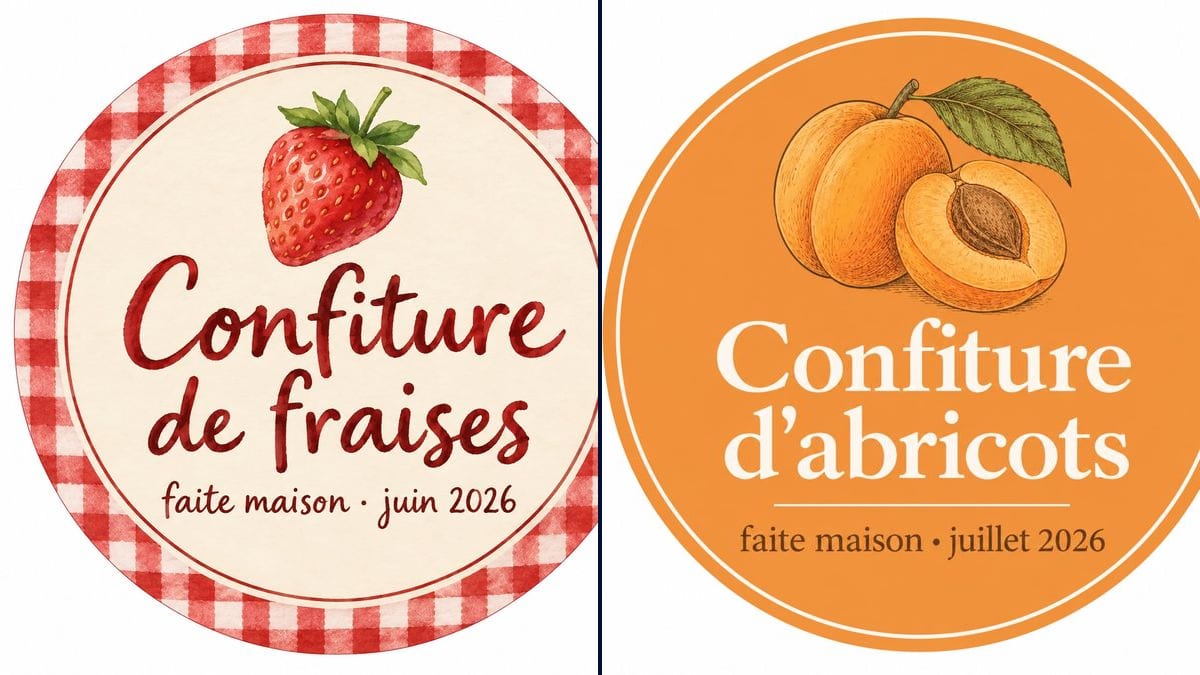
Real workflow: a round cream label with a red gingham border and a watercolour strawberry, "Confiture de fraises" in handwritten letters, then an orange label with two drawn apricots and "Confiture d'abricots" in white.
At a glance
In June, jam gets made ten jars at a time, and three months later nobody knows which batch is which. A marker on masking tape does the job; a proper label turns the jar into a gift. This workflow gives you two round labels to print and cut out, with the fruit and the date it was made.
The hard part is getting a flat, clean, round label rather than a photo of a jar. The prompt asks for a front view on white, ready to cut, and gives the two lines in quotes. GPT Image 2.5 Sunburst writes them letter for letter, middle dot included.
To sell at a market or in a shop, move on to the product label, which leaves room for the required information. Both labels cost six credits.
These are the files of the workflow above, exactly as the models produced them, unretouched. The starting point is shown when there is one.
Render
Home jam makers, families preparing gifts, associations running a stall.
The jam name and the date line in quotes, and the size of your jar.
Pick the style
Red gingham and handwriting for a farmhouse look, a coloured background and a line drawing for a more modern jar.
Change the fruit and date
"Plum jam", "Quince jelly", the month and year: each line in quotes.
Print at the right size
Measure the lid or the front of the jar. For a standard 12 oz jar, a label of about 2.5 inches across.
Cut and stick
On sticker paper, or plain paper with a little glue. A circle punch gives a clean edge.
The same canvas, tuned for different needs: each variation is two or three lines of prompt away.
The cherry tree gave more than expected and Martine made twenty jars. A "Cherry jam · June 2026" label on sticker paper, and the pantry shelf finally makes sense.
The children give a jar of jam they made together. The label carries their names instead of "homemade", and the jar goes into a small kraft bag tied with string.
A parents' association sells jam to raise money for the school. One label per flavour in the same style, and the stall looks like it was planned well in advance.
Three jams, a honey, a gingerbread loaf. Matching gingham labels tie the jars together, and the hamper looks like a gift rather than a cupboard clear-out.
A couple gives each guest a small jar of apricot jam. The label reads "Emma & Hugo · 20 June 2026" in place of "homemade", and the jars wait on the tables next to the place cards.
He has made it every autumn for forty years. His grandchildren prepare labels with his name, and he sticks them on this year's jars himself, one by one.
Jam keeps for a long time, but you still want to know which year it's from. Month and year fit on one line.
Without "flat front view on a white background", the model may draw the whole jar with the label at an angle. Keep that phrase.
A 4-inch label spills over a standard jar. Measure first and scale down when printing.
To sell, even at a market, labels usually need set information. This workflow makes the decorative label; check your local labelling rules before selling.
On the demo, yes: both jam names and both date lines are exact, middle dot included.
Yes: the render is a single square label, to repeat in your printing software with the "multiple per page" option.
Yes: replace "homemade" with "made by Grandma Jean", for example. Keep it short; the label is small.
Six credits, three per render on GPT Image 2.5 Sunburst at medium quality. Each extra flavour costs three credits.
It spells accurately on light backgrounds and it is the cheapest model in the catalogue. For twenty flavours, that adds up.
A 1:1 square, with the round label centred on white. Cut it out with scissors or a circle punch.
Yes: replace "round jam jar label" with "rectangular label with rounded corners" and switch the Image node to landscape.
Not always in every detail: for the apricot, the demo shows a richer drawing than a simple line, with one whole fruit and a half. Ask for "two whole apricots" if it matters.
Make homemade jam labels with AI
Use this workflowFree account, no card required. The workflow opens pre-filled in your canvas.
 GPT Image 2.5 Sunburst
 Nano Banana 2.1
 Recraft V4.1