The beekeeper's web shop
He sells his honey on his own site and at markets. Before December he switches his product pages to festive shots made from photos he already has, without buying a tree or hiring a studio.
Your product photo set in a Christmas scene, then a spring one, with no new photo shoot. The product stays exactly the same. Workflow visible here, no account needed.
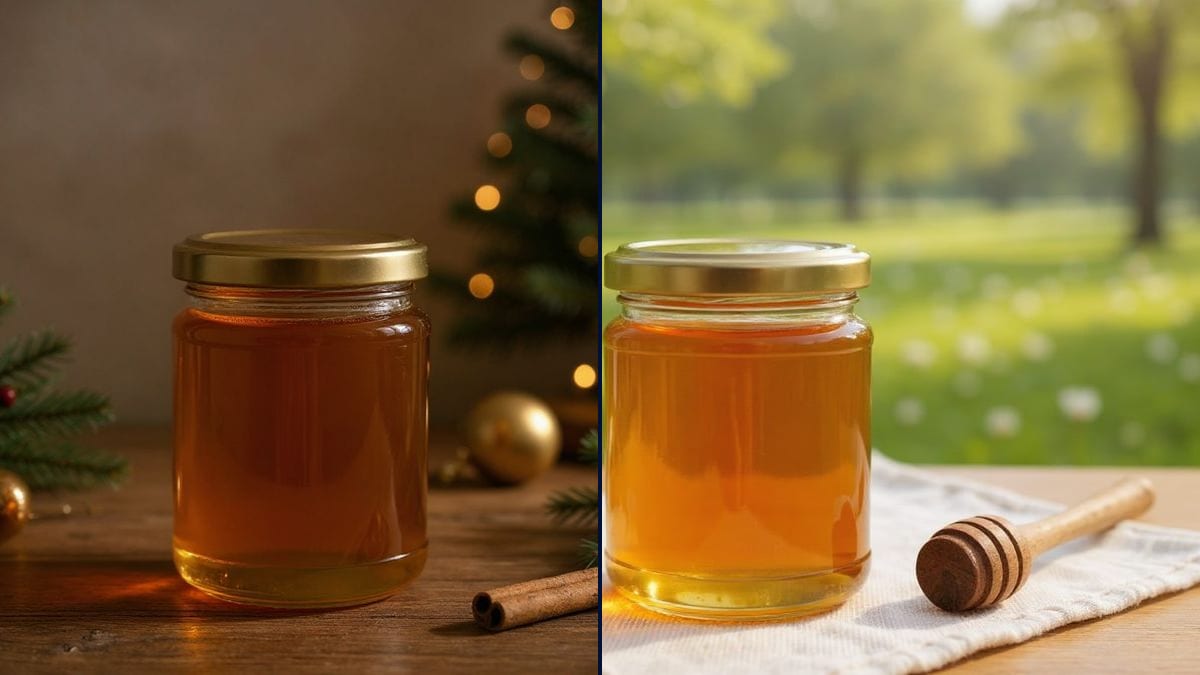
Real workflow: a photo of a honey jar with a gold lid on a wooden table, then the same jar among fir branches, berries and fairy lights, and on a linen cloth with white blossom and a honey dipper.
At a glance
November comes round and the online shop still shows the same jar on a white background. A Christmas shoot means buying props, spending a day on photos, and doing it all again in spring. This workflow starts from the photo you already have and places YOUR product in two settings: a festive table, then a spring morning.
The hard part is changing the whole background without retouching the object. Left alone, a model redraws the jar, lightens the honey or changes the lid, and the picture sells something other than what goes in the parcel. The prompt lists what must stay the same. Flux Kontext replaces the setting and keeps the product as it is.
To dress the jar first, go through the product label; to announce the offer, use the sale banner. Both settings cost twelve credits.
These are the files of the workflow above, exactly as the models produced them, unretouched. The starting point is shown when there is one.
Starting point
Render
Makers, producers and small brands selling online who want seasonal visuals without a new photo shoot.
A sharp photo of the whole product on a plain background, a description of the setting and the list of product features to keep.
Photograph the product
Sharp, whole, on a plain background, lit from the side. A phone photo by a window is enough.
Describe the setting
The surface, three or four props, the light and the background: wooden table, fir branches, blurred fairy lights. The more precise, the less the model improvises.
Name what stays put
Material, colour, lid or cap, size, position. Every feature you name is a feature kept.
Check before you publish
Compare the product with the original photo: shape, colour, label. A sales photo has to show what the customer will receive.
The same canvas, tuned for different needs: each variation is two or three lines of prompt away.
He sells his honey on his own site and at markets. Before December he switches his product pages to festive shots made from photos he already has, without buying a tree or hiring a studio.
Every candle has its white-background shot. For the Christmas gift boxes she sets them among fir branches and lights, then moves to a spring scene in March for Mother's Day.
A deli posts one product from its shelves every week. The same jar of jam or pâté changes season through the year, with no new photo session each time.
A serum bottle already shot in the studio moves into a warm scene for the gift sets page, and into a floral one for the April newsletter, without booking the photographer again.
On marketplaces the main image stays on white. Secondary images in a Christmas setting help show that the item makes a good present, right when people are shopping for gifts.
A local producer prepares posters and posts announcing his stall at the Christmas market, with his own products in a festive mood that makes people want to stop by.
"Put it in a Christmas scene" leaves the model free to retouch the bottle or the colour. Name the material, colour, cap and size.
The model fills in what is missing and makes it up. Start from a photo where the product is whole and sharp, edges included.
Ten accessories and the product gets lost in the middle. Three or four items around it are enough to set the season.
Label text can get scrambled when the setting changes. Read it on the render; if it moved, add "the same label, the same text".
No: same glass, same honey, same gold lid, same size. In the demo the jar is identical in both settings.
Yes: replace "the jar" with your product and list its features: material, colour, shape, cap or wick.
Yes: Valentine's Day, Easter, Mother's Day, back to school. Describe the season's setting in a new node.
Twelve credits, six per render on Flux Kontext. A third setting for another holiday costs six more.
Because it changes the image around the object and keeps the object itself: the jar in the demo changed neither shape nor colour.
Nearly. In the demo everything is there for Christmas; in spring the blossom came out white, without the pink. Run it again or stress the colour if it matters.
Yes, for your own products. See what you can do with AI images for the commercial-use rules.
4:3 landscape, which suits banners and social posts. The product takes up less of the frame than in a vertical photo, so shoot it fairly large.
Put your product in a Christmas scene with AI
Use this workflowFree account, no card required. The workflow opens pre-filled in your canvas.
 Flux Kontext
 Nano Banana 2.1
 GPT Image 2.5 Sunburst