Make a printable Christmas menu with AI

A Christmas menu to print on A5 for the family table, with your dishes and each guest's name. One green and gold Christmas Eve version, one Christmas lunch version on kraft. Workflow visible here, no account needed.

Make a printable Christmas menu with AIInteractive demo

Real workflow, real results. Pan and zoom freely.

Use this workflow

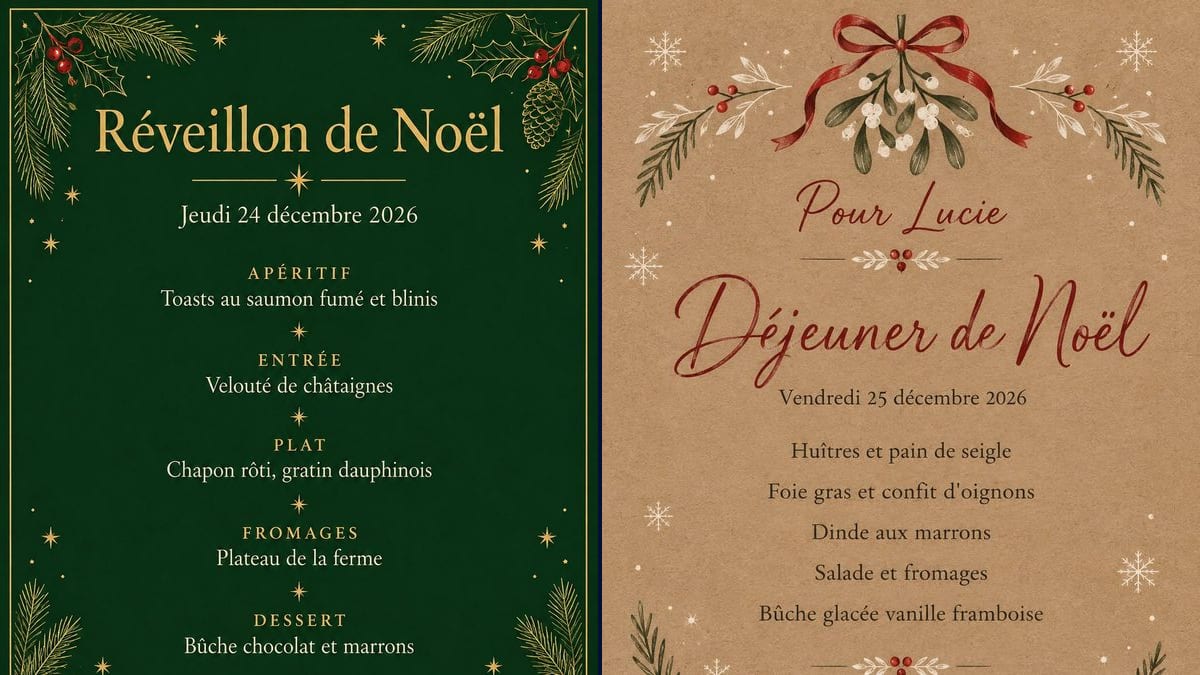
Real workflow (demo in French): "Réveillon de Noël" (Christmas Eve dinner) in gold on deep green, above "Jeudi 24 décembre 2026", five courses in small capitals separated by stars, fir branches, holly with red berries and pine cones in the corners, then the lunch card on kraft paper, a red bow and mistletoe at the top, "Pour Lucie" (for Lucie) and "Déjeuner de Noël" (Christmas lunch) in red script, five dishes and "Bon appétit !". The mistletoe is green; the prompt asked for white and red.

At a glance

You provide
a text or a brief
What the workflow produces
2 images in 3:4
Canvas structure
5 nodes wired by 2 connections
Models wired in
GPT Image 2.5 Sunburst
Cost of one full run
about 6 credits, roughly $0.07
Account
The demo is visible without an account; generating requires a free account, trial credits included

On the evening of the 24th or at lunch on the 25th, the table has been set since morning, and what's often missing is a card saying what's for dinner. A printed menu, on each plate or in the middle of the table, tells everyone what's coming and answers the children's question about dessert before they ask. This workflow gives you two A5 portrait menus: one for Christmas Eve, deep green and gold, with the courses in small capitals, and one for Christmas lunch, on kraft paper, with the guest's name at the top.

A free menu template found online already has its dishes, or a blank box where your text doesn't quite fit. Here you write every line yourself, in quotation marks in the prompt, and the model copies it letter for letter. GPT Image 2.5 Sunburst got every line on both cards right on the first try, accents included. With the decoration it took liberties: red berries on the Eve card, green mistletoe on the lunch card. The demo is in French: replace the lines with your own dishes, "Roast turkey", "Christmas pudding" and so on, in your own language.

For a wedding dinner, see the wedding menu and the place cards; for the parcels under the tree, the Christmas gift tags; for the people who can't come, a greeting card. The children can get their letter to Santa ready while you write the menu. Both cards cost six credits.

Actual renders from the demo

These are the files of the workflow above, exactly as the models produced them, unretouched. The starting point is shown when there is one.

Render

A "Réveillon de Noël" (Christmas Eve dinner) menu in gold serif lettering on deep green, inside a thin gold border, above a rule with a star and "Jeudi 24 décembre 2026" in cream, five courses in spaced gold small capitals, "APÉRITIF", "ENTRÉE", "PLAT", "FROMAGES", "DESSERT", each followed by its dish in cream and separated by small stars, "Joyeux Noël" between two gold rules, fir branches and holly in gold line art, with red berries and pine cones in the corners that the prompt didn't ask for; every line exact on the first try, at 1055 x 1491 pixels, close to A5Generated with GPT Image 2.5 Sunburst
A "Déjeuner de Noël" (Christmas lunch) menu on kraft paper, a red ribbon bow and a sprig of green mistletoe with white berries at the top, "Pour Lucie" and "Déjeuner de Noël" in red script, "Vendredi 25 décembre 2026" and five dishes in dark type, from "Huîtres et pain de seigle" to "Bûche glacée vanille framboise", "Bon appétit !" in red script, white snowflakes and red berry branches in the corners, green where the prompt wanted white and red; every line exact on the first try, at 1055 x 1491 pixelsGenerated with GPT Image 2.5 Sunburst

Who it is for

Families hosting Christmas Eve dinner on the 24th or Christmas lunch on the 25th, parents and grandparents setting the table who want a printed menu with their own dishes and each guest's name.

Which files to provide

The lines of the menu, each in quotation marks and in order: title, date with the right day of the week, course names if you want them, dishes, the guest's name if needed, sign-off. No photo.

How it works

  1. 1

    Pick Christmas Eve or Christmas lunch

    The Eve card, green and gold, puts each dish under a course name in small capitals: it works in the middle of the table, or one per couple. The lunch card, on kraft, lists the dishes with no course names and has a name at the top: it's the menu you put on each plate.

  2. 2

    Write your dishes in quotation marks

    Replace the demo dishes with yours, each in quotation marks, in the order they're served. Keep it short: five courses, as in the demo, one line each. Check the day of the week before you write the date, and keep "No other words, no prices, no address" at the end.

  3. 3

    Check the render word by word

    Compare every line with the prompt, accents and apostrophes included. If a dish is missing or a word comes out warped, rerun the node for three credits. In the demo, neither render needed a second try.

  4. 4

    Print on A5

    The render has almost exactly the shape of an A5 sheet. Print it on A5, or two to an A4 sheet and cut it in half. On thick card, 200 to 250 gsm, it sits better on the plate and guests can take it home.

Variations and use cases

The same canvas, tuned for different needs: each variation is two or three lines of prompt away.

One card per guest, with their name

Take the lunch version and change only "Pour Lucie" (or "For Lucie") each time you rerun the node: one card per plate, three credits each, so thirty credits for ten guests. Check each name, especially ones with an accent or a hyphen. Only "Lucie" was tested here.

A children's menu

A separate card for the kids' table, with their own dishes: "Mini burgers", "Mac and cheese", "Chocolate yule log". Ask for bright colours, a few snowflakes, a small drawn reindeer and rounded lettering they can read on their own. Not tested here.

A New Year's Eve menu

The same prompt for 31 December: "New Year's Eve Dinner", "Thursday 31 December 2026", your dishes, and "Happy New Year 2027" at the bottom. Swap the fir and holly for stars, gold confetti and champagne glasses, on a black or midnight blue background. Not tested here.

Black and white to save ink

The green background of the Eve card covers the whole sheet and empties a colour cartridge in a few menus. Ask for thin black lines on white paper, no solid fills, with the same fir branches and border: the card then prints on a laser printer. Not tested here.

The matching place card

A third node with the same kraft paper and red bow, in landscape: just the name in script and a small sprig of mistletoe. Printed on thick card and folded in half, it stands in front of the plate, next to the menu. Not tested here.

A bilingual menu for the family

If part of the table speaks French or Spanish, write each dish twice, in English and then translated in smaller type underneath. That doubles the lines: keep to three or four dishes at most, or the writing shrinks and mistakes creep in. Not tested here.

Common mistakes

Too many lines on the card

Twelve dishes, three desserts and the wine for each course: the more lines there are, the more likely the model is to warp or drop one, and the smaller the writing gets. The demo stops at five courses and a date, and every line is right. Past seven or eight lines of dishes, make two cards.

Printing without checking every word

A missing accent or a swapped letter in a dish name stays on the table for the whole meal, in front of the whole family. Read every dish on the render, letter by letter, before printing twelve copies, especially names, apostrophes and accents.

The wrong day of the week

The model copies the date you give it, even a wrong one. "Wednesday 24 December 2026" would come out as written, though the 24th is a Thursday. Check a calendar: in 2026, Christmas Eve falls on a Thursday and Christmas Day on a Friday.

Blowing it up to poster size

The render is 1055 x 1491 pixels: about 180 dots per inch on A5, 127 on A4, and barely 90 on A3. For a big menu on the wall or an easel, the text goes soft. Stay at A5 or A4, or upscale the image before sending it to a print shop.

Frequently asked questions

Are the dishes on the menu spelled correctly?

Yes, on both cards, first time: "APÉRITIF", "ENTRÉE", "Velouté de châtaignes", "Chapon rôti", "Bûche chocolat et marrons", "Huîtres et pain de seigle" and "Foie gras et confit d'oignons" are all right, accents included. In "Bon appétit !" the accent is small and touches the cross of the t's. Always read it through before you print.

Why is the mistletoe green when the prompt asked for white and red?

Sunburst drew the mistletoe in its natural colours, green leaves and white berries, and added branches with red berries in the corners. The ribbon, the snowflakes and some of the leaves are white and red as asked. To force the palette, try "white and red only, no green" and rerun: that wasn't tested here.

How is this different from the wedding menu?

The wedding menu goes with a reception dinner, with the couple's names and often a seating plan. The Christmas menu is for the family table: a meal on the 24th or the 25th, holiday dishes, and a guest's name if you want one card per plate.

Can I print the menu on A5?

Yes. The renders are 1055 x 1491 pixels, almost exactly the shape of an A5 sheet, so the card fills the page with no white bands. That's about 180 dots per inch, sharp on a home printer. On A4 it drops to about 127 dots per inch: fine at arm's length, a little less crisp up close.

Can I change the dishes and the date?

Yes, that's what it's for: replace each quoted line with your dishes and your date, in the order they're served, and keep the rest of the prompt. Sunburst copies what's inside the quotation marks. Stay at the demo's number of lines or only a few more, and read every word on the render.

How much does the menu cost?

Three credits per render on GPT Image 2.5 Sunburst at medium quality, six for the two demo cards. Another try costs three credits. A menu with no name can be printed as many times as you like; one card per guest with their name costs three credits a card.

Can I make the menu in English or another language?

Yes. The demo is in French: write the quoted lines in your language, for example "Christmas Eve Dinner" and "Roast turkey with all the trimmings", and keep the rest of the prompt. Only French was tested in the demo, so read every word.

Does the green background use a lot of ink?

Yes, the green covers the whole sheet. For one or two cards in the middle of the table it doesn't matter; for twelve place settings, the colour cartridge goes fast. The kraft lunch card uses ink too, because of its textured background. A version in black lines on white needs far less, but it wasn't tested here.

Are the dates on the menu right?

Yes. 24 December 2026 is a Thursday and the 25th a Friday, and both renders print them that way ("Jeudi", "Vendredi"), letter for letter. For another year, check the day on a calendar before you put it in the prompt: the model won't fix a wrong date.
Make a printable Christmas menu with AI

Use this workflow

Free account, no card required. The workflow opens pre-filled in your canvas.