An outdoor rustic wedding
Cream cards and watercolour eucalyptus suit a wooden table, linen and loose greenery. Keep the rustic sheet as it is and only change the names and "Claire & Julien".
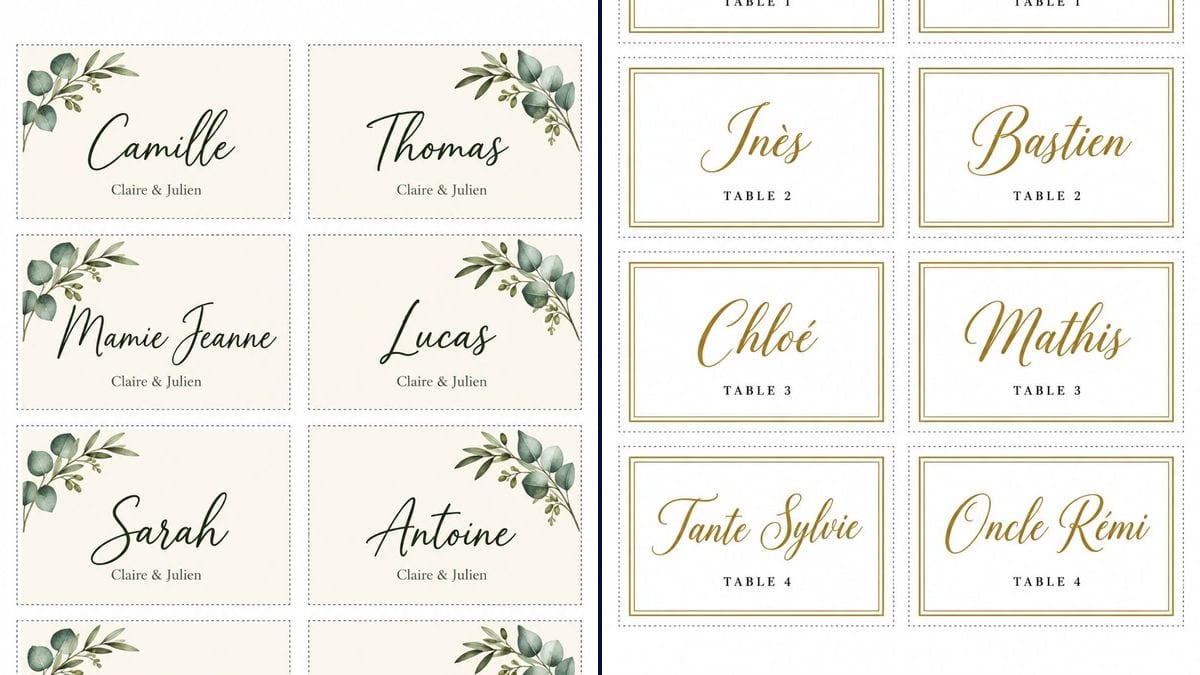
A sheet of eight rustic eucalyptus place cards and a white and gold sheet with table numbers, ready to cut out. Workflow visible here, no account needed.
Real workflow (French guest names): eight cream cards with a watercolour eucalyptus sprig, from Camille to Papi Henri, with "Claire & Julien" underneath, then eight white cards with a gold double border, from Margaux to Oncle Rémi, each with its table number, TABLE 1 to TABLE 4.
At a glance
Place cards are the last job before the wedding, done the week the seating plan is finally settled. This workflow gives you two A4 sheets of eight flat cards to cut out. The first is rustic: a cream card, a watercolour sprig of eucalyptus and olive, the guest's name in dark green script and the couple's names underneath. The second is white and gold, with the table number under each name.
It all comes down to spelling. An image model left to itself drops accents and turns an ampersand into something else. The prompts give every word in quotation marks, letter for letter, and forbid everything else. In the demo, GPT Image 2.5 Sunburst got every name right on the first try. On the other hand, the line under the name is small, and the eucalyptus sprig is the same on all eight cards.
This workflow makes the cards that sit on each plate. For the board that tells guests where to sit, see the seating chart, and for the meal itself, the wedding menu. The welcome sign greets guests at the door, and the thank-you card goes out after the party. Both sheets cost six credits.
These are the files of the workflow above, exactly as the models produced them, unretouched. The starting point is shown when there is one.
Render
Couples doing their own table decorations, bridesmaids, best men and relatives helping out the week of the wedding, and families hosting a christening or a birthday with a seated meal.
The guest list in groups of eight, the line to put under each name (your names or the date) and, for the elegant sheet, each guest's table number.
Put your guests in the quotation marks
Replace Camille, Thomas and the rest with your guests, and "Claire & Julien" with your own names or the date. On the elegant sheet, change each "TABLE 1" to match your plan. The prompt asks for eight cards: for six guests, switch to 2 columns and 3 rows.
Run one sheet per group of eight
Eighty guests means ten sheets, so ten renders. Keep the same prompt and only change the names in the quotation marks: the style stays the same from one sheet to the next.
Check every name letter by letter
Zoom in on the image before printing. Accents, hyphens, double letters: a "Katherine" who should be "Catherine" slips by on screen and gets noticed once it sits in front of her.
Print on A4 at actual size
In the print dialog, pick "actual size", not "fit to page". The sheet's margin is only about 6 mm, so print a test page first and check the dotted line isn't clipped. Use thick paper or card around 250 gsm, then cut with a craft knife and a ruler.
The same canvas, tuned for different needs: each variation is two or three lines of prompt away.
Cream cards and watercolour eucalyptus suit a wooden table, linen and loose greenery. Keep the rustic sheet as it is and only change the names and "Claire & Julien".
The elegant sheet puts "TABLE 1" to "TABLE 4" under the name: guests find their table on the seating chart, then their seat on the card. The numbers can become table names, such as "BRIDAL PARTY", written in full between the quotation marks.
The demo gives flat cards. For a card that stands up, ask the prompt for a card twice as tall with a fold line across the middle and a blank top half. This hasn't been tested here: check the render before you run every sheet.
The dark green and the gold can be swapped in the prompt: terracotta with olive, navy with a silver border, dusty pink. Change the colour of the name and the decoration and leave the rest of the prompt alone to keep the grid.
The same sheet works for any party with a seated meal. Replace "Claire & Julien" with "Leo's christening" or "Martha turns 60", and describe a decoration that fits the theme instead of the eucalyptus.
For a big wedding, split the guest list into groups of eight in a spreadsheet, then paste each group into the prompt. Fifteen sheets cost forty-five credits, and the style stays the same as long as you only touch the names.
Everything is right in the demo, but an unusual name or a nickname can come out with a wrong letter. Read it letter by letter on screen: redoing a sheet costs three credits, spotting the mistake on the table on the day leaves you no time to fix it.
The sheet already has the proportions of an A4 page. With "fit to page", some printers shrink the image and the cards lose their intended size. Pick "actual size" and run a test on plain paper to check the margin of about 6 mm.
The demo cards are flat, with no fold. If you want tent cards in front of each plate, say so in the prompt from the start instead of folding a card that wasn't drawn for it.
The text under the name already comes out small in the demo. With a date, a venue and the couple's names on one line, it would get hard to read. Keep it to two or three words, or ask the prompt for bigger text.
In the demo, yes: Élodie, Inès, Chloé and Rémi keep their accents, and "Claire & Julien" keeps its ampersand on all eight cards. No render was redone. Still read each name before printing, because a model can slip on an unusual one.
No, they are flat cards to cut out, with no fold line. They lie on the plate or the napkin. For a folded card that stands up, you have to ask for it in the prompt, with a blank half above the name. The demo didn't test this, so check the result before you print the whole set.
Eight, in a grid of two columns and four rows. Beyond that, run one more sheet per group of eight, three credits each, changing only the names.
Six credits, three per sheet on GPT Image 2.5 Sunburst at medium quality. Each extra group of eight guests costs three more credits.
Because it spells correctly, accents and ampersand included. In the demo it copied sixteen names, eight "Claire & Julien" lines and eight table numbers without a mistake, on the first try.
The sheets come out at 1055 x 1491 pixels, close to A4 and not the 3:4 that was asked for. Printed at actual size on A4, each card measures about 9.5 by 6 cm, slightly taller on the elegant sheet, with a margin of about 6 mm around the sheet. For a sharper print, run the image through the photo upscaler first.
The model drew one sprig and repeated it identically, flipped for the right-hand column. On a table it looks consistent. If you want a different decoration on each card, list them one by one in the prompt.
Up close, yes. "Claire & Julien" and "TABLE 1" come out in small, crisp letters, but you can't read them from more than a metre away. If the table number has to be seen from a distance, ask the prompt for it in bigger type.
Make printable wedding place cards with AI
Use this workflowFree account, no card required. The workflow opens pre-filled in your canvas.
 GPT Image 2.5 Sunburst
 Nano Banana 2.1
 Recraft V4.1