Make a printable letter from Santa with AI

A printable letter from Santa to answer your child, with their name and a detail from their year. A parchment version with a wax seal, an illustrated page for two children. Workflow visible here, no account needed.

Make a printable letter from Santa with AIInteractive demo

Real workflow, real results. Pan and zoom freely.

Use this workflow

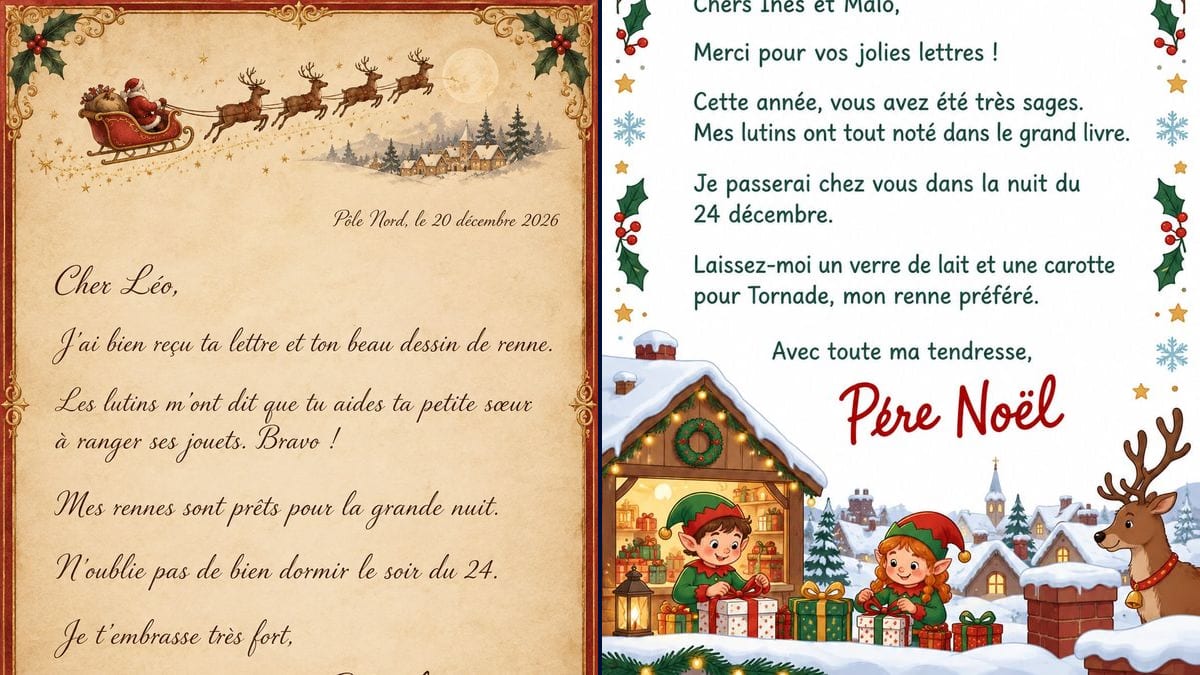
Real workflow (demo in French): a letter on aged parchment inside a red and gold border, the sleigh and its four reindeer at the top, with a snowy village, a church and a full moon the prompt didn't ask for, "Cher Léo," (Dear Léo) and six lines of brown calligraphy, the "Père Noël" signature and a wax seal with a star, then an illustrated white page, "Une lettre du Père Noël" (a letter from Santa) in red, "Chers Inès et Malo,", two elves wrapping presents and an added reindeer with a bell. On the second one, the accent on "Père" in the signature looks like an acute accent: check before printing.

At a glance

You provide
a text or a brief
What the workflow produces
2 images in 3:4
Canvas structure
5 nodes wired by 2 connections
Models wired in
GPT Image 2.5 Sunburst
Cost of one full run
about 6 credits, roughly $0.07
Account
The demo is visible without an account; generating requires a free account, trial credits included

Your child has posted their letter to Santa, or left it by the fireplace. Now they're waiting for an answer. This workflow gives you a letter that looks like it came from the North Pole, in their name, with one detail only they will recognise: the reindeer they drew, the way they help their little sister. Two A4 versions: a page on aged parchment with the sleigh, holly and a wax seal, and an illustrated white page for two children, with elves in their workshop.

You write every sentence in quotation marks in the prompt, and the model copies it letter for letter. GPT Image 2.5 Sunburst got all sixteen lines of the two letters right, accents, cedilla and "œ" included. It added some scenery of its own: a village and a moon on the parchment, a reindeer with a bell on the illustrated page. And on that second page, the accent on "Père" in the cursive signature reads badly. The demo is in French: replace those lines with your own text, in your language, and read every word before you print.

The letter your child writes is a different page: the printable letter to Santa, a sheet to fill in or colour. If you'd rather Santa spoke out loud, see the personalized video from Santa. For the rest of the holidays, the Christmas gift tags, the Christmas menu and the greeting card print the same way. Both letters cost six credits.

Actual renders from the demo

These are the files of the workflow above, exactly as the models produced them, unretouched. The starting point is shown when there is one.

Render

A letter from Santa on aged parchment paper, inside a red and gold border with holly in all four corners, Santa's sleigh pulled by four reindeer at the top, and beside it a snowy village with a church and a full moon the prompt didn't ask for, then "Pôle Nord, le 20 décembre 2026" (North Pole, 20 December 2026), "Cher Léo," (Dear Léo) and six lines of dark brown calligraphy, down to "Je t'embrasse très fort," (lots of love), the large "Père Noël" signature and a red wax seal with a gold star at the bottom right; every line exact on the first try, accents and "œ" included, at 1055 x 1491 pixels, A4 proportions, about 180 dpi at A5Generated with GPT Image 2.5 Sunburst
A letter from Santa on an illustrated white page, a fir garland with a red bow at the top, holly, stars and snowflakes down the sides, "Une lettre du Père Noël" (a letter from Santa) in red, "Chers Inès et Malo," (Dear Inès and Malo) and five sentences in dark green rounded type, including the carrot for Tornade, an invented reindeer, "Avec toute ma tendresse," (with all my love) and the "Père Noël" signature in red script, whose grave accent reads like an acute one, a snowy workshop at the bottom with two elves wrapping presents, village roofs, and a reindeer with a bell on its collar added at the bottom right; every line exact, at 1055 x 1491 pixelsGenerated with GPT Image 2.5 Sunburst

Who it is for

Parents and grandparents of young children who have received or read their child's letter to Santa and want to answer with a printed letter in the child's name, with one true detail from their year, to slip into an envelope or under the tree.

Which files to provide

The sentences of the letter, each in quotation marks and in order: place and date, the child's or children's names, one or two sentences with a true detail from their year, a line about the night of the 24th, a sign-off and the signature. No photo.

How it works

  1. 1

    Pick the style of letter

    The parchment looks like an old letter written with a quill, with a wax seal, for a child who looks out for "real" details. The illustrated page, with its elves and rounded type, is easier to read for a child who's just starting to sound out words, and it works for siblings.

  2. 2

    Write short sentences with one true detail

    Replace the demo's French lines with your own, in your language, starting with the name, then add one thing your child did this year or wrote in their letter. One sentence per line, in quotation marks, in order. Sunburst writes accurately when each sentence fits on one or two lines: six or seven short sentences beat one long paragraph.

  3. 3

    Read every word on the render

    Compare the render with the prompt, letter by letter, looking closely at accents, apostrophes and the cursive signature. On the two-child demo, the accent on "Père" looks like an acute accent. If a word comes out warped, rerun the node for three credits.

  4. 4

    Print on good paper and leave it under the tree

    Print at A5 for a crisp page, or at A4 or US letter knowing the calligraphy will be a little softer. Thick paper or parchment paper looks far better than a sheet from the printer tray. Fold it into an envelope, or leave it under the tree or by their slippers.

Variations and use cases

The same canvas, tuned for different needs: each variation is two or three lines of prompt away.

A letter for a child who can't read yet

For a three or four year old, keep it to three very short sentences in big rounded letters, and ask for more pictures: a reindeer, a tree, a present. A parent reads it aloud while the child looks at the drawings. Not tested here.

A reply praising one specific step forward

The true detail is what makes the letter: "The elves saw you ride your bike without stabilisers", "Well done on your first year at big school". One sentence like that is enough; with three, the trick shows. Check it letter by letter. Not tested here.

A letter sent by an elf

Change the signature and the tone: "Your elf, Pip", a more childlike hand, a green and red page with tiny footprints. The elf can announce they're keeping an eye on the house until the 24th, or tell what's going on in the workshop. Not tested here.

A nice list certificate signed at the North Pole

Instead of a letter, a certificate: "Official Nice List", the name in large type, "awarded on 20 December 2026", a gold border, a seal and Santa's signature. Little text, so less risk of a typo. Not tested here.

A letter for a class or a nursery

For a teacher or a nursery worker: "Dear children of the Robin class", two sentences about what the class did this year, and Santa's visit to the school party. One page, printed once per child, still costs three credits. Not tested here.

A letter in two languages

For a bilingual family, write the quoted lines in both languages, one under the other, or make two versions. Only French was tested in the demo: read the letters specific to each language closely, the "ñ", the "ß", the umlauts. Not tested here.

Common mistakes

Writing a paragraph that's too long

The longer the text, the more likely the model is to double a letter or skip a word, and the smaller the calligraphy gets. Stick to six or seven short sentences, one idea each. If you have a lot to say, make two letters rather than one cramped page.

Printing without checking the signature

Cursive signatures are where accents slip: on the two-child demo, "Père" has an accent that looks acute. Zoom in on the signature before printing. If it bothers you, remove it from the prompt and sign by hand in red or gold ink.

Mentioning something the child never told anyone

A Santa who knows everything makes a child smile; a Santa who brings up a fight or a bad mark can worry them. Use what your child wrote in their letter or something they're proud of. Keep the tone warm and positive.

Dating the letter after 24 December

The letter arrives before the big night: date it the 20th or 22nd of December, not the 26th. The demo says "Pôle Nord, le 20 décembre 2026", a Sunday. Change the year too if you reuse the prompt next winter.

Printing full page on copier paper

At full A4, the 1055 x 1491 pixel render gives about 127 dots per inch, a little soft for fine calligraphy, and office paper gives the game away. Print at A5 on thick or parchment paper, or switch to high quality for A4.

Frequently asked questions

Is the child's name spelled correctly?

In the demo, yes: "Cher Léo," and "Chers Inès et Malo," are right, like all sixteen lines of the two letters, accents included. The one flaw is in the cursive signature on the illustrated page, where the grave accent on "Père" looks like an acute one. Always read every word before printing, especially an unusual name.

How is this different from the letter to Santa?

The letter to Santa is the sheet your child fills in, with their wish list and a drawing. This page is the reply: a letter already written, signed by Santa, that parents print and the child receives. They go together: one in November, the other a few days before the 24th.

Is a letter or a video from Santa better?

A letter can be kept, reread and tucked into a memory box. The video from Santa shows an invented Santa saying your child's name out loud, which works better for little ones who can't read yet. Nothing stops you doing both.

What size should I print the letter from Santa?

At A5 the page stays sharp: the renders are 1055 x 1491 pixels, the proportions of an A4 sheet, which works out at about 180 dots per inch at that size. At A4 or US letter it drops to around 127 dots per inch and the fine lettering goes a little soft. For a full A4 page, Sunburst's high quality setting suits better, but it costs more.

What paper makes it look real?

Thick paper, 120 to 160 gsm, ivory or cream, or the parchment paper sold in stationery shops. The parchment version already has its texture printed, so smooth white paper works too. Print borderless if your printer allows it, so the frame reaches the edge.

Can I sign the letter by hand?

Yes, and it's a good way round a badly drawn cursive signature. Remove the "Père Noël" line from the prompt, leave a space at the bottom, then sign with a red felt tip or a gold pen. Handwriting your child doesn't know looks more real: ask a grandparent or a neighbour.

How much does a letter from Santa cost?

Three credits per render on GPT Image 2.5 Sunburst at medium quality, six for the two demo letters. Another try costs three credits. Once you're happy with it, print it as many times as you like, a copy for the memory box included.

Why does the demo have an extra village and reindeer?

Sunburst fills in the scenery on its own when the prompt leaves room: on the parchment it added a snowy village with a church and a full moon beside the sleigh; on the illustrated page, a reindeer with a bell on its collar. For a plainer page, add "nothing else in the scenery" to the prompt.

What about several children in the same family?

Either one shared letter, like the "Chers Inès et Malo," demo, or one letter per child with their own detail, three credits each. Children compare: keep the same style and length for each, and change only the name and the personal sentence.
Make a printable letter from Santa with AI

Use this workflow

Free account, no card required. The workflow opens pre-filled in your canvas.