Zero-waste bulk store labels
For jars you refill at the bulk store, keep the kraft sheet and replace the eight names with what you buy by weight: pumpkin seeds, quinoa, cashews. Change each drawing in the brackets too, in the same order.
Eight kraft labels for flour, rice or coffee with a line for the opening date, and twelve round chalkboard labels for spices. Workflow visible here, no account needed.
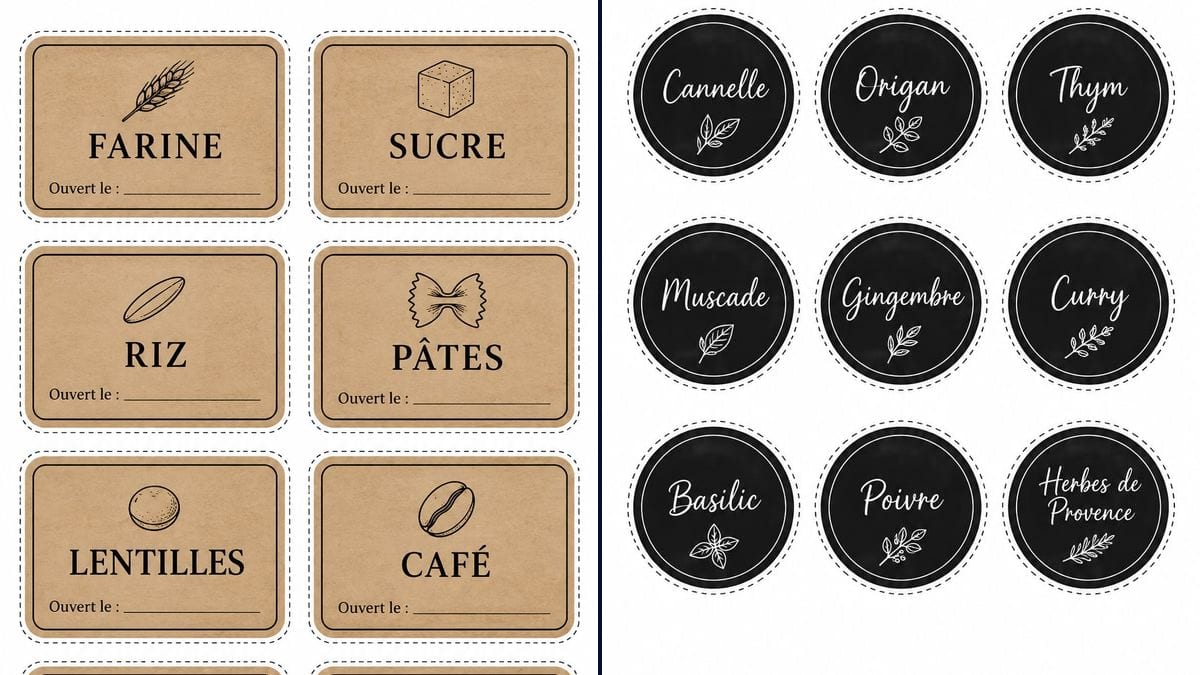
Real workflow (French labels): eight kraft labels with a black double border, from FARINE to POIS CHICHES, with "Ouvert le :" and a line for the date, then twelve round chalkboard labels, from Cumin to Herbes de Provence, with a small sprig drawn under each name.
At a glance
In a cupboard full of identical glass jars, flour and sugar look a lot alike. This workflow gives you two A4 sheets to cut out. The first has eight rectangular kraft-coloured labels with a black double border, the name in large capitals with a small drawing above it, and "Ouvert le :" (opened on) followed by a line to write the date by hand. The second has twelve matte black chalkboard circles for spice jars, each name handwritten in white.
The text matters more than anything else. An image model left to itself drops the accent from CAFÉ or adds a word under the name. The prompts give every word in quotation marks, letter for letter, and forbid everything else. In the demo, GPT Image 2.5 Sunburst got every word right on the first try. The drawings are less reliable: the lentil looks like a bread roll, the oat flake like an almond, and the sprigs under the spices are nearly all the same.
This workflow is for organising the kitchen. For jars you give away, the homemade jam label is round and made for gifting. The school name labels mark the kids' things, and the Christmas gift tags go on the presents under the tree. Once the jars are sorted, the recipe card and the weekly planner help you plan the meals. Both sheets cost six credits.
These are the files of the workflow above, exactly as the models produced them, unretouched. The starting point is shown when there is one.
Render
People who keep their kitchen in glass jars, bulk store regulars who refill their own containers, and families who want everyone to find the flour or the cumin without opening three jars.
Your jars in groups of eight, your spices in groups of twelve, and for each food the small drawing to put above its name.
Put your foods in the quotation marks
Replace FARINE, SUCRE and the rest with what's in your jars, in your own language, and the twelve spices with yours. Change the list of drawings in brackets too, in the same order as the names. For six jars instead of eight, switch to 2 columns and 3 rows.
Describe each drawing in a few words
"A lentil" gave a round bread roll in the demo. For a food whose shape is hard to recognise, write what should be seen, such as "three flat lentils seen from above". Or drop the drawing on that label: the name is enough.
Check every word letter by letter
Zoom in on the image before printing. Accents, apostrophes, double letters: a "CHICKPAES" slips by on screen, then stares at you every morning from the jar.
Print a test page and measure
The sheet comes out in 2:3, taller than an A4 page: print with "fit to page", on plain paper first. Hold a label against a jar to check the size, then move to sticker paper. Craft knife and ruler for the rectangles, scissors for the circles.
The same canvas, tuned for different needs: each variation is two or three lines of prompt away.
For jars you refill at the bulk store, keep the kraft sheet and replace the eight names with what you buy by weight: pumpkin seeds, quinoa, cashews. Change each drawing in the brackets too, in the same order.
The "Ouvert le :" line can become two lines, such as "Opened:" and "Best before:", written in full between the quotation marks. The label then carries more text: check on the test page that both lines are still readable.
Swap the French names for FLOUR, SUGAR, RICE and the rest, or put two languages one under the other for a shared kitchen or a holiday let. A bilingual name takes more room: switch to six labels per sheet if the letters get cramped.
Cold and frost peel ordinary paper off. Print on sticker paper made for the freezer, or cover the label with clear tape, and replace "Ouvert le :" with "Frozen on:" in the prompt.
The same sheet works for bottles of laundry liquid, washing-up liquid or cleaner you make yourself. Keep the product name and a line for the date, and store those bottles away from the food jars so nobody mixes them up.
The two styles swap: ask for kraft-coloured circles for the spices, or black chalkboard rectangles for the pantry, by changing only the style sentence in the prompt. The grid and the text list stay as they are.
Everything is right in the demo, accents and apostrophe included. But once you change the names, QUINOA can lose a letter or an É its accent. Read it letter by letter on screen: redoing a sheet costs three credits, reprinting and re-sticking twelve labels takes far longer.
The sheet comes out in 2:3, taller and narrower than an A4 page. With "fit to page", the printer shrinks the image to make it fit, and the labels may not be the size you had in mind. Print a test page on plain paper and hold a label against the jar before you use the good paper.
Steam, wet hands, a jar you rinse: a plain paper label ends up curling and the ink runs. For jars you wash or keep near the stove, use water-resistant sticker paper, or laminate the labels before you stick them on.
In the demo, FLOCONS D'AVOINE and POIS CHICHES already come out in a narrower font than FARINE or RIZ: the model squeezed them to fit the width. A longer name or an extra line would get hard to read. Keep it to one or two words, or switch to six labels per sheet for long names.
In the demo, yes: PÂTES and CAFÉ keep their accents, FLOCONS D'AVOINE keeps its apostrophe, and "Ouvert le :" is identical on all eight labels. Herbes de Provence wraps onto two lines without splitting a word. No render was redone. Still read everything, especially after changing the names.
By hand, on the blank line after "Ouvert le :". A ballpoint works on matte paper; on a laminated label or glossy sticker paper, use a permanent marker. The spice labels have no date line, because the prompt didn't ask for one.
Eight rectangles for the pantry, in two columns and four rows, and twelve circles for the spices, in three columns and four rows. For a bigger cupboard, run one more sheet and only change the names, three credits each.
Six credits, three per sheet on GPT Image 2.5 Sunburst at medium quality. Each extra sheet of eight jars or twelve spices costs three more credits.
Because it spells correctly, accents and apostrophes included. In the demo it copied twenty names and eight "Ouvert le :" lines without a mistake, on the first try.
It depends on your print, so measure it. The sheets come out at 1024 x 1536 pixels, a 2:3 ratio rather than the 3:4 that was asked for, and taller than an A4 page. With "fit to page", the image fills the height and leaves a wider white margin on the sides. Print a test page, measure a label and compare it with your jars. If they're too small, ask for six labels per sheet instead of eight.
The model drew a round, domed lentil that looks more like a bread roll, and an oat flake shaped like an almond. To fix it, describe the shape in the brackets, such as "three flat lentils seen from above", or remove the drawing from that label. The demo didn't test this, and each new render costs three credits.
Not really. The prompt asked for "a leaf or a sprig", and the model drew nearly identical sprigs under every name. Basil gets real basil leaves and the pepper sprig carries a few berries, but nothing suggests paprika, curry or cinnamon. For a drawing that fits each spice, list them one by one in the prompt, such as a cinnamon stick or a chilli. This hasn't been tested here.
Make printable pantry labels for kitchen jars with AI
Use this workflowFree account, no card required. The workflow opens pre-filled in your canvas.
 GPT Image 2.5 Sunburst
 Nano Banana 2.1
 Recraft V4.1