Remove the brand from a prop before the shoot with AI
Your photo of a branded prop comes back with a neutral design, then with a brand invented for the film. A quick way to plan your greeking. Workflow visible here, no account needed.
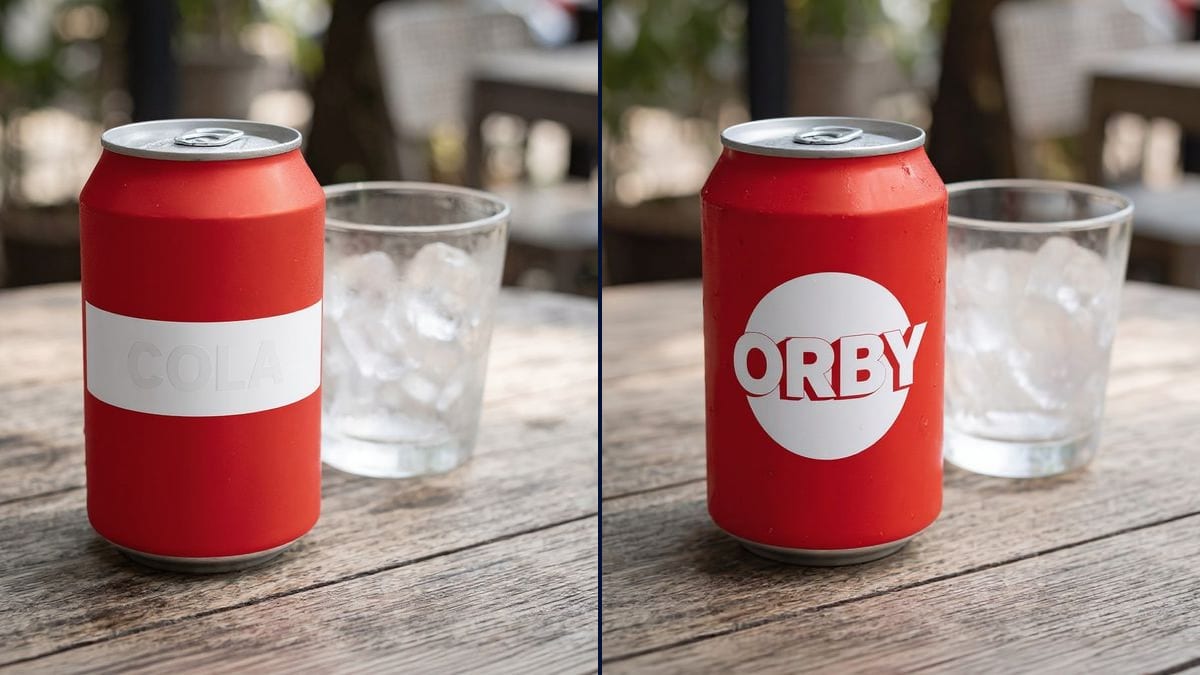
Real workflow: a red can of the invented brand FIZZCO on a café table, then the same can in the same framing with a white band and the word "COLA", and with a white circle and the invented name "ORBY".
At a glance
You provide
1 photo · a text or a brief
What the workflow produces
2 images in 1:1
Canvas structure
6 nodes wired by 4 connections
Models wired in
Flux Kontext
Cost of one full run
about 12 credits, roughly $0.14
Account
The demo is visible without an account; generating requires a free account, trial credits included
On set, the can on the table, the cereal box and the laptop tend to arrive with their brand on them. Leaving it in shot means showing a protected logo without permission, handing out product placement nobody negotiated, or risking a broadcaster asking for the shot to be fixed. So props teams greek it: they cover or replace the brand. This workflow shows both options on a photo of the object before you touch the real thing.
The hard part is erasing without redrawing. A model that regenerates the image changes the object's shape or colour, and the shot no longer cuts. Flux Kontext edits the existing photo: the prompt names what goes, what replaces it and everything that stays. In the demo, the brand vanished without a trace and the can didn't move.
These are the files of the workflow above, exactly as the models produced them, unretouched. The starting point is shown when there is one.
Starting point
Photo of your branded item
Render
The same red can, now matte, with a plain white band and a very faint word "COLA"Generated with Flux KontextThe same red can, same framing and droplets, with a white circle and the invented brand "ORBY" in rounded lettersGenerated with Flux Kontext
Who it is for
Props teams, production designers, location managers, short film directors and AI filmmakers who need a brand out of shot.
Which files to provide
A sharp photo of the object with the brand facing the camera, plus a list of what has to go and what stays.
How it works
1
Photograph the prop
On the set or on a table, brand facing the camera and well lit. This is the reference photo of the object as it comes out of stock.
2
Say what goes
Logo, graphic, slogan, barcode if it shows: name each element. Anything you don't name may stay.
3
Choose neutral or fictional
A neutral design for a background object, an invented brand when the object gets a close-up or comes back across several scenes.
4
Dress the real prop
The image is the mock-up for the label you print and stick on. On the day, it's the dressed object that goes in front of the camera.
Variations and use cases
The same canvas, tuned for different needs: each variation is two or three lines of prompt away.
The props person and the café scene
The scene is set on a café terrace and the rental house supplied cans of a real brand. The props person shows the director both options on a photo, then prints the chosen label and dresses the cans the night before.
The family kitchen set
The open cupboards on set are full of branded boxes. The production designer photographs the most visible ones and builds a consistent fictional range, the same white circle on the cereal, the coffee and the milk.
The short heading to festivals
A director shot a take where her actor drinks a well-known soda. Before submitting to festivals, she uses the image to plan the neutral version her VFX artist will reproduce on the shot in post.
The AI film with no real logos
An AI filmmaker generates shots from reference images. He strips the brands from his prop photos before feeding them in, so the video model doesn't copy an existing logo.
The series and its recurring brand
In the series, the character always drinks the same soda. The production invents a brand, rolls it out on cans and bottles, and keeps it from episode to episode as part of the world.
The music video and the deal that isn't
An artist doesn't want people to think he's sponsored by the brand on his headphones. The director shows the greeked version to his team before the shoot, then the art department covers the logo with matching tape.
Common mistakes
Not naming every element
"Remove the brand" often leaves the graphic, here the wave, which is enough to recognise a product. List the logo, the graphic, the slogan and any sign that belongs to the brand.
Keeping the signature colour
Some brands are recognisable from their colour alone. If your red and white can still says one particular drink, change the colour in the prompt too.
Inventing a name that exists
A made-up name may already be registered, or recall a real brand without you noticing. Search the web and a trademark database before you print it on fifty props.
Forgetting continuity
If part of the scene is already shot with the object, the render has to keep the same size, position and condition. Ask for it, and compare with a frame from the shot.
In the demo, yes: the FIZZCO name and its wave are gone on both renders, with no stray letters. The word "COLA" on the neutral version is very faint on the white band, though.
Why did the neutral version lose its water droplets?
Because its prompt doesn't mention them: Kontext smoothed the can while editing it. The "ORBY" version, which asks for "the same condensation droplets", keeps them. Add that phrase whenever the image has to match a shot already in the can.
Does it work on video?
This workflow handles a still. On footage already shot, brand removal happens in post, shot by shot; the image then serves as a reference for the VFX artist.
How much do the two renders cost?
Twelve credits, six per render on Flux Kontext. A third version on the same photo, another fictional brand for instance, costs six more.
Why Flux Kontext?
Because it edits the photo you give it instead of creating a new one: the can stays in place, and the table, the glass and the light are the ones in your photo. It only keeps what you name, though, such as the water droplets.
Why remove brands from a shoot at all?
Mainly for two reasons: a logo in shot may need permission, and a recognisable product becomes product placement nobody negotiated. Every broadcaster has its own rules; the production checks them with its advisers, and this page is no substitute.
What exactly is greeking?
The on-set term for covering or replacing a brand on a prop: tape, a homemade label, an invented brand. This workflow mocks up that label.
What output format?
The square of your photo, here 1024 x 1024 pixels. Enough to judge the result and prepare the label; to print it at full size, go through the Enhance node.
Remove the brand from a prop before the shoot with AI
 Flux Kontext
 Nano Banana 2.1
 GPT Image 2.5 Sunburst