Catch Santa on camera in your own living room with AI
One photo of your living room, and Santa drops by on Christmas night: a security camera still or a phone snapshot. 14 credits, and the flaws are shown.
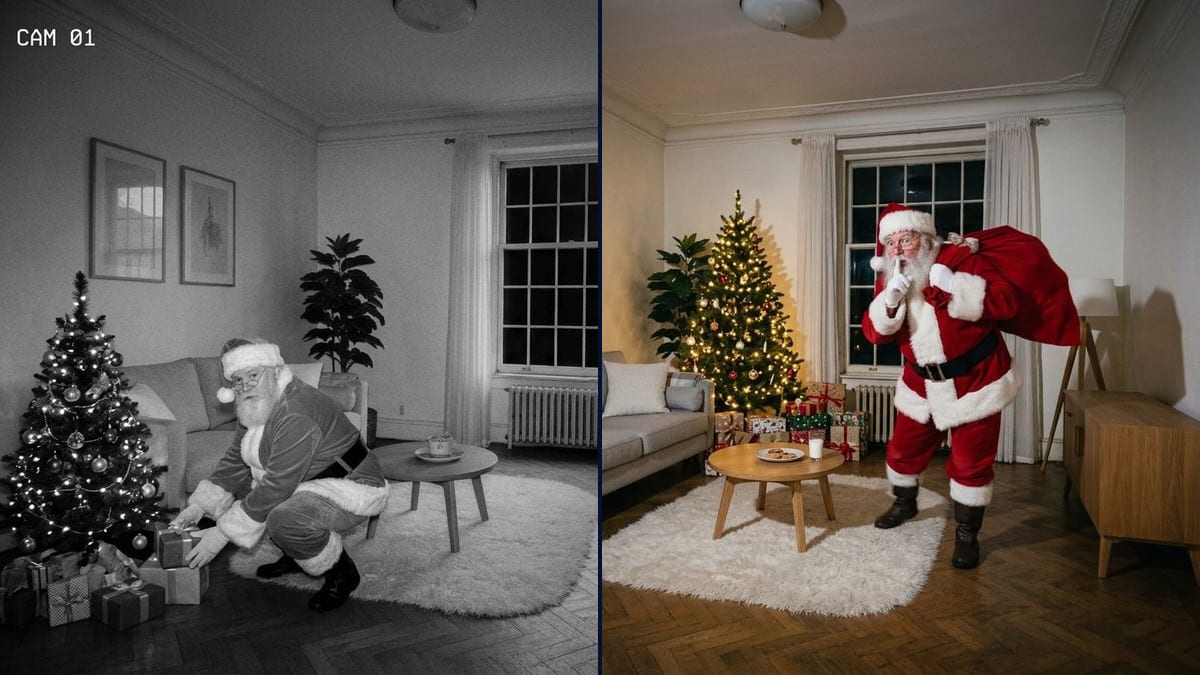
Real workflow: a bright living room with a grey sofa, then the same room in night vision with Santa crouching by a tree and the date 24-12-2026, and a night photo of him crossing the rug with his sack, a finger to his lips. The glasses weren't requested and the tree changes place.
At a glance
You provide
1 photo · a text or a brief
What the workflow produces
2 images in 4:3
Canvas structure
6 nodes wired by 4 connections
Models wired in
Nano Banana 2.1
Cost of one full run
about 14 credits, roughly $0.17
Account
The demo is visible without an account; generating requires a free account, trial credits included
On Christmas morning you show your kids the camera image: Santa crouching by the tree, in your living room, at 23:47. The format comes back every year, and several tools have a page for it this season, miraflow.ai and morphic.com among them. They're all vendors, and none gives a number we could check. The useful part of those guides is the advice to start from a real photo of the room, because otherwise the child recognises nothing.
This workflow gives you two images from the same photo: a black and white security camera view with the time overlaid, and a phone snapshot taken in a hurry by the light of the tree. Nano Banana 2.1 kept the room well and the camera text is exact. It also took liberties: Santa wears glasses nobody asked for, and the tree ends up in front of the sofa.
These are the files of the workflow above, exactly as the models produced them, unretouched. The starting point is shown when there is one.
Starting point
A photo of your living room
Render
The same room in black and white night vision, Santa crouching to place a gift by a lit tree and glancing at the lens, CAM 01 and 24-12-2026 23:47:12 overlaid; room and text exact, but the tree sits in front of the sofa, glasses were added and Santa is sharper than the roomGenerated with Nano Banana 2.1The same room at night in colour, Santa crossing the rug with his sack and a finger to his lips, in front of a tree with warm lights, biscuits and milk on the table; sofa, table and sideboard kept, but the plant moved back, the window narrower, the lamp hidden and glasses addedGenerated with Nano Banana 2.1
Who it is for
Parents and grandparents of young children preparing a Christmas morning surprise, content creators picking up the Santa caught on camera format, families wanting an image to share over the holidays.
Which files to provide
A well-lit photo of your living room, taken from high up in a corner, and a list of your furniture in the prompt. The photo is optional.
How it works
1
Photograph the room from a corner
Hold the phone high, like a camera fixed to the wall, and keep some floor clear. For a child to believe it, they have to recognise their sofa and their rug.
2
Describe your room in the prompts
The prompts name the demo's grey sofa, white rug and sideboard. Replace them with your own furniture, or the model may add those pieces or change yours.
3
Set the right date and time
On the security image, the text 24-12-2026 23:47:12 is in the prompt. Change it if you celebrate on the morning of the 25th or if the time doesn't match bedtime.
4
Check the room before you show the image
Compare it with your starting photo: moved furniture, changed frames, a narrower window. Kids spot these things. If something moved, run it again: a render costs 7 credits.
Variations and use cases
The same canvas, tuned for different needs: each variation is two or three lines of prompt away.
Security camera or phone snapshot
The black and white view is more forgiving: grain and infrared hide the flaws, and the overlaid time does the work. The colour photo shows the suit better, but it also shows everything that's off. For children under six, the security image is enough.
By the fireplace instead of the tree
If you have a fireplace, describe it in the prompt and ask for Santa climbing out with soot on his boots. Models easily move what isn't named, so list the fireplace among the things that stay in place. Not tested on the demo.
A video doorbell image on the doorstep
Take the photo from the front door at chest height and ask for a very distorted wide angle and a sack on the doormat. Avoid naming a doorbell brand in the prompt. Not tested here.
The reindeer seen through the window
Add a reindeer silhouette in the garden behind the glass. A black night window hides additions badly, so keep it small and blurred. Variant not tested, do it after the main photo.
Several images from the same night
Run the security node two or three times with times that follow on: he arrives, he puts the gifts down, he eats the biscuit. Check that the tree stays in the same place from image to image, which the model doesn't guarantee.
A more faithful model if the room moves
If Nano Banana 2.1 moves your furniture too much, switch to Nano Banana Pro at 19 credits a render. It holds a busy room better, with no guarantee. The demo didn't need this.
Common mistakes
Photographing the room by day and forgetting the night
The model darkens the window, but a wide open curtain in full sun sometimes leaves reflections. Close the curtains or take the photo late in the day.
Leaving names or family photos in view
If you post the image, the frames, the drawings with your child's name and the address on a letter go with it. Put them away before the photo.
Passing the image off as a real recording outside the home
For a child on Christmas morning, it's a game. Never use it to suggest a break-in or to accuse anyone: a fake camera image can have real consequences.
No, the prompt adds it. If your tree is already up, photograph it and remove the sentence that adds one, or the model puts in a second tree.
Why is Santa wearing glasses?
The model added them on its own in both renders, since that's a very common picture of the character. Write "no glasses" if you don't want them.
Can I turn it into a video?
Yes, connect a Video node to the security image and ask for Santa to put the gift down and stand up, with a fixed camera. The demo stops at the two images and the video costs extra credits.
How much do the two images cost?
14 credits, 7 per render on Nano Banana 2.1 at 1K. Running one image again costs 7 credits.
How big are the images?
1200 x 896 pixels in 4:3. That's enough for a phone or a tablet. For a print, switch the node to 2K, which raises the price of the render.
Will the camera text be exact?
On the demo, yes: CAM 01 and 24-12-2026 23:47:12 come out without errors. The model still writes that text, so read it each time, since a digit can change from one render to the next.
Do I need an actual camera?
No, a phone photo is enough. Hold it up high to imitate the angle of a camera on the wall, and the overlay does the rest.
Does Santa's face look like someone?
The prompt asks for an invented character, and no real person is used as a model. Don't swap in a famous person's face. Nano Banana 2.1 generates the face on each render, so it changes from image to image.
Catch Santa on camera in your own living room with AI
 Nano Banana 2.1
 Flux Kontext
 Seedream 5 Pro