Make a printable nice list certificate with your child's photo
Your child's photo on a printable nice list certificate from Santa: a parchment with a painted portrait, or a list with their name in gold. Flaws shown.
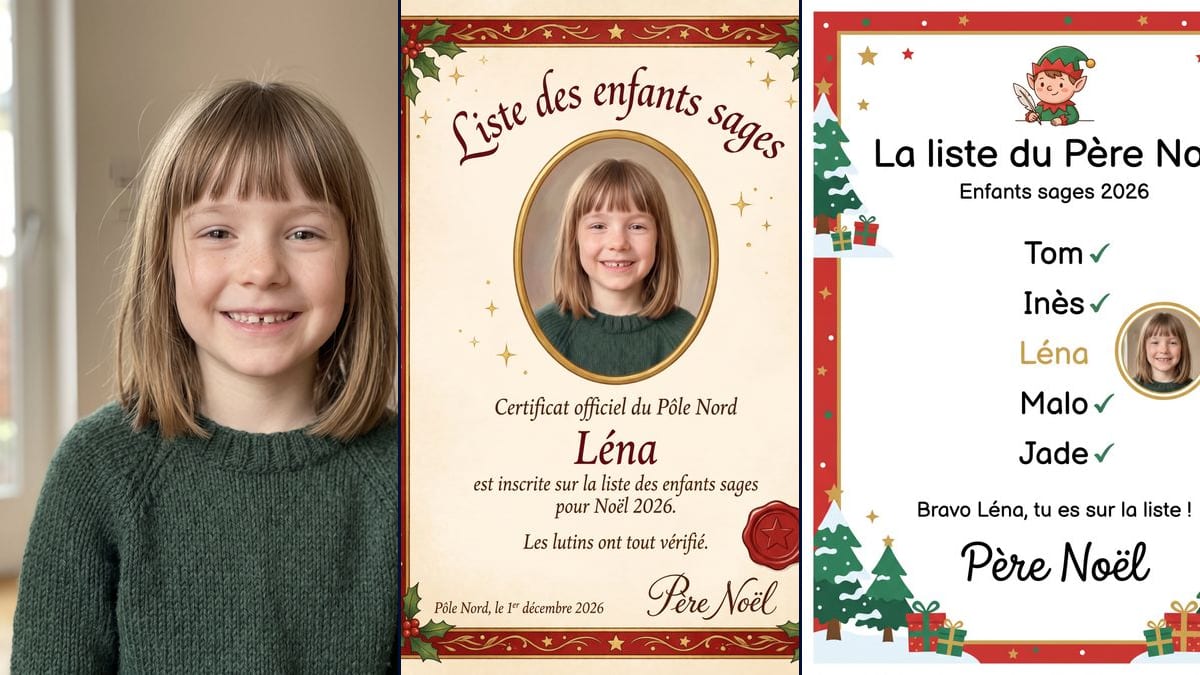
Real workflow: a girl of about seven with a fringe and a missing front tooth, then a cream parchment certificate with her painted portrait in a gold oval, holly, a star wax seal and Santa's signature, and a white page from Santa's list where her name sits in gold next to her photo. All the French text is exact; the portrait is smoothed, and her name has no green tick, unlike the others.
At a glance
You provide
1 photo · a text or a brief
What the workflow produces
2 images in 3:4
Canvas structure
6 nodes wired by 4 connections
Models wired in
Nano Banana Pro
Cost of one full run
about 38 credits, roughly $0.46
Account
The demo is visible without an account; generating requires a free account, trial credits included
A nice list certificate is an old December habit: a page signed by Santa telling a child they made the list. This autumn it also turned up as a video format. viralvideoai.app listed "Santa Nice List" among its new formats between 25 October and 13 November 2026, with Santa unrolling a list until golden sparkles reveal the child's portrait. That's the only dated source we found. This workflow makes the printed version with your child's real face on it: a parchment certificate, or a page from the list itself.
Nano Banana Pro writes the text and keeps the face. On the demo, made in French, every word came out letter for letter, accents included. The parchment portrait is repainted and smoother than the photo, which is what the prompt asks for. The list page has two flaws: the child's name is in gold but lacks the green tick the other four names have, and a thin white margin runs around the border. The pages are 3:4, close to A4 but not quite, so check your print settings.
These are the files of the workflow above, exactly as the models produced them, unretouched. The starting point is shown when there is one.
Starting point
Your child's photo
Render
A cream parchment certificate in French with a red and gold border, holly in the corners and gold stars, the girl's painted portrait in a gold oval, a red wax seal with a star, the title "Liste des enfants sages", the name "Léna" and the signature "Père Noël"; all text exact, freckles and tooth gap kept, but the skin is smoothed by the painted styleGenerated with Nano Banana ProA white page titled "La liste du Père Noël" with a red border of snowy fir trees and presents, a small elf holding a quill, five first names with green ticks and the girl's photo in a gold circle next to "Léna" in gold, signed "Père Noël"; text exact and face kept, but "Léna" has no green tick, there is no highlighted band, and a thin white margin surrounds the borderGenerated with Nano Banana Pro
Who it is for
Parents and grandparents who want a printable Santa certificate with their child's face for a stocking or a December surprise, teachers and childminders preparing a Christmas activity with the parents' agreement, families who already do a letter from Santa.
Which files to provide
A sharp photo of the child taken straight on, with the parents' agreement, their first name spelled correctly, and the lines of text you want on the page, in your language.
How it works
1
Pick a clear photo of the child
Face straight on, good light, no filter. Chest height is enough. The parchment repaints the face but the list shows it as a photo, so sharpness matters most there.
2
Replace the French text with yours
The quoted lines in each prompt are the demo's French text: name, sentence, date, signature. Swap them for your own words in your language, and spell the child's name exactly as it should appear.
3
Rewrite the face description
The prompts describe the demo girl: light brown fringe, freckles, a gap in her front teeth, green sweater. Put your child's features in, or the model pulls the portrait towards hers.
4
Print with fit to page
The image is 3:4. On A4, fitted to the width, about 17 mm of the sheet stays white. On US Letter it fits almost exactly. Thick cream paper suits the parchment.
Variations and use cases
The same canvas, tuned for different needs: each variation is two or three lines of prompt away.
Parchment or list page
The parchment looks like an official document, with a painted portrait, holly and a wax seal. The list page is lighter and cartoon-like, with an elf and the child's real photo next to their name, which makes "you made the list" easy to read for a small child.
Siblings, one certificate each
Run the template once per child with their own photo and name. Keep the same sentence and date so the certificates match. On the list page, you can also put the siblings' names in the five lines. Not tested on the demo.
Your own sentence
Replace "Les lutins ont tout vérifié." (the elves checked everything) with a line of your own: a nod to something they did well this year, a joke about the cat. Keep it to one line, like the demo, and check the spelling on the result.
A different date
The parchment is dated "Pôle Nord, le 1er décembre 2026" (North Pole, 1 December 2026). Change it to the day you'll hand it over, Christmas Eve for example, written the way dates are written where you live.
On paper or on a screen
Printed, it fits in a stocking or an envelope. On a tablet or phone, you can show it as a message that just arrived from the North Pole. The 1792 x 2400 pixel file works for both.
A version that moves
The trend started as a video. Connect a Video node to the parchment and describe a small movement: sparkles drifting, the seal catching the light. The demo stops at the two images, and video costs extra credits.
Common mistakes
Printing without reading the text
The demo text came out exact, but your lines are new to the model. Read every word before you print, the name and the date first. A misspelt name is the first thing a child who can read will notice.
Posting it with the name and the face
A certificate with a first name, a face and sometimes a town is personal information about a child. Send it to family privately rather than putting it on a public profile.
Leaving the demo girl's description in
The prompts mention a light brown fringe, freckles and a missing front tooth. If your child has none of these, change those lines, or the portrait drifts towards the demo girl.
Yes. The model writes whatever you put between quotes, so replace "Liste des enfants sages" with "Nice List" and so on. We only tested the French demo, so read every word on the result before printing.
Is my child's photo shared anywhere?
No, the image stays in your Imaginode workspace. The certificate carries a first name and a face, though, so think twice before posting it publicly.
Can I put several children on one page?
The list page already has five names, so you can write your children's names in. The prompt places only one photo, though. Asking for several faces at once is something we haven't tested.
How much do the two pages cost?
38 credits, 19 per render on Nano Banana Pro. Redoing one page costs 19 credits.
Is it exactly A4?
No. The pages are 1792 x 2400 pixels, a 3:4 ratio. A4 is a little taller, so fitted to the width you get a white strip of about 17 mm. On US Letter the fit is almost exact.
Why does the name in gold have no tick?
The prompt gives every name a green tick and highlights the child's line in gold. The model treated the gold as a replacement for the tick. Add "the line Léna also has a green tick", with your child's name, if you want it.
Why is the parchment portrait smoother than the photo?
The prompt asks for a soft painted portrait to match the old paper look, and the painting smooths the skin. For the real photo, as on the list page, replace "redrawn as a soft painted portrait" with "as a real photo".
Was a real child used for the demo?
No. The girl in the demo was generated for this page and doesn't exist. The other names on the list are made up too.
Make a printable nice list certificate with your child's photo
 Nano Banana Pro
 GPT Image 2.5 Sunburst
 Seedream 5 Pro