The writer sending her first short
Nora is sending "The Last Train" to three production companies. She checks her title page against the template before exporting the PDF, so nothing gives away that it's her first submission.
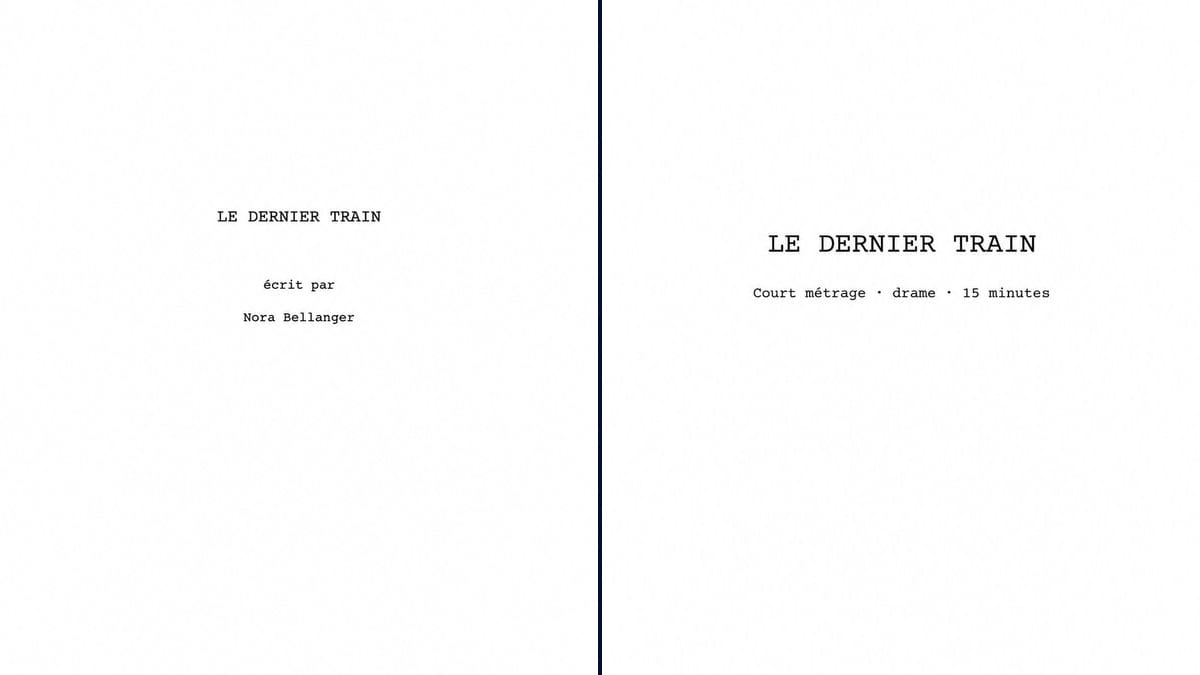
A screenplay title page that follows industry conventions, Courier, centred title, contact details bottom left, plus a blind version for contests. Workflow visible here, no account needed.
Real workflow: two French title pages in Courier for "LE DERNIER TRAIN", a made-up short film, one with Nora Bellanger's credit, draft date and email at the bottom left, the other anonymous with genre, running time and an entry number.
At a glance
A screenplay title page follows rules nobody really writes down: 12 pt Courier, title centred, "Written by", the name, and contact details at the bottom left. No artwork, no logo, no border. A reader at a production company or a contest spots it straight away when those rules are ignored. This workflow shows the two versions a writer needs: the signed page and the blind page for competitions.
The hard part is adding nothing. Image models love to decorate, and a good title page is almost empty. The prompt fixes the font, where each block goes and every line in quotes. Sunburst spells correctly in Courier, but the image is still an image: to send the script, type the page in your software, and use this render as a template or a prop.
To hear the script read aloud, see the table read; to send it to festivals once it's shot, our guide to contests. Both pages cost six credits.
These are the files of the workflow above, exactly as the models produced them, unretouched. The starting point is shown when there is one.
Render
Screenwriters sending a script to a producer or a contest, screenwriting tutors, prop masters who need a believable script on camera.
The title, the name or entry number, the draft date and contact details, copied in quotes.
Copy your title
In capitals, exactly as it appears at the top of the script. A working title can be swapped later: change the line, render again.
Signed or blind
Signed for a producer, an agent, a fund: name and contact details. Blind for many contests: genre, running time and the number the rules give you.
Contact details bottom left
Email, phone, agent if you have one. The draft date can go there too, or bottom right, depending on who you're sending to.
Rebuild it in your software
Final Draft, Fade In, WriterDuet or Highland generate the title page as text. Compare with the image and fix anything that's off.
The same canvas, tuned for different needs: each variation is two or three lines of prompt away.
Nora is sending "The Last Train" to three production companies. She checks her title page against the template before exporting the PDF, so nothing gives away that it's her first submission.
The rules say no name and no contact details. The contest version shows where the genre, running time and entry number go, and is a reminder to strip the name from the PDF properties too.
He shows students the expected title page next to a bad one with artwork and a novelty font. Both pages serve as teaching material for the whole year, pinned up next to the whiteboard.
A character in the film is a screenwriter, and a script sits on her desk in three shots. The prop master prints the title page with a made-up title for a believable insert.
He submits a short film script to an open call. He wants a page in standard format, like everyone else's, so his writing is judged on the pages rather than the presentation.
Two writers co-write. The credit becomes "Nora Bellanger & Marc Lenoir" under "Written by", the ampersand being the convention for a writing team, as opposed to "and" for writers who worked separately.
Artwork, a border, colour, a title font: everything you add says "beginner" to a reader who sees fifty a week. Courier, black, white.
Removed from the page but still in the footer, the file name or the PDF properties: the entry can be disqualified. Check all three.
The script changes with every rewrite. Without a date or draft number, nobody knows which version the producer read.
An image title page at the front of a text PDF stands out, prints badly and can't be searched. Rebuild the content in your software.
In the demo, yes: title, credit line, name, draft date, email and entry number are all exact, in Courier, accents and the @ sign included.
Better not: an image page doesn't read as text, prints less crisply and is easy to spot. Type it, and keep the image as a template.
No. The convention is a bare page. Keep mood images for the series bible or the pitch deck, never for the script.
Six credits, three per page on GPT Image 2.5 Sunburst at medium quality. A third version, with an agent or a co-writer, costs three more.
Because it spells correctly in Courier and holds back from decorating when told not to. It's also the cheapest model in the catalogue, which matters for a page you redo with every draft.
12 pt Courier, title in capitals centred about a third of the way down, "Written by" then the name, contact details bottom left, nothing else. Some contests and funds have their own rules: theirs come first.
In the demo it's closer to a quarter. In your software the position takes care of itself; in the image, write "in the middle of the top half of the page" if you want it lower.
Checking the layout at a glance, showing the template in a class, and as a prop: a script lying on a table in a shot, or an insert of the first page.
Make a screenplay title page with AI
Use this workflowFree account, no card required. The workflow opens pre-filled in your canvas.
 GPT Image 2.5 Sunburst
 Nano Banana 2.1
 Recraft V4.1