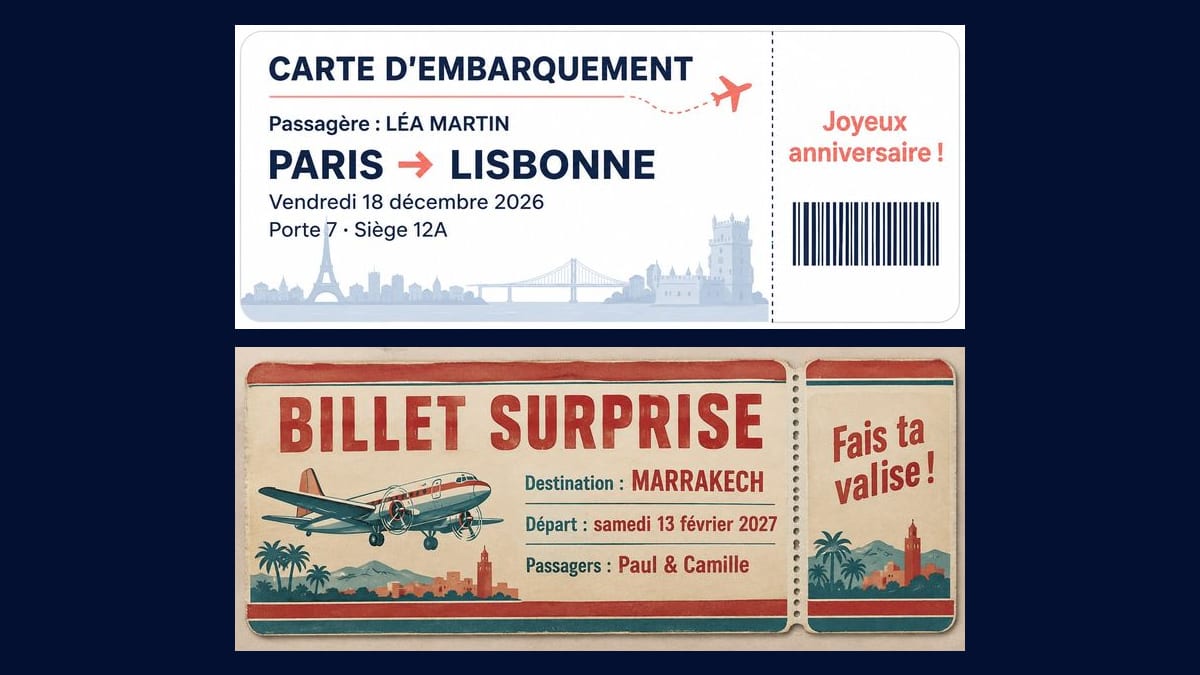
Léa's birthday
A weekend in Lisbon, booked on the quiet. The boarding pass comes folded inside the birthday card, and the stub that says happy birthday ends up on the fridge as a souvenir.
A fake boarding pass or a vintage ticket to print and reveal a surprise trip, with the name, destination and date. Workflow visible here, no account needed.
Real workflow (demo in French): a Paris to Lisbon boarding pass for Léa Martin's birthday, white with navy and coral, a plane and the skylines of Paris and Lisbon, then a 1960s-style surprise ticket to Marrakech in red and teal, with a propeller plane, palm trees and a minaret.
At a glance
A trip as a present usually means a booking confirmation sitting in someone's inbox, and nothing to put under the tree or inside the birthday card. This workflow takes the name, the destination and the date, and gives you two tickets to print: a modern boarding pass and a 1960s-style ticket. Slip it in an envelope and they find out about the trip when they open it.
The tricky part is the text. An image model left to itself invents a flight number, a time, sometimes the logo of a real airline. The prompt puts every line in quotation marks, forbids the rest and keeps real airlines out of it. GPT Image 2.5 Sunburst spells correctly, accents included, and is the cheapest model in the catalogue. The ticket is a keepsake: it does not replace the boarding pass the airline gives you.
For a present that isn't a trip, try the printable gift voucher; to put the destination on the wall, the travel poster; for the party that goes with it, the birthday invitation. Both tickets cost six credits.
These are the files of the workflow above, exactly as the models produced them, unretouched. The starting point is shown when there is one.
Render
Couples, families and friends giving a trip who want to reveal it with a ticket to open: birthdays, Christmas, Valentine's Day, a proposal.
The passenger or passengers, the route or destination, the date with its weekday, and the line for the stub, each in quotation marks.
Check the date and the day
Write the weekday with the date, "Friday 18 December 2026", and check it against a calendar. The model copies what you give it, mistakes included.
Quote every line
The title, the passenger, the route, the date, then the line for the stub. Five or six lines at most: on a ticket this narrow, the letters shrink fast.
Pick the style
Modern and clean for a believable boarding pass, vintage for a ticket with some charm. The style lives in the first sentence of the prompt; the text stays the same.
Print and trim
Use 200 to 250 gsm card. At 20 cm wide (about 8 inches) the ticket is about 8.3 cm tall and fits a long envelope. Score the fold along the dotted line so the stub tears off cleanly.
The same canvas, tuned for different needs: each variation is two or three lines of prompt away.
A weekend in Lisbon, booked on the quiet. The boarding pass comes folded inside the birthday card, and the stub that says happy birthday ends up on the fridge as a souvenir.
Paul is taking Camille to Marrakech on Saturday 13 February. The vintage ticket waits under her coffee cup at breakfast, both names on it and "pack your bag" on the stub: they leave that same day.
A family holiday doesn't fit in a parcel. The ticket rolled into a tube or tucked into a box gives everyone something to unwrap on Christmas morning, even if the flight is in April.
He is taking his partner to Venice and won't say why. The ticket reads "Destination: SURPRISE" with the departure date; the real reason for the trip waits until the last evening.
For a fortieth wedding anniversary, the children chip in for a holiday. A ticket with both parents' names, read out over dessert, lands better than a card with a cheque in it.
Not every trip involves a plane. Swap the plane for a train, "boarding pass" for "train ticket", gate and seat for coach and seat number, and the prompt works the same way.
"Saturday 14 February 2027" doesn't exist: the 14th is a Sunday. The model writes what you give it, so check the date before you run the render.
A real airline's name or logo on a fake ticket is someone else's trademark, and a document someone could mistake for the real thing. The prompt rules them out: leave that sentence in.
Give no instruction about the background and Sunburst adds landmarks; in the demo the Eiffel Tower runs behind "Porte 7". Write "plain background, no landmarks" for a clean ticket, or name the scenery you want.
Don't put your booking reference or the real barcode on the gift ticket, and don't post the real pass online: its barcode holds the passenger's name and the booking reference.
In the demo, yes: every line is exact on both tickets, the French accents on "LÉA", "Siège" and "février" included, along with the arrow and the middle dot. Read each version before you print.
No. It is a keepsake to give. To board, you need the boarding pass the airline issues at check-in: keep that one for the airport and this one for the moment you announce the trip.
Yes: write "Destination: SURPRISE" in quotation marks and give only the departure date. They know when to pack, not where they're going.
Six credits, three per render on GPT Image 2.5 Sunburst at medium quality. A third ticket, for the return leg or another passenger, costs three more.
Because it copies text letter for letter, accents and punctuation included, and it is the cheapest model in the catalogue. In the demo it handled navy on white as well as red on cream paper.
The prompt asks for 16:9, but both renders come out at 1942 by 809 pixels, roughly 2.4:1. That is longer, and closer to a real ticket. Printed 20 cm wide, it is about 8.3 cm tall.
No, the bars are drawn and hold nothing. If you want a phone to open something, add a QR code afterwards in an image editor, pointing to a message or a birthday video.
Yes, in another node: a greeting card in the same colours, with the ticket inside. Use the same palette in both prompts so the two pieces belong together.
Make a printable surprise boarding pass with AI
Use this workflowFree account, no card required. The workflow opens pre-filled in your canvas.
 GPT Image 2.5 Sunburst
 Nano Banana 2.1
 Recraft V4.1