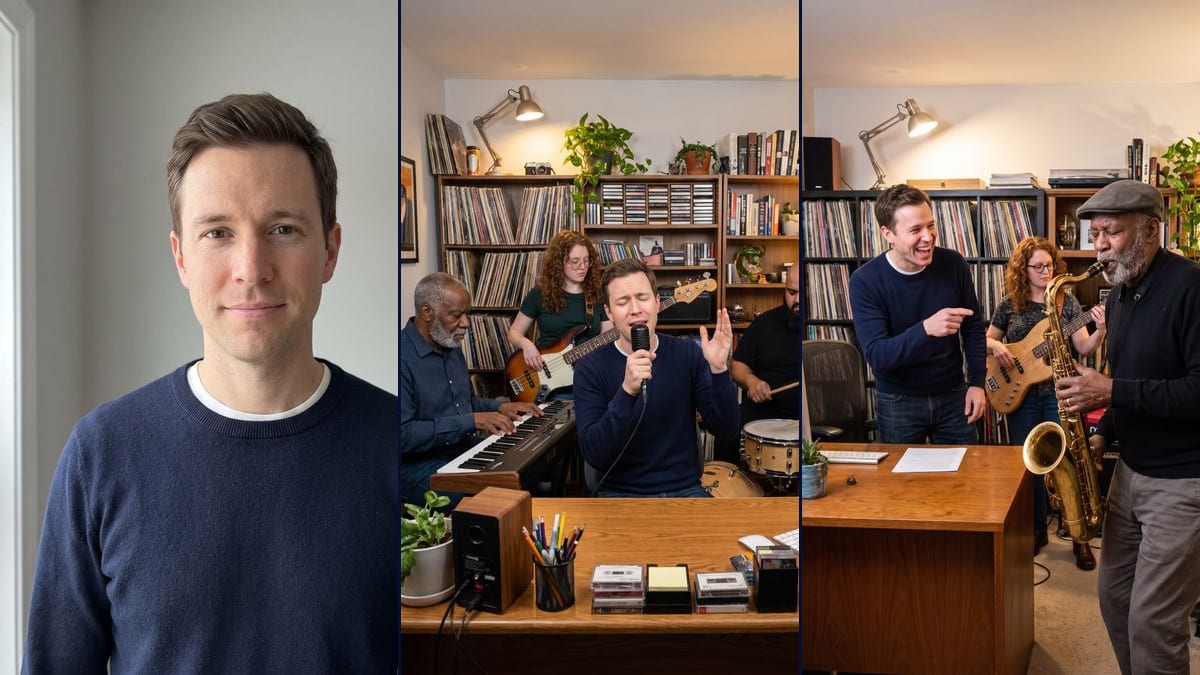
Your photo as the singer of an intimate Tiny Desk style concert: at the mic with an invented band, then handing the solo to the sax. Workflow visible here.
Real workflow: a portrait of a clean-shaven man in his thirties, in a navy sweater against a light grey wall, then the same man at the mic behind a wooden desk, eyes closed, surrounded by four invented musicians, and the same man laughing as he points at a sax player in a flat cap. The face is his in both; while singing he seems to be sitting instead of standing, and in the solo he has no mic and stands next to the desk.
At a glance
You provide
1 photo · a text or a brief
What the workflow produces
2 images in 3:4
Canvas structure
6 nodes wired by 4 connections
Models wired in
Nano Banana Pro
Cost of one full run
about 38 credits, roughly $0.46
Account
The demo is visible without an account; generating requires a free account, trial credits included
On TikTok right now, people are putting themselves into a Tiny Desk concert: a band squeezed behind a desk, shelves full of records, a singer giving everything a couple of metres from the lens. According to makeviral.ai, it started with videos that paste new faces onto Charlie Wilson's concert from June 2023. This workflow starts from a photo of you and makes two images: you at the mic with the band, then you laughing as you hand the solo to the sax player.
Tiny Desk is a series from NPR, the American public radio network, and Imaginode has no connection with it. The demo doesn't copy the real desk or the logo, and none of the musicians is a real person: it's an intimate concert in the same spirit, with an invented band. The face holds up well in both renders. The poses followed less closely: while singing he looks seated, and in the solo he's next to the desk, without a mic.
These are the files of the workflow above, exactly as the models produced them, unretouched. The starting point is shown when there is one.
Starting point
Your photo
Render
The same man singing into a black handheld mic, eyes closed, one hand raised, behind a wooden desk cluttered with cassettes, a pencil pot, a speaker and a screen, surrounded by an older keyboard player with a grey beard, a red-haired bassist in glasses, a bald drummer with a black beard and a backing singer with long black hair, in front of shelves of vinyl; he seems to be sitting, and a few illegible letters remain on the keyboard and the cassettesGenerated with Nano Banana ProThe same man bursting out laughing and pointing at an older sax player with a grey beard and a flat cap who steps forward for the solo, a red-haired bassist and a bearded keyboard player behind, in front of shelves of vinyl; he's standing next to the desk, without a mic, and a stray letter and some fake text show up on the red keyboard and the ampGenerated with Nano Banana Pro
Who it is for
People who want to do the TikTok Tiny Desk trend with their own face, music fans who like the feel of intimate concerts, content creators looking for a starting image to animate.
Which files to provide
A sharp, well-lit front-facing photo of you or of someone who agreed, and the concert described: instrument, musicians, style.
How it works
1
Pick a front-facing photo
A sharp, well-lit portrait with the whole face visible. That one image is all the model has to copy your features from: a cap or a shadow over the eyes, and it guesses.
2
Adjust the first line
The prompts say "the man from the photo" and describe a clean-shaven man in a navy sweater. Change those words, the outfit and the hair if your photo shows someone else.
3
Keep the list of musicians
Each musician has an age, a hairstyle, a beard or glasses. Without that list, the model fills the office with copies of you. Change the details if you like, but keep them all different.
4
Look closely at the instruments
Zoom in on the headstock, the keyboard and the amps: a letter or a fake word sometimes survives. If it bothers you, rerun that node on its own, nineteen more credits.
Variations and use cases
The same canvas, tuned for different needs: each variation is two or three lines of prompt away.
The singer or the one handing over the solo
The singing shot is the classic image of the trend, you at the mic in the middle of the band. The solo is funnier: you're laughing and making room for the sax player, like a bandleader having fun. The face paragraph is the same in both.
A different instrument for you
Swap the mic for an acoustic guitar, a keyboard or congas, and describe where the hands are. Keep "behind the desk", or the model pulls you out of the frame and the concert loses its squeezed-in feel.
The office band with colleagues
The parodies cited by makeviral.ai put several faces into the same concert, coaches for instance. Do it with your colleagues or friends. With several photos on the node, describe who plays what, each with their own face. This version wasn't tested here, and everyone has to agree.
Another style of music
The solo prompt says funky, with a saxophone. For folk, put in a fiddle and a double bass; for rap, a turntable and a beatmaker behind the screen. Change the light too if you want a cooler mood.
The content creator
They keep the singing image, connect a Video node to it to make the band move for a few seconds, then lay royalty-free music over it in the edit. The video result isn't guaranteed, and this page has no video demo.
Common mistakes
Letting the model invent the band
The first tries gave musicians who all had a bit of your face. The prompt now describes each one: age, hair, beard, glasses. If you shorten it, keep at least those features.
Forgetting to ban brands and toys
Without the line "no logo, no brand name", a readable instrument brand showed up in the first renders, and licensed toys on the shelves. Those two lines of the prompt are there for that.
Using a famous person
Using a famous musician's face, or a photo of someone without their consent, is a real image rights problem. Use your own photo, or one of a friend who said yes.
No. Tiny Desk belongs to NPR, the American public radio network, and Imaginode has no connection with it. The prompt describes an office full of vinyl, books and plants, in the same spirit, without the logo or the exact layout of the real desk.
Are the musicians real people?
No, they're invented and described one by one in the prompt. Don't add the name of a famous musician: on top of the image rights issue, the model may give them your face or distort theirs.
Will I get the music from the concert?
No. This template makes two images, with no sound. The music from the original concerts is under copyright. For a video, connect a Video node after one image and add, in your edit, music you have the right to use; this page has no video demo.
How much do the two images cost?
About 38 credits, nineteen per render on Nano Banana Pro in 2K. Rerunning a single image costs nineteen more credits.
Why Nano Banana Pro?
Because it carries a face over from a single photo while the whole scene changes around it: the office, the band, the light. An editing model like Flux Kontext is better at keeping the original background, which is no use here.
What size is the image?
1792 x 2400 pixels, in vertical 3:4. The right orientation for a TikTok post or a story, and big enough to crop in on your face.
Why am I sitting when the prompt says standing?
The model saw a desk and a chair, and sat you down. To force the pose, write "standing, the desk comes up to his waist, no chair behind him" and rerun the singing node.
Can I do it with a photo of a woman?
Yes. Replace "the man from the photo" with "the woman from the photo" in both prompts, describe her outfit and hair, and remove "clean-shaven with no beard".
 Nano Banana Pro
 Seedream 5 Pro
 Flux Kontext