The birthday present
A whole stadium chanting someone's first name costs two hundred and forty credits and gets watched ten times over. It is the use this workflow exists for.
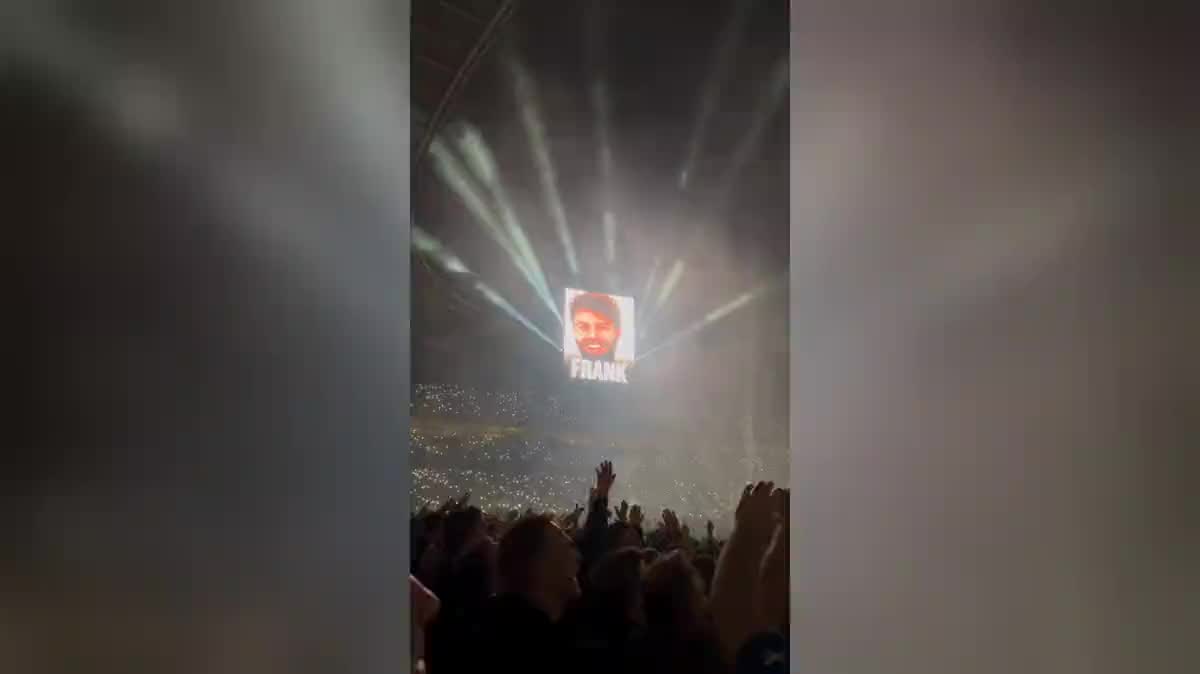
One selfie and two Seedance 2.5 nodes: your face on the giant screen of a stadium or a concert, and the crowd chanting your name. The real workflow, with both renders, is visible here without an account.
The real workflow: the selfie wired as a reference into two Seedance 2.5 nodes, one venue per node. Both videos are the demo's own, the name written by the model.
At a glance
Your face on a stadium's giant screen, your first name written under it, and the crowd on its feet chanting. This is the gift use of the family: a birthday, a leaving do, a question asked in public.
The unknown of this workflow was the text. Writing a clean word inside an image is something our IMAGE models have done for a long time; our video models, that had not been measured. It has been since 13 September 2026: Seedance 2.5 writes a short first name in capitals, clean, on a screen.
So stay inside what was measured. A short first name, in capitals. A whole sentence, a long name or an accented script have not been checked, and a video model that fails at text does not half fail: it returns a mush of letters. Both shots cost two hundred and forty credits.
These are the files of the workflow above, exactly as the models produced them, unretouched. The starting point is shown when there is one.
Starting point
Render
Give one sharp selfie
Framed from the waist up, facing the camera, in daylight. It is the shot that appears in close-up on the screen, so its sharpness shows at scale.
Swap the first name
Both prompts carry FRANK in capitals. Put the name of the person the video is for, short and in capitals, and nothing else.
Pick the venue
A stadium at night, a concert, a hall. The venue changes the emotion: the stadium says achievement, the concert says celebration.
Look at the text before you send it
It is the one element of the shot that can fail outright. A glance at the video before you hand it over avoids sending a badly formed name.
The same canvas, tuned for different needs: each variation is two or three lines of prompt away.
A whole stadium chanting someone's first name costs two hundred and forty credits and gets watched ten times over. It is the use this workflow exists for.
Replacing the phone-filmed goodbye with a giant screen showing their name gives a keepsake nobody forgets, and one that circulates around the team.
A company greeting a new recruit by name on a stadium screen says its enthusiasm better than a standard welcome message ever does.
A proposal, an invitation, a question asked in public: the giant screen gives a short sentence a solemnity that plain text does not have.
An amateur club putting its players on a big stadium screen gives each of them thirty seconds of the professional treatment, for the price of a coffee.
If the situation should change rather than the recognition, your future job places you in the setting of the role instead of in front of a stand.
What was measured is a short first name in capitals. A sentence leaves the verified ground, and that is where a video model returns deformed letters that ruin the whole shot.
The longer the word, the more chances the model has to get it wrong. Accents were not checked either: if the name carries any, look at the render before you hand the video over.
A name and a date, or a name and a logo, double the risk. One word on screen is the prompt that was measured, and it is the one that comes out clean.
This is the one workflow of the family where an element can fail outright. Thirty seconds of checking avoids giving away a video with a badly written name.
Yes, if it is short and in capitals: that is what was measured on 13 September 2026 on both demo shots. A long name, a sentence or accents fall outside the verified ground, and there the text can deform.
That is not what was tested, and it is the case where a video model fails most often. If you want a sentence, generate the shot without text and add it in the edit, where it will be sharp for certain.
Yes, with their consent: that is exactly the gift use. The workflow changes nothing about image rights, and a video made for someone is made with their agreement if it is going to be published.
Two hundred and forty credits, one hundred and twenty per five second video in 720p with sound. Changing the name and rerunning one shot costs one hundred and twenty.
On both demo shots, yes: FRANK in clean capitals on the stadium screen and on the LED wall. It is a measurement from 13 September 2026, and it holds for a short word in capitals.
A Latin-alphabet name has been verified. Non-Latin scripts have not been tested on this model, and any doubt about the text is settled by looking at the render before sending it.
Vertical 9:16 in 720p, the native format of social feeds. The format and resolution guide gives the expected sizes network by network.
Yes, with their consent, and that is the intended use. The workflow changes nothing about image rights: a video made for someone is made with their agreement if it is to be published.
Create a video where a whole stadium chants your name, with AI
Use this workflowFree account, no card required. The workflow opens pre-filled in your canvas.
 Wan 3.0
 Seedance 2.0
 Kling V3