The trend video, with your face
Five vertical seconds ready for TikTok, Reels or Shorts: you at the wheel of a car taking off, while everyone is talking about the flying Roadster.
One selfie is enough: you at the wheel of a red roadster floating over a desert road, then five seconds of video where it takes off. See the workflow here, no account needed.
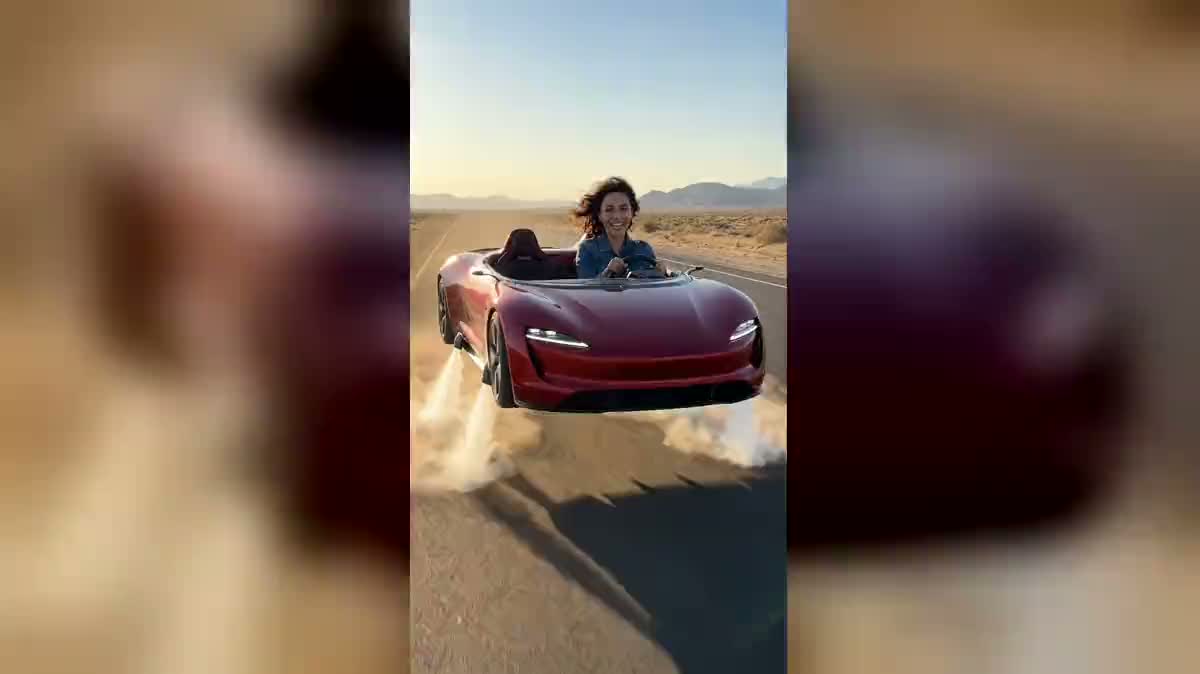
Real workflow: the selfie of an invented woman in a denim jacket, then the same woman at the wheel of a red roadster with no logo, floating over a desert road on jets of air, and five seconds of Wan 3.0 where the car climbs and flies off, camera in front of her.
At a glance
On 15 October 2026, Tesla showed a Roadster prototype that jumps, flips in the air and lands again on compressed air thrusters. In the days that followed, creators started remaking the scene with their own face at the wheel. This workflow does it from your selfie: one image, then a five second video with sound.
The face holds up fine. The flying is harder: on the first attempt, Wan 3.0 put the car back on the road after two seconds, orange flames under the body. The prompt now asks for a gap under the wheels from start to finish and bans fire. The car itself is invented, with no logo and no badge, and Imaginode has no link with Tesla.
In the same family: become a giant, the zoom from space and freeze time. For your real car, change its colour. The image and the video cost seventy-nine credits.
These are the files of the workflow above, exactly as the models produced them, unretouched. The starting point is shown when there is one.
Starting point
Render
People who want to join the flying Tesla trend on TikTok, Instagram and YouTube Shorts, content creators, car fans, friends putting together a video gift.
A selfie or a face-on portrait, face sharp in daylight, and if you like the colour of the car and the setting.
Take a sharp selfie, face on
Face in daylight, no sunglasses, hair visible. The model copies what it sees: a dark photo or a side view gives you a driver who only looks like you from a distance.
Describe the car, never your face
Colour, shape, setting: change whatever you like in the first prompt. Leave the words "exactly the same person" and don't describe your features, or the model redraws them.
Judge the image before the video
The video starts from the image as it is. If the car touches the road or a logo shows up on the bonnet, run the image again: nineteen credits, against sixty for the video.
Run the video and watch the ending
The last frames are where things slip: in the demo the jets turn slightly orange and the hair gets shorter. If the car lands, run it again with the same prompt.
The same canvas, tuned for different needs: each variation is two or three lines of prompt away.
Five vertical seconds ready for TikTok, Reels or Shorts: you at the wheel of a car taking off, while everyone is talking about the flying Roadster.
A photo of a friend who dreams about sports cars, and the clip where they lift off over the desert: it lands well in the group chat on the morning of their birthday.
The new driver who just got their licence, at the wheel of a car that flies away: a funny way to tell the family, with no brand logo anywhere.
Change the colour, the shape or the landscape in the prompt: a black coupe over a city at night, a white car over a coastline. The face stays the one from your photo.
The still image, before you even make the video, works as a YouTube thumbnail or a profile picture that stops the scroll: your grin at the wheel, dust rising under the car.
Two photos in two Media nodes, both wired into the same image: you driving, a friend beside you. Check on the image that each keeps their own face before you run the video.
Asking for "a Tesla" in the prompt pushes the model to draw a badge. Keep "no badge, no logo, no lettering": a published video carrying a brand logo can be taken down.
As soon as the prompt describes features, the model redraws them instead of taking the ones in the photo. Describe the car, the outfit and the setting, never your face.
A car touching the road in the image, or a driver who is too small, stays that way for five seconds. Redo the image first; it costs a third of the video.
Without "no flame", the model draws rocket engines, orange flames and all, and the car often ends up landing. The white air jets and the dust are what sell the effect.
No. The car is an invented roadster with no logo or badge, and the prompt bans any lettering. Imaginode has no link with Tesla; the name only describes the trend.
Any face-on portrait works, selfie or not, as long as the face is sharp and well lit. A group photo works badly: the model can't tell who goes behind the wheel.
You can ask for one in the video prompt, but during a flip the face leaves the frame and often comes back changed. The demo keeps the camera in front of the driver so her face stays the same.
Seventy-nine credits: nineteen for the image on Nano Banana Pro, sixty for five seconds of Wan 3.0 at 720p with sound. A new image on its own costs nineteen credits.
Seedance 2.5 refuses a first frame that shows a real person, which is the case as soon as your face is at the wheel. Wan 3.0 accepts it and renders the flight and the sound in one pass.
Yes, Wan 3.0 goes up to thirty seconds at the same price per second. The longer it runs, the more likely the car is to land, so watch the ending before you post.
Yes, it is your face and an invented car. Label it as AI generated when the platform asks, and leave no brand logo in the image.
Only with their consent. Putting someone at the wheel who never asked for it, let alone someone famous, stops being a harmless joke once the video is online.
Put yourself in the flying Tesla with AI
Use this workflowFree account, no card required. The workflow opens pre-filled in your canvas.
 Nano Banana Pro
 Wan 3.0
 Seedance 2.5
 Kling V3