Vignette
Also calledVignetting, Edge darkening, Corner falloff
A vignette is a darkening, or occasionally a lightening, of the corners and edges of the frame that leaves the center brighter and sharper. It draws the viewer's eye inward toward the subject and can add intimacy, nostalgia, or a sense of unease.
What it tells
Vignette works as a quiet directional cue. By dimming the periphery, it removes competing visual weight and tells the audience exactly where to look without a cut or a camera move. Directors reach for it to make a wide shot feel private, to soften a modern digital image into something warmer and older, or to tighten the psychological space around a character who feels watched, cornered, or lost in their own head.
How it is shot
Vignette can happen optically or digitally. Optically, wide apertures on vintage or ultra-wide lenses cause natural light falloff at the corners, and stacked filters or a mismatched lens hood physically block the edges of the image circle. Digitally, colorists add a radial gradient mask, usually oval, that reduces exposure by 0.5 to 2 stops toward the frame edges, with a soft feather (30 to 60 percent) so the transition is invisible rather than a hard ring. Intensity, shape, and center point are adjustable per shot, and some films shift the vignette's position frame by frame to track a moving subject.
When to use it
- Isolating one product or face inside a visually busy or cluttered location.
- Building a nostalgic, memory-like, or vintage photograph feel for a flashback.
- Suggesting tunnel vision, fear, or fading consciousness in a character's point of view.
- Softening a clean digital image so it reads as filmed rather than shot on video.
Not to be confused with

Bokeh blurs out-of-focus background shapes through lens optics, while vignette darkens the frame's edges regardless of focus. They often appear together but solve different problems: one hides detail, the other hides brightness.
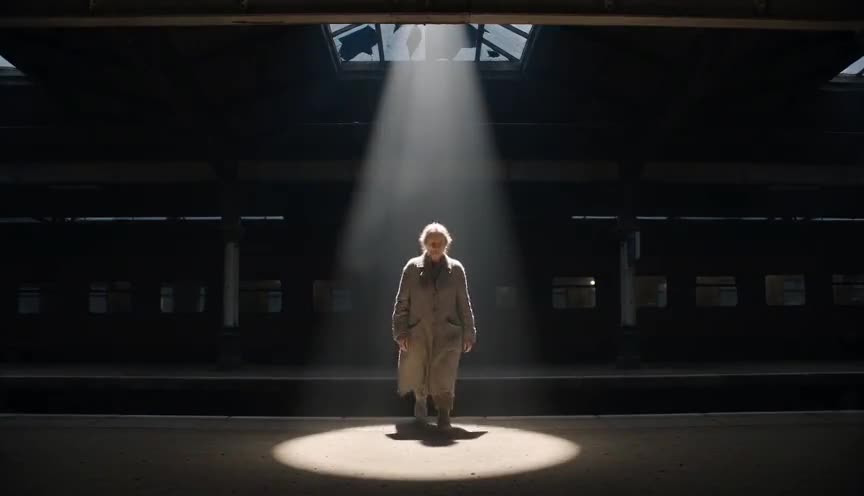
A spotlight physically lights the subject brighter than the surroundings using a lighting instrument on set, while vignette darkens the surroundings after the fact through the lens or in post. Spotlight adds light, vignette subtracts it.
In film
Amélie (2001)
Uses a warm, tight vignette across many scenes to give the film a storybook, nostalgic, hand-drawn feel.
The Assassination of Jesse James by the Coward Robert Ford (2007)
Uses custom Deakinizer lenses that vignette and blur frame edges in selected shots, giving memories and landscapes an antique, inward-focused quality.
The prompt
Name the effect directly, using words like vignette, darkened corners, or radial falloff around a bright center, and specify how strong it is (subtle, moderate, heavy) and its shape (oval, circular). Mention that the center stays exposed normally while only the edges dim. Avoid vague words like border or frame, which models may render as a literal drawn line instead of a soft light falloff.
The exact prompt that rendered the video on this page. Keep the description of the move, change the subject and the setting.
Vignette: a static locked-off medium shot inside a small flower shop, an adult woman with curly gray hair arranging a bouquet of white peonies at a wooden counter, soft window light on her face and hands. The center of the frame stays brightly and evenly lit while the corners and edges darken gradually in a soft oval falloff, roughly one stop darker than the center, feathered with no hard edge. Nothing moves except her hands trimming a stem and dust drifting faintly in the light. No text.
Common mistakes
Vignette too dark or too abrupt
Pushing the falloff past 2 stops or skipping the feather creates a visible dark ring that reads as a filter mistake instead of a natural light falloff.
Static vignette on a moving camera
Keeping the vignette centered on the original frame while the camera pans or dollies leaves the subject off-center in the dark, which looks like a lighting error rather than a stylistic choice.
Applying it to every shot
Using the same vignette strength on wide shots, close-ups, and inserts flattens depth and makes the whole sequence feel like one flat filter instead of a considered choice per shot.
Frequently asked questions
What is a vignette in filmmaking?
It is a darkening of the frame's corners and edges that leaves the center brighter, guiding the viewer's attention inward. It can happen naturally through lens optics or be added later in color grading.
Why do cinematographers use vignette?
It focuses attention on the subject without a cut, softens busy backgrounds, and adds mood, from nostalgic warmth to psychological tension, depending on how dark and how fast the edges fall off.
Can vignette be added after filming?
Yes, most vignettes today are added in post-production with a radial gradient mask that reduces exposure toward the edges, since this gives more control over shape, strength, and timing than relying on lens optics alone.
Do AI video tools support vignette well?
Models like the ones used on Imaginode respond well to explicit terms like vignette, darkened edges, or radial falloff paired with a clear description of what stays bright at the center, which produces a convincing result.