Your cat's viral video
Your cat asleep on the sofa, then "meanwhile in her head" and the trap session: both shots edited back to back give exactly the format going around on TikTok and Instagram.
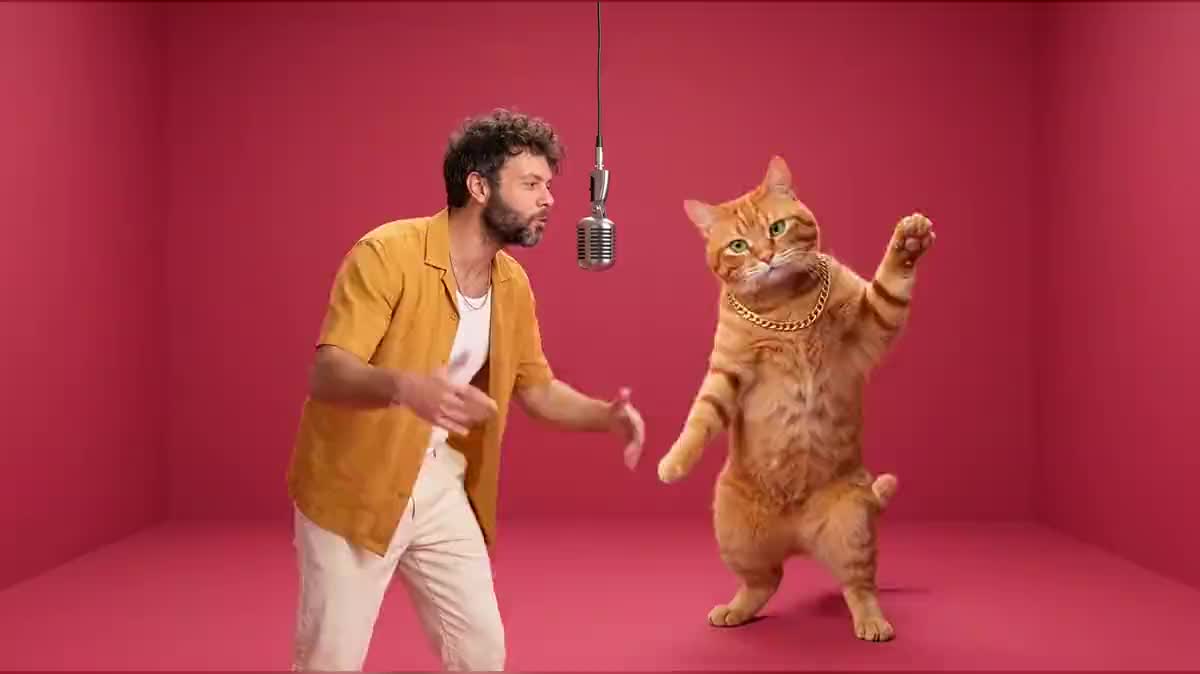
Your photo and your cat's become a trap session: you rap at the hanging mic, your giant cat dances and raps its line in English. See the workflow here, no account needed.
Real workflow: a photo of Frank and one of a ginger cat go into the same image, a raspberry pink studio with a hanging mic, then ten seconds of Wan 3.0 with sound: a trap beat, Frank raps, the giant cat dances and raps its line in English.
At a glance
The format is everywhere right now: a live session filmed against a wall of one single colour, a microphone hanging from the ceiling, and next to the rapper a cat as tall as they are, dancing and grabbing the mic. This workflow recreates it with you and your cat, from two photos.
The hard part is keeping both: your face and your cat's coat. So both photos go into the same image, which composes the scene in one go; the video then starts from that image without redrawing anything, and adds the beat and the voices.
Wan 3.0 renders the movement, the trap beat and both voices in a single pass, in English, lips and mouth in sync with the lyrics you write. The image and ten seconds of video cost one hundred and thirty-nine credits.
These are the files of the workflow above, exactly as the models produced them, unretouched. The starting point is shown when there is one.
Starting point
Render
Cat owners who post on TikTok and Instagram, creators who follow trends, musicians who want an offbeat teaser, shelters and pet brands.
A photo of you with a sharp face, and a photo of your cat from the front in daylight, plus one line of rap in English for each.
Give two sharp photos
A portrait of you, face well lit, and a photo of your cat showing its coat and eyes. A cat curled up in the shade gives a giant that does not look like it.
Pick the wall colour
One saturated colour, wall and floor blended together: raspberry pink here, but orange, mint green or royal blue work too. That plain background is what makes the format recognisable at first glance.
Check the image before the video
Your face, the cat's stripes, its size next to you: everything is judged on the image, which costs nineteen credits. A video run on a failed image costs one hundred and twenty more.
Write your two lines
One line for you, one for the cat, in English between quotes, like the clips going around. The model raps them in order, and the cat grabs the mic with a real rapper's voice.
The same canvas, tuned for different needs: each variation is two or three lines of prompt away.
Your cat asleep on the sofa, then "meanwhile in her head" and the trap session: both shots edited back to back give exactly the format going around on TikTok and Instagram.
A friend's photo and their cat's, their name in a line of rap: ten seconds of duet that land better than a card, and get shared in the group chat.
An artist releasing a track can shoot an offbeat teaser with their cat, writing the real line of the chorus: the video catches the eye and points to the full song.
A volunteer at the mic and the cat up for adoption dancing beside them as a giant: the video carries the cat's name in the lyrics and travels far better than an adoption listing.
A pet food maker or a scratching post shop stages a customer's cat with their consent, and the video becomes an ad that does not look like an ad.
Same duet, three wall colours and three tracks: three videos that follow each other on your account like episodes of a series, with the same recognisable cat every time.
As soon as the prompt describes a face, the model redraws it instead of keeping the one in the photo. Describe your outfit and your gesture, never your features.
A cat far away, in the shade or curled up leaves the model guessing its coat: the giant looks like a cat, not like yours. Take it from the front, in daylight.
Without the sentence that forbids it, the cat falls back to meowing instead of rapping. Keep "never meowing" and "real human rapper voice" in the video prompt.
The video starts from the image as it is: a cat that is too small or a badly placed mic stay there for ten seconds. Rerun the image, it is six times cheaper.
The model composes the trap beat and raps the lyrics you write. To lay an existing track under it, edit the video with your track in the Montage node, respecting the rights to the song.
Yes, just replace "cat" with "dog" in both prompts. The giant keeps the coat and head of the animal in the photo, and raps with the same rapper voice.
Because it is the signature of the format: a plain wall, a hanging mic, nothing else. A busy set loses the reference and pulls the eye away from the duet.
One hundred and thirty-nine credits: nineteen for the image on Nano Banana Pro, one hundred and twenty for ten seconds of Wan 3.0 in 720p with sound. A new image alone costs nineteen credits.
Seedance 2.5 refuses a first frame showing a real person, which is the case as soon as you are in the scene. Wan 3.0 accepts it and renders the beat, the voices and the dance in a single pass.
No, that is the example's choice, like the clips going around, and English rap sounds right over a trap beat. Keep the lines short: two clear lines beat a whole verse.
Yes, Wan 3.0 goes up to thirty seconds, at the same price per second. Then write four lines taking turns, so each of you gets a moment at the mic.
Yes, it is your picture, your cat and music composed by the model. Label the content as AI generated when the network asks, as TikTok and Instagram offer to.
Rap a duet with a giant cat using AI
Use this workflowFree account, no card required. The workflow opens pre-filled in your canvas.
 Nano Banana Pro
 Wan 3.0
 Seedance 2.5
 Kling V3