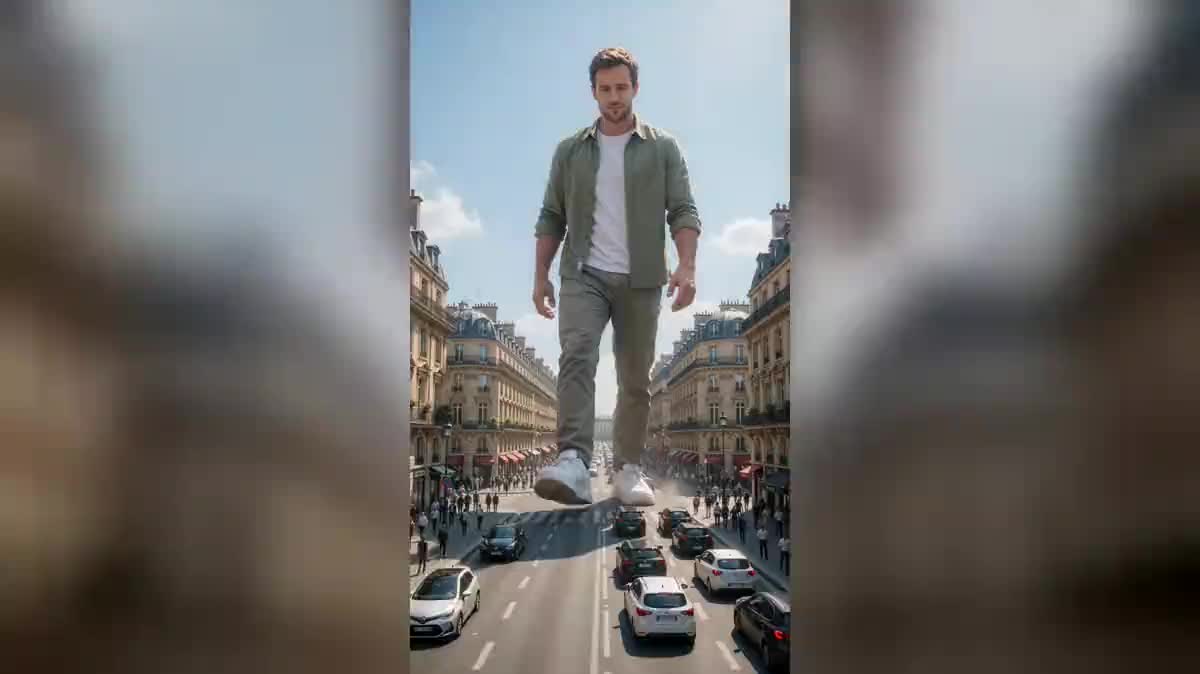
Stepping over the avenue
The reference shot of the genre: cars the size of shoes between your trainers, pedestrians scattering, your head above the rooftops. It is the one that reads the fastest.
Your selfie goes to three Wan 3.0 nodes that make you the size of a building in a real street: you step over the traffic, you sit on a rooftop, you lift a bus between two fingers.
The real workflow: the selfie wired as a reference to three Wan 3.0 Video nodes, one staging per node. The three videos are the demo's own, the same face and the same jacket.
At a glance
One selfie is enough. No shot to film, no green screen, no editing: your photo enters three nodes and you come out at the scale of a building, in the middle of a real street, filmed from the pavement with the camera tilted up.
The three stagings in the demo tell three different size relations: you step over a line of stopped cars, you sit on a Haussmann rooftop as if it were a bench, you lift a whole bus between your thumb and forefinger to look at it.
What makes the effect is not your size, it is the SCALE of the scene. The prompts insist that the cars, the pedestrians and the buses stay real sizes, otherwise the model renders a model village. Wan 3.0 accepts a real face as a reference and keeps it, where other models refuse it or redraw it. The three videos cost one hundred and eighty credits.
These are the files of the workflow above, exactly as the models produced them, unretouched. The starting point is shown when there is one.
Starting point
Render
Give a sharp selfie
Framed at the chest, facing the camera, in daylight, against any background. It is the only thing you are asked for, and it does not need to be beautiful, it needs to be sharp.
Do not describe your face
The prompt points to the reference photo and never describes your features. As soon as a face is described, the model believes it has to rebuild it, and it rebuilds it its own way.
Keep the low angle
The camera at street level, tilted up, is what gives the sense of height. Seen head on at your own eye level, the same picture no longer tells anything.
Generate all three, then change city
"Generate all" outputs the three shots. Then replace the Haussmann facades with your own real city in the prompt, and rerun the node you care about.
The same canvas, tuned for different needs: each variation is two or three lines of prompt away.
The reference shot of the genre: cars the size of shoes between your trainers, pedestrians scattering, your head above the rooftops. It is the one that reads the fastest.
Forearms on your knees, feet hanging in front of the third floor windows. The calm of the pose contrasts with the size, and that contrast is what makes the picture.
A real bus, with its windows and its passengers, tiny in your hand. It is the shot that gives the best measure, because everybody knows how big a bus is.
Replace the Haussmann facades with whatever is typical where you live: brick houses, a market square, a seafront. The effect gains a lot when the set is recognisable.
A giant towering over the city makes an animated poster hook for a concert, a party or an opening. The name and the date go on afterwards in the edit, not in the video.
The same mechanism works in miniature: ask to be ten centimetres tall on a kitchen table, with cutlery at your scale. The consistency lock stays exactly the same.
The model takes what it sees: a dark or shaky face comes out dark or approximate on all three shots. A sharp daylight photo changes the whole result.
As soon as you write the colour of the eyes or the shape of the nose, the model rebuilds a face instead of reusing yours. The prompt speaks of the set, the photo speaks of you.
Without the sentence that demands real cars and real pedestrians, the model builds a model village where everything is small, and you no longer look big, you look normal inside a train set.
Seen head on at face level, a giant looks like a portrait. It is the low angle from the street that builds the height, and the prompt has to say so.
No, the street is described in the prompt and built by the model. If you want your exact street, describe it precisely or go through the AI meme video, which starts from a photo of your street.
On the three shots of the demo, yes: it is the same face and the same jacket as at the start. The likeness holds better in a wide shot than in a very tight close-up, which suits a giant.
The node accepts up to ten reference images, so yes, add a second selfie and name both people in the prompt. Expect more attempts before the two faces hold together.
One hundred and eighty credits, sixty per five second video in 720p with sound. Rerunning a single shot after changing the city costs only sixty credits.
Yes, the Edit node assembles the three in the browser, with no software and no extra credit. Fifteen seconds of giant make a complete video.
The images can, under the conditions explained by the guide on the rights on AI images. Watch out though for the brands the model invents on the buses and the shopfronts.
Because there is nothing to film: the scene does not exist. So the node has no starting shot, it is the model that composes the frame around your photo.
Vertical 9:16 in 720p, the native format of social media. The node also offers 16:9 if the video is going to YouTube.
Become a giant in your city with AI
Use this workflowFree account, no card required. The workflow opens pre-filled in your canvas.
 Wan 3.0
 Seedance 2.0
 Kling V3