The first bookshop signing
A self-published author lands an afternoon at her local bookshop. She brings the cream poster printed three times: one for the window, one for the till, one for the shelf.
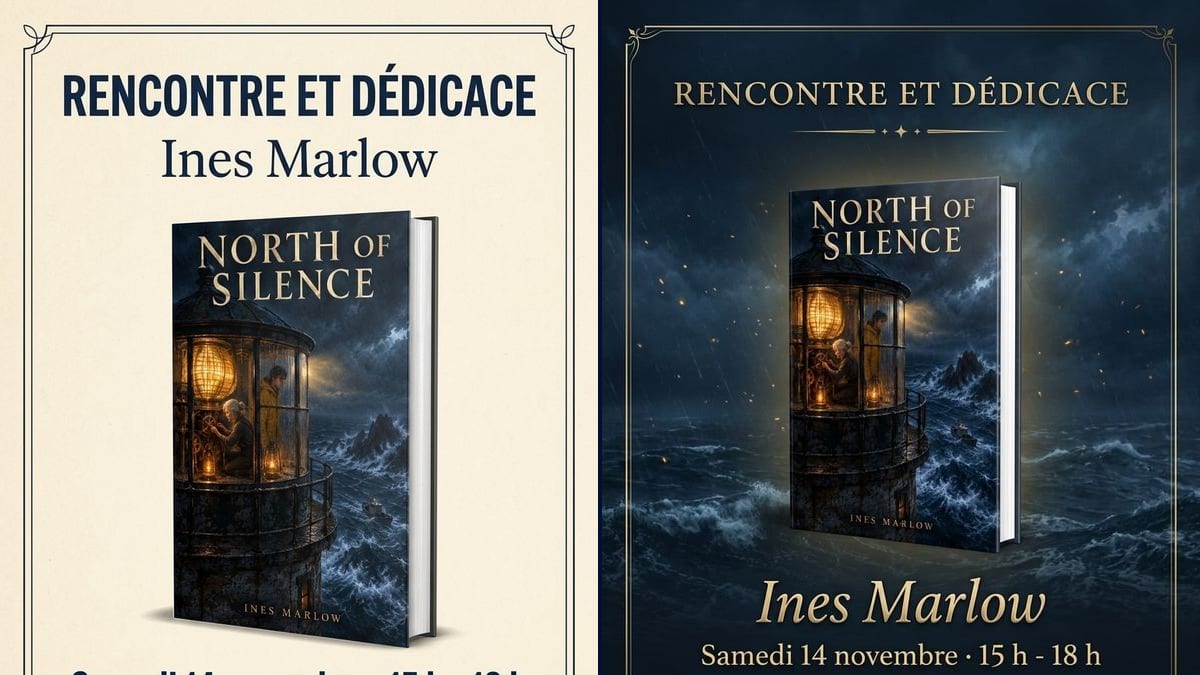
Two signing posters with your book in the middle, a cream one for the window and a navy and gold one, date, times and bookshop written letter for letter. Workflow visible here, no account needed.
Real workflow: the cover of the made-up novel "North of Silence", then a framed cream poster with the book standing in the middle and dark blue French text, and a navy poster over the stormy sea with gold text.
At a glance
The bookshop said yes to a signing, and you have three weeks to get people through the door. Booksellers rarely have time to make a poster, and the one you knock up yourself tends to show a squashed cover under a heading in a default font. This workflow puts YOUR book in the middle of two A4 posters, a light one for the window and a dark one in the mood of the cover.
The hard part is keeping the book recognisable and the text right. A model left alone draws a different book or adds words. The prompt asks for the exact cover and quotes the title, date, time and venue. Nano Banana 2.1 puts the cover you supply on a 3D book and spells accented capitals correctly.
For something to hand out at the table, see the bookmarks; to announce the event on video, the book trailer. Both posters cost fourteen credits.
These are the files of the workflow above, exactly as the models produced them, unretouched. The starting point is shown when there is one.
Starting point
Render
Self-published and traditionally published authors preparing a signing, booksellers, libraries, book fair organisers.
The front cover, and the four lines in quotes: type of event, author name, date and times, bookshop and town.
Upload the cover
The final front, title included. That's what appears on the book in the middle of the poster.
Write the four lines
The type of event, your name, the day and times, the bookshop and town. Each one in quotes, in the order you want.
Check the date
Weekday and date have to match on this year's calendar. The model writes what you give it.
Send it to the bookseller
A4 for the window and the till, and the same image on your socials and the shop's, two to three weeks ahead.
The same canvas, tuned for different needs: each variation is two or three lines of prompt away.
A self-published author lands an afternoon at her local bookshop. She brings the cream poster printed three times: one for the window, one for the till, one for the shelf.
A novelist has a stand at the fair and signs on Saturday afternoon. The night version, with the stand number in place of the bookshop, goes on his socials the week before.
A librarian is organising a reading followed by a signing. She replaces the bookshop line with the library's name, adds the time of the reading, and prints a few copies for the noticeboard.
The author visits four bookshops in a month. Same prompt, one poster per stop: only the date and the address change, and the book looks identical on each one, so readers recognise it.
The bookseller is hosting the author in a fortnight and has no designer. He uploads the book's cover and has the poster the same day for the window and the shop newsletter.
For a virtual event with readers from several countries, the night version becomes the event image, with "Live" and the sign-up link in the venue line instead of a bookshop.
Saturday 14 November is right in 2026 and wrong in 2027. The model copies without checking: confirm the weekday on the calendar before you render.
The bookshop name without the town, and the poster is useless on social media, where readers come from everywhere. Put the shop and the town on the same line.
Blurb, price, press quote, shop opening hours: the poster gets hard to read from a distance. Four lines, the book in the middle, the rest in the post that goes with it.
A poster that goes up the day before only brings in regulars. Give it to the bookseller two to three weeks ahead, and post a reminder the day before.
In the demo, yes: the French heading, the name, the date and the bookshop are exact on both posters, accented É and middle dot included.
In the demo, the cover is faithful: lighthouse, characters, title and name. The 3D book itself is made up: on the bookshop version it's as thick as a hardback rather than a paperback.
Not in this workflow, which only reads the cover. Add the logo afterwards in layout software, at the bottom of the poster where there's room.
Fourteen credits, seven per render on Nano Banana 2.1. A poster for another stop on the tour costs seven more.
Because it carries the cover you supply onto a 3D book instead of inventing one, and it spells accented capitals correctly. In the demo, there isn't a single mistake on either poster.
The render comes out at 3:4, 896 x 1200 pixels, a little wider than A4. Print on A4 with a margin top and bottom, after a pass through the Enhance node.
Yes: ask for 4:5 or 1:1 in the prompt, or crop the poster around the book and the first two lines.
No: the bookshop, Ines Marlow and "North of Silence" were made up for the demo. Replace every line with your real event.
Make a book signing poster with AI
Use this workflowFree account, no card required. The workflow opens pre-filled in your canvas.
 Nano Banana 2.1
 Flux Kontext
 GPT Image 2.5 Sunburst