The book fair
A self-published novelist has a stand for the first time. He puts a stack of lighthouse bookmarks next to his books, and visitors leave with the title and his name even if they don't buy that day.
Two sheets of three bookmarks for your novel, a stormy lighthouse and a quote on cream paper, title and name written letter for letter. Workflow visible here, no account needed.
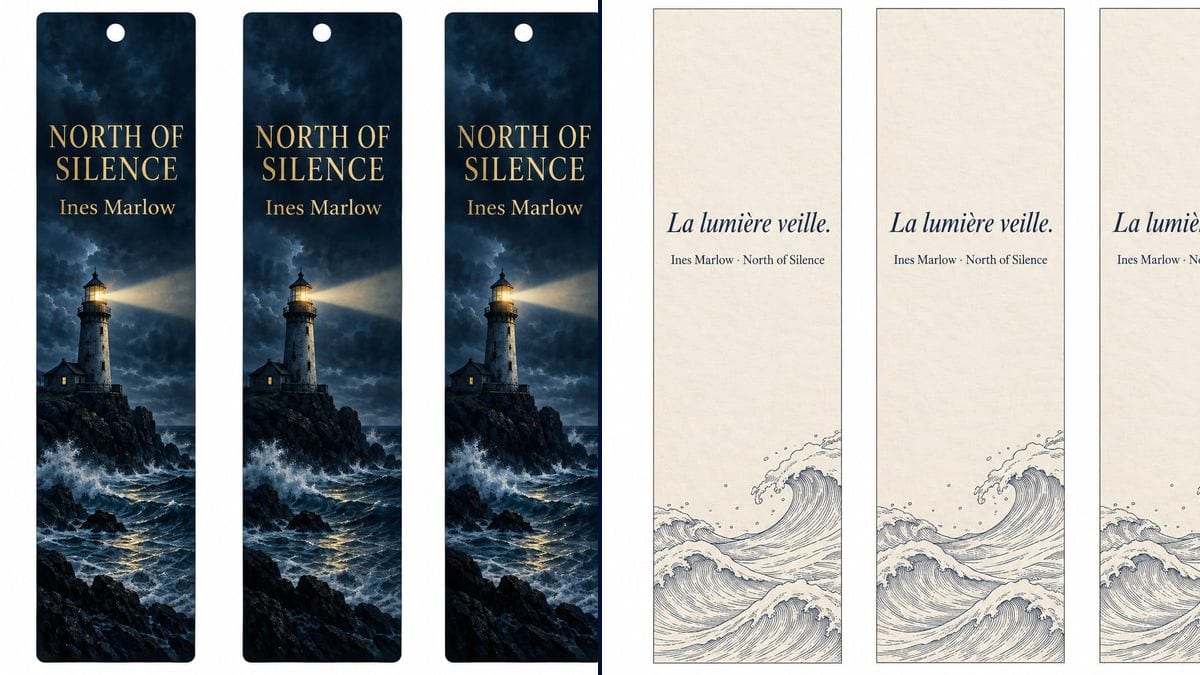
Real workflow: three dark blue bookmarks with a lighthouse, its beam and the gold title "NORTH OF SILENCE", then three cream bookmarks with an italic French quote and engraved waves along the bottom.
At a glance
At a book fair or a signing, the bookmark is what people take home when they aren't buying yet. Most authors throw one together by squashing the cover into a 2-inch strip. This workflow gives you two sheets of three bookmarks designed for that shape: dark artwork with the title, and a quote on cream paper.
The hard part is the narrow format and the text. A tall thin strip leaves little room, and a model left alone widens the bookmark, varies the three copies or adds a word. The prompt fixes the shape and count and quotes every line. Sunburst spells it right for three credits a sheet.
For the event where you'll hand them out, see the book signing poster; to mark your own books, the bookplate. Both sheets cost six credits.
These are the files of the workflow above, exactly as the models produced them, unretouched. The starting point is shown when there is one.
Render
Novelists and self-published authors preparing a book fair, a signing or crowdfunding rewards, booksellers, book clubs.
Two lines of text in quotes, title and name or a quote and its source, and the motif you want with its colours.
Pick the text
Title and your name, or a line from the book and its source. Two lines at most: the strip is about two fingers wide.
Describe the motif
Something from your cover or your world: lighthouse, forest, key, silhouette. This template doesn't read your cover, so describe it with its colours.
Keep the white background
Three bookmarks side by side on white is what lets you cut cleanly. Ask for a hole if you're adding a tassel or ribbon.
Upscale, then print
Run the sheet through the Enhance node, print on heavy card, around 300 gsm, and cut with a ruler or a guillotine.
The same canvas, tuned for different needs: each variation is two or three lines of prompt away.
A self-published novelist has a stand for the first time. He puts a stack of lighthouse bookmarks next to his books, and visitors leave with the title and his name even if they don't buy that day.
An author ships her signed copies herself. She slips a quote bookmark into each parcel, a small touch that makes readers want to post a photo of the package.
For the fifteen-pound tier, the author promises the book and an exclusive bookmark. The quote version, with a line that only appears in the book, turns it into something special.
Before the signing, the bookseller keeps bookmarks at the till for two weeks. Every customer leaves with the title, and the event date can go on the back.
A host is preparing the meeting on a novel. She prints the quote sheet with a line chosen by the group, and every reader keeps one in their own copy of the book.
Each volume gets its bookmark, same layout, different motif and colour. Readers collect them, and the whole series stands out at a glance on a crowded book fair table.
A portrait cover shrunk to a narrow strip becomes unreadable. Keep one motif and two lines of text, designed for the bookmark's shape.
Blurb, website, socials, price: the strip overflows and the model shrinks everything. Two lines on the front, the rest on the back or behind a QR code.
Text that nearly touches the edges gets clipped by the guillotine, as the demo quote could be. Ask for an inner margin, or cut a little wider.
An 80 gsm bookmark folds in the first book it marks. Print on heavy card or hand the sheet to a printer, asking for a file with bleed.
In the demo, yes: "NORTH OF SILENCE", "Ines Marlow" and the French quote are exact on all six bookmarks, accent and middle dot included.
Not with this template, which starts from a blank page and draws its own motif. To reuse the exact artwork, start from your cover in an image node that takes an input image, such as Nano Banana 2.1.
Yes: make a second sheet with a short blurb, your website or a QR code added later in your layout software, and print double-sided with the strips lined up.
Six credits, three per sheet on GPT Image 2.5 Sunburst at medium quality. A third sheet, for another volume or another quote, costs three more.
Because it spells correctly, accents and punctuation included, and it's the cheapest model in the catalogue. In the demo it also holds gold type on a dark background and repeats the same bookmark three times without drifting.
The usual size is around 2 x 6 to 2 x 8 inches. The demo strips have those proportions; measure them when printing and adjust the scale before cutting.
For home printing, after the Enhance node, yes. A print shop often prefers one file per bookmark with bleed: cut the sheet up and give them each strip.
Yes, for your own book with your own text. A quote from another author needs their permission; see the rules on commercial use.
Design custom bookmarks for your book with AI
Use this workflowFree account, no card required. The workflow opens pre-filled in your canvas.
 GPT Image 2.5 Sunburst
 Nano Banana 2.1
 Recraft V4.1