Make a custom wine bottle label with AI

A wine bottle label to print for a gift, with your names and your date. A wedding anniversary version on cream paper, a midnight blue and gold Christmas cuvée. Workflow visible here, no account needed.

Make a custom wine bottle label with AIInteractive demo

Real workflow, real results. Pan and zoom freely.

Use this workflow

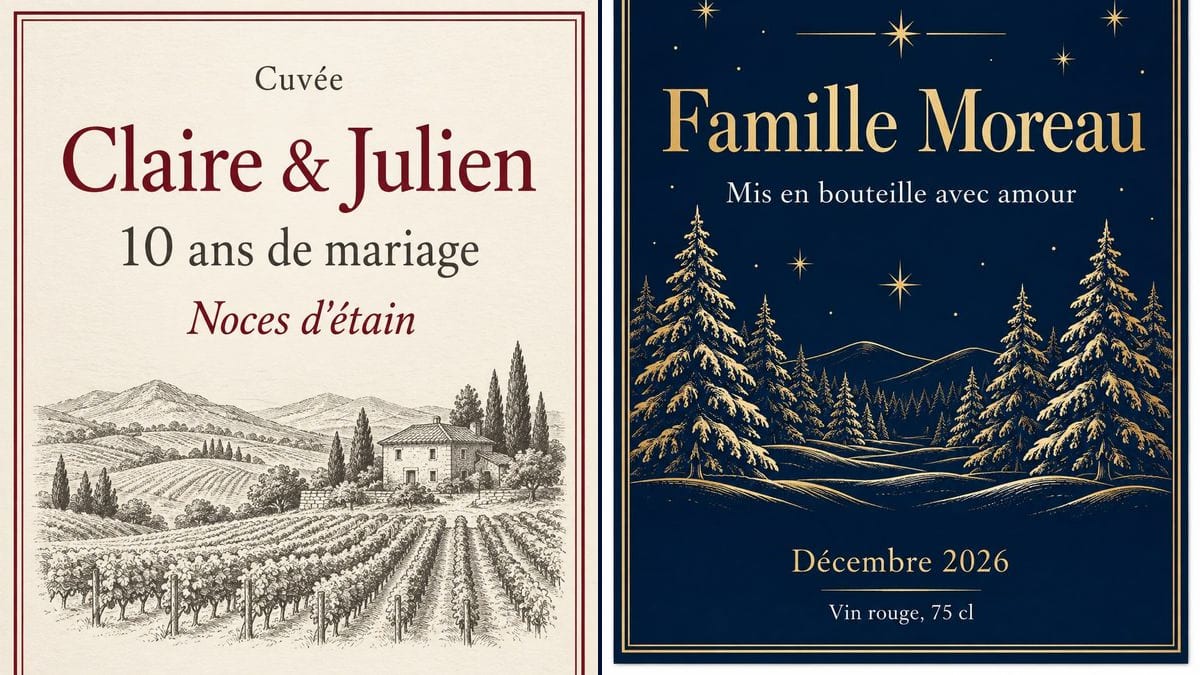
Real workflow (demo in French): a cream label with a double burgundy border, "Cuvée" then "Claire & Julien" in large type, "10 ans de mariage" (10 years married), "Noces d'étain" (tin anniversary) in italics, an engraved vineyard with a stone house and cypress trees the prompt didn't ask for, "Millésime 2016" at the bottom, then a midnight blue label, "Cuvée de Noël" and "Famille Moreau" in gold, snowy firs and stars in gold line art. The Christmas one sits on a white background with a shadow: crop it before printing.

At a glance

You provide
a text or a brief
What the workflow produces
2 images in 3:4
Canvas structure
5 nodes wired by 2 connections
Models wired in
GPT Image 2.5 Sunburst
Cost of one full run
about 6 credits, roughly $0.07
Account
The demo is visible without an account; generating requires a free account, trial credits included

A bottle of wine is what people bring when they can't think of anything else. Put the couple's names and the year they married on the label and it's a gift made for them. This workflow gives you two portrait labels to print at 9 x 12 cm on adhesive paper and stick on a bottle you bought: one for a tenth wedding anniversary, on cream paper with an engraved vineyard, and a Christmas cuvée in the family's name, midnight blue and gold.

You write every line in quotation marks in the prompt, and the model copies it letter for letter: the names, the occasion, the year. GPT Image 2.5 Sunburst got all eleven lines on the two labels right on the first try, accents included. With the decoration it took a few liberties: cypress trees in the vineyard, extra gold rules on the Christmas label. The demo is in French: replace the lines with your own, in your language. The label is for giving, not selling: it doesn't carry the information a wine on sale must have.

If you make and sell, see the product label; for jars from the kitchen, the jam labels; for parcels under the tree, the Christmas gift tags. The bottle ends up on a festive table: the Christmas menu and the wedding menu print the same way. Both labels cost six credits.

Actual renders from the demo

These are the files of the workflow above, exactly as the models produced them, unretouched. The starting point is shown when there is one.

Render

A wine label on textured cream paper inside a double burgundy border, "Cuvée" in small type, "Claire & Julien" in large burgundy serif lettering, "10 ans de mariage" (10 years married) in dark grey, "Noces d'étain" (tin anniversary) in burgundy italics, a line engraving of a vineyard on hills with a stone house, and cypress trees the prompt didn't ask for, which give it a Tuscan look, then "Millésime 2016" and "Vin rouge, 75 cl" at the bottom; every line exact on the first try, with a curly apostrophe in "d'étain", at 1086 x 1448 pixels, about 300 dpi at 9 x 12 cmGenerated with GPT Image 2.5 Sunburst
A midnight blue wine label inside a double gold border, "Cuvée de Noël" (Christmas cuvée) in gold, an added star between two lines under the title, "Famille Moreau" in large gold lettering, "Mis en bouteille avec amour" (bottled with love) in white, a snowy fir forest and stars in gold line art, "Décembre 2026" with an added line under it and "Vin rouge, 75 cl" in white; every line exact on the first try, but the label is shown as a card on a white background with a faint shadow, to crop before printing, at 1086 x 1448 pixelsGenerated with GPT Image 2.5 Sunburst

Who it is for

People giving a bottle for a wedding anniversary, a family Christmas, a birth or a leaving do, who want a label printed at home in the recipients' names to stick on a bottle they bought.

Which files to provide

The lines of the label, each in quotation marks and in order: heading word, names or family name, occasion, year or date, type of wine and volume. No photo.

How it works

  1. 1

    Pick the style of label

    The anniversary version looks like the classic label of a fine wine: cream paper, an engraved vineyard, burgundy lettering. It suits an anniversary, a wedding, a leaving do. The Christmas version, midnight blue and gold, goes with an end-of-year gift or a bottle you bring to the family meal.

  2. 2

    Write your lines in quotation marks

    Replace the names, the occasion and the year with yours, each in quotation marks, in order from top to bottom. Change "Vin rouge, 75 cl" too if the bottle is a white or a magnum. Keep "No other words, no address, no alcohol percentage" at the end.

  3. 3

    Check every letter on the render

    Compare each line with the prompt, accents and ampersand included. If a name comes out warped, rerun the node for three credits. In the demo, neither label needed a second try.

  4. 4

    Print at 9 x 12 cm and stick it on

    Print at actual size, with no fit to page, on matte or laid adhesive paper. Let the ink dry for a few minutes, cut it out, then stick the label over the original one or next to it, smoothing from the centre outwards.

Variations and use cases

The same canvas, tuned for different needs: each variation is two or three lines of prompt away.

A champagne label for a wedding or a leaving do

Keep the anniversary layout and change the lines: "Champagne", the couple's names and the date, or a colleague's name and "Happy Retirement". Swap the vineyard for glasses and bubbles in line art. Check the shape of the bottle before printing. Not tested here.

Home-brewed beer or homemade apple juice

The same prompt works for a beer brewed at home or apple juice from the family orchard: "House Ale", "Garden Apple Juice", the family name and the year. Change the engraving to hops, an apple tree or a barn. Not tested here.

A corporate gift in a client's name

For a bottle you give a client at the end of the year, put their name or their company's in large type with a short line under it, such as "Thank you for this year". One rerun per client, three credits each. Skip logos: the prompt forbids them, and a redrawn logo rarely comes out right. Not tested here.

A birth: "born in 2026"

A cuvée to celebrate a baby, to open on their eighteenth birthday or to give to the grandparents: the first name in large type, "born in 2026", and the date of birth at the bottom. Ask for a soft design, pastel tones, a small star. Not tested here.

A set of labels for the tables at a wedding

One bottle per table, each with its table name and the couple's names: "The Vineyard Table", "The Cypress Table". Keep the same design and change just one line each time you rerun, so the set stays consistent. Three credits per label. Not tested here.

A white or rosé version

On a bottle of white, the demo's burgundy clashes a little. Ask for a sage green or gold border and an engraving of pale grapes, and write "White wine, 75 cl" or "Rosé, 75 cl" in place of "Vin rouge, 75 cl". Not tested here.

Common mistakes

Printing without checking every letter

A name with an extra letter on a bottle you're giving is the first thing the person notices. Read every line on the render before printing, especially unusual names, hyphens, accents and the ampersand.

Printing with "fit to page"

The print dialog often offers to scale the image to the page: the label comes out A4 size and no longer fits the bottle. Pick "actual size" or 100% in the print window, and check with a ruler: 9 cm wide, 12 cm tall.

Sticking it on before the ink is dry

On adhesive paper, inkjet ink stays wet for a while. If you cut and smooth it straight away, your finger smears the thin lettering. Give it a few minutes, then handle the label by its edges.

Forgetting the ice bucket

Champagne or white wine often goes in an ice bucket, and ordinary paper cockles and peels off in the water. For those bottles, use a water-resistant adhesive paper or spray a varnish over the printed label before you stick it on.

Leaving "Vin rouge, 75 cl" on the wrong bottle

The demo's last line describes a red in a 75 cl bottle. On a white, a champagne or a 150 cl magnum, it's wrong. Fix it in the prompt, or drop it if you stick the label next to the original, which already gives the volume.

Frequently asked questions

Are the names and the year spelled correctly?

Yes, on both labels, first time: "Claire & Julien", "10 ans de mariage", "Noces d'étain", "Millésime 2016", "Cuvée de Noël", "Famille Moreau" and "Décembre 2026" are all right, accents included. The one difference: the apostrophe in "d'étain" is curly where the prompt had a straight one. Always read it through before you print.

Can I sell a wine with this label?

No. Wine that's put on sale has to carry mandatory information, including alcohol content, volume, allergens such as sulphites and the pregnancy warning pictogram, and the demo has only part of it. This label is for giving a bottle you bought. For a product you sell, see the product label and check the rules where you sell.

How is this different from the Christmas gift tags?

The gift tags are small sheets to cut out, with "To" and "From", that you tie to the ribbon on a parcel. The wine label is one large 9 x 12 cm label, stuck on the bottle, that covers or sits beside the winemaker's own.

What size should I print the label?

At 9 x 12 cm, about 3.5 x 4.7 inches, the size the prompt asks for. The renders are 1086 x 1448 pixels, a 3:4 ratio, which works out at about 300 dots per inch at that size: print shop sharpness, and the small "Vin rouge, 75 cl" line stays crisp. Still measure the straight part of your bottle before you print.

What paper should I use for a bottle label?

Adhesive paper in A4 or letter sheets, matte or laid for the look of a wine label. Check it suits your printer, inkjet or laser. If the bottle is going in an ice bucket, pick a water-resistant version or varnish the label.

Should I cover the original label?

It's up to you. Stuck over it, yours takes all the space; stuck beside it or on the back, it leaves the winemaker's information visible, which is easier if the bottle is going to be served to guests. The same label works both ways.

How much does a custom wine label cost?

Three credits per render on GPT Image 2.5 Sunburst at medium quality, six for the two demo labels. Another try costs three credits. Once you're happy with the render, print it as many times as you like: twenty identical bottles still cost three credits.

Why is the Christmas label sitting on a white background?

The prompt asked for the flat label on a plain white background, and Sunburst drew it as a card lying on it, with a faint shadow. The anniversary label fills the whole frame. For the Christmas one, crop the render right at the gold border before printing if you want a clean cut.

Can I write the label in English or another language?

Yes. The demo is in French: write the quoted lines in your language, for example "Happy Anniversary" or "Merry Christmas from the Smiths", and keep the rest of the prompt. Only French was tested in the demo, so read every word.
Make a custom wine bottle label with AI

Use this workflow

Free account, no card required. The workflow opens pre-filled in your canvas.