The short film's opening shot
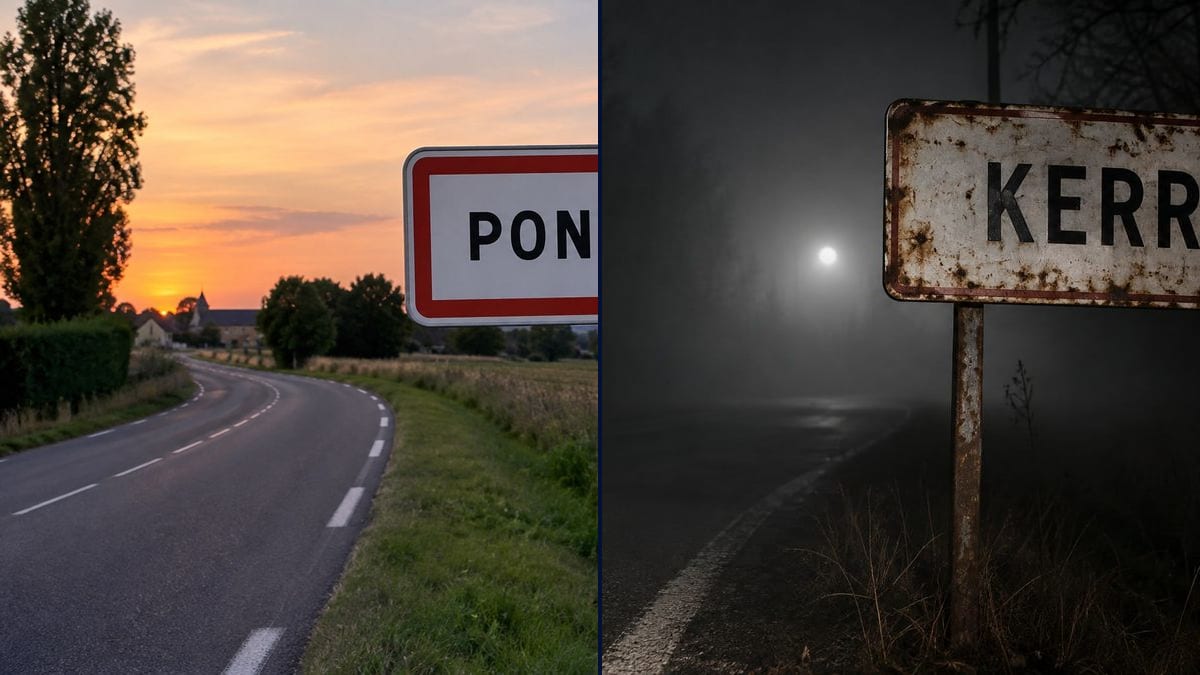
"Le Dernier Train" opens with a car arriving in Pontcarré. The director has no budget to build a sign and no road to close: the dusk photo of the sign becomes the first shot, animated afterwards.
Your film's town name on a town entrance sign, new at dusk or rusted in the fog, written letter for letter. Workflow visible here, no account needed.
Real workflow: a white "PONTCARRÉ" sign with a red border by a winding country road, an orange sunset and a church tower in the distance, then a rusty "KERREC" sign on two posts, at night, in the fog.
At a glance
The invented town in your script has to exist on screen, and the simplest shot to establish it is the sign at the edge of the road. On a real shoot you have to build it and get permission to put it up; in an AI film or a teaser you need an image that holds. This workflow gives you two town entrance signs: a new one at dusk on a country road, and a rusty one in the fog for a horror film.
The hard part is the text and the number of signs. A model left alone adds a second one, and that's where it misspells. The prompt describes the sign, quotes the name and bans any other sign. Sunburst writes the name right, accent included, for three credits a photo.
To turn the town's main street into a period set, see location to period set; to choose your locations, location scouting. Both signs cost six credits.
These are the files of the workflow above, exactly as the models produced them, unretouched. The starting point is shown when there is one.
Render
Directors, production designers, props teams, AI filmmakers, authors giving their invented town a face.
The town name in quotes, the condition of the sign, the road and the time of day you want.
Invent the town name
A name that sounds right for the region of your story. Look it up on a map: in the demo, Pontcarré turned out to be a real place.
Choose the sign's condition
Clean and new for a comedy or a drama, peeling and rusty for horror, snowed over or covered in stickers for another mood.
Describe the road and the hour
Country road, bend, fields, forest, time of day. That's what makes the establishing shot, as much as the name.
Ban the other signs
Write "no other signs, no other words". Without it, the model adds a welcome sign or a speed limit, often misspelled.
The same canvas, tuned for different needs: each variation is two or three lines of prompt away.
"Le Dernier Train" opens with a car arriving in Pontcarré. The director has no budget to build a sign and no road to close: the dusk photo of the sign becomes the first shot, animated afterwards.
The story takes place in an abandoned village. The rusty KERREC sign in the fog sets the mood in a single image, before the first character even steps into frame.
The designer has to have a real metal sign made for the set. She sends the image to the sign maker as a reference for colour, lettering and ageing, then signs off on the sign before the shoot.
His series is set in an invented town he shows often. He keeps the sign as a reference image, and each episode opens on the same name, filmed at a different time of day.
A self-published author shares the town from her book series on social media. The dusk entrance sign becomes the recurring visual that announces each new volume.
A band is shooting a video on an empty road at night. The rusty sign bearing an invented town from the lyrics comes back as a marker between the verses.
An invented town named after a real one, and viewers go looking on the map. Check the name before you print: the demo fell into that trap with Pontcarré.
Every extra sign is extra text, and it's usually the one that comes out wrong. One sign, one name, everything else banned.
Without "clear black capital letters", the wear can make the name unreadable. Ask for rust on the background and the edges, not on the letters.
A twenty-letter name in capitals ends up tiny on the sign. Go for a short name, or a two-part one the model can split over two lines.
In the demo, yes: PONTCARRÉ with its accent and KERREC are exact. A first try at the rusty version added a second, misspelled sign, hence the current prompt.
Not without permission: a fake sign on a road open to traffic misleads drivers. For a shoot, talk to the local council and whoever manages the road.
Yes: ask for the name crossed by a red diagonal bar, as on French exit signs, and keep "no other words".
Six credits, three per photo on GPT Image 2.5 Sunburst at medium quality. One more version, under snow for instance, costs three more.
Because it spells correctly, accents included, and it's the cheapest model in the catalogue. The white sign suits it well, and the night version stayed readable.
3:2 landscape, 1536 x 1024 pixels. Crop to 16:9 for a film shot; the sign stays in frame.
Yes: send the image to a video node with a car driving past or the fog drifting. The name, written by Sunburst, stays the one in the starting image.
Yes: describe the local design, for example the yellow sign with black letters used for German towns, and keep the name in quotes and "no other signs".
Make a fictional town sign with AI
Use this workflowFree account, no card required. The workflow opens pre-filled in your canvas.
 GPT Image 2.5 Sunburst
 Nano Banana 2.1
 Recraft V4.1