The apartment thriller
A director shoots a crime short on a tight budget. The detective's screen shows the missing man's file in close-up, and the props person just plays the image full screen on an old laptop.
Two fictional 16:9 screens for your insert shots, a police database and a spaceship dashboard, every field written letter for letter. Workflow visible here, no account needed.
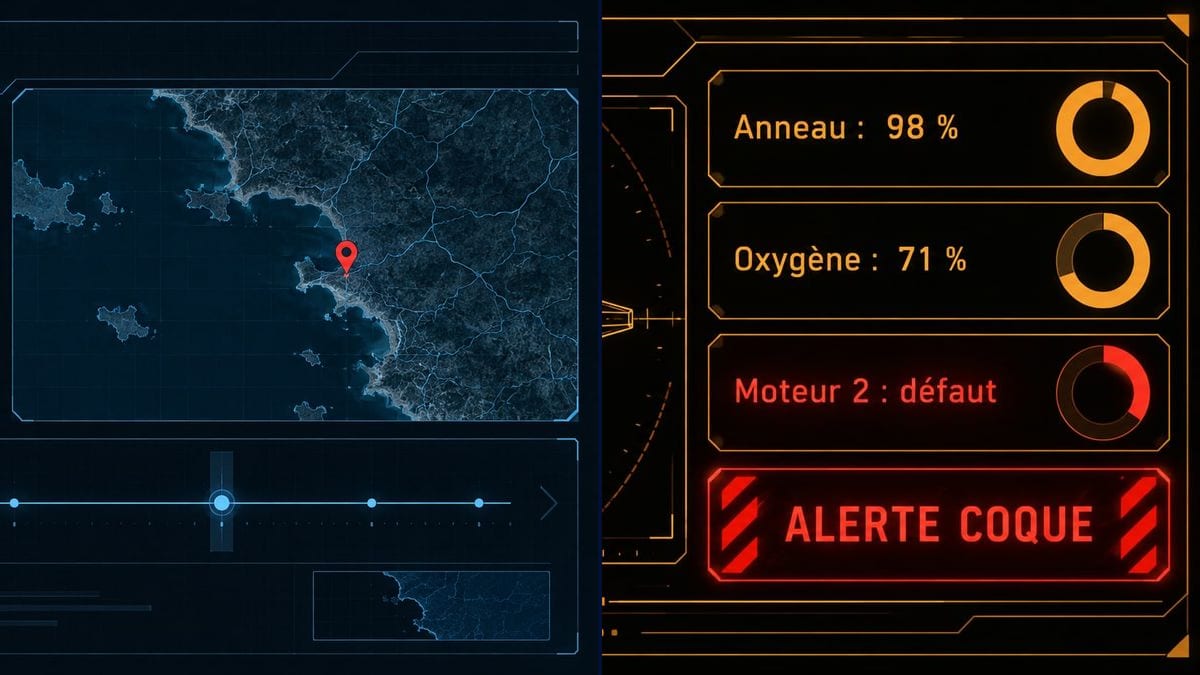
Real workflow: the midnight blue screen "ARCHIVES · ENQUÊTE 0412" with Jonas Marlow's file, a silhouette, a coastline map pinned at Kerrec and a timeline, then the amber screen "ARGO-7 · SYSTÈMES" with a ring-shaped ship diagram and the hull alert in red. Both are in French.
At a glance
In a thriller, the shot of the computer screen often carries the key information of the scene: a name, a place, a status. Shooting real software is a headache, with its logos, menus and update pop-ups, and the art department doesn't always have a graphic designer to build an interface. This workflow gives you two fictional 16:9 screens: a police database and a spaceship dashboard.
The hard part is the text. The audience reads the screen in two seconds and has to find exactly what the script calls for, with no gibberish around it. The prompt gives each field in quotes and bans any other word and any real logo. Sunburst writes those lines letter for letter, even on a dark background.
For the objects on the desk, see the prop sheet; for the fictional brand that shows up on the boot screen, the fictional company logo. Both screens cost six credits.
These are the files of the workflow above, exactly as the models produced them, unretouched. The starting point is shown when there is one.
Render
Props teams, production designers, on-set graphic designers, short film directors and AI filmmakers with a screen insert to shoot.
The fields the audience has to read, in quotes, the type of interface and its colour.
List what the audience reads
The fields that serve the story, five or six at most: a name, a place, a status, an alert. Each one in quotes.
Describe the rest as shapes
Map, timeline, gauges, charts: visual elements with no text. That is what makes it look like real software without adding words.
Pick the colour of your world
Cold blue for the police, amber for an old ship, green for a vintage terminal. Keep the same colour on every screen in the film.
Play back or comp in
Full screen on a monitor in the set, or composited in post over a green screen. 16:9 matches monitors and TVs.
The same canvas, tuned for different needs: each variation is two or three lines of prompt away.
A director shoots a crime short on a tight budget. The detective's screen shows the missing man's file in close-up, and the props person just plays the image full screen on an old laptop.
A collective builds a cockpit out of painted plywood in a garage. Three amber monitors lit inside the set provide both the light and the information, with the alert that sets up the next scene.
An AI filmmaker needs the same screen in several generated shots. He keeps the interface as a reference image so the screen keeps the same look, and checks the fields shot by shot.
In "LIGNE DE NUIT", Nora Bellanger's fictional series, the database comes back every episode. The production designer only changes the fields from one version to the next, and the screen stays consistent across seasons.
A theatre company projects the computer screen the actors consult onto the back wall. A still with three fields in large type, readable from the back row, covers the whole scene.
A music video shows a character trapped inside an old computer system. A green interface with the song title in one field becomes the opening image and the backdrop on the studio screen.
Without "no other words", the interface fills up with fake text, letters that look like words but aren't. In a close-up it shows immediately.
Ten lines of data and the audience can't find the name that matters. Keep the information the scene needs and leave the rest as shapes.
A window that borrows a well-known system's title bar or a real service's logo draws the eye and raises clearance questions. Ask for an invented interface with no real logos.
A monitor on set turned up too bright blows out on camera. Lower its brightness and set exposure accordingly, or comp the image in post.
In the demo, yes: the five lines on the police screen and the five on the ship screen are exact, French accents included.
Not in this workflow, which outputs a still. For a blinking cursor or a pulsing alert, rebuild the image in motion graphics, layer by layer.
Yes: the image is about 1672 x 940 pixels. On a large screen shot up close, run it through the Enhance node first for extra sharpness.
Six credits, three per screen on GPT Image 2.5 Sunburst at medium quality. A third version, the screen after the discovery for instance, costs three more.
Because it copies the fields letter for letter, accents and spacing included, and it's the cheapest model in the catalogue. It's safest on light backgrounds, but in the demo it handled both dark screens.
Yes: switch the node to a vertical format and describe the app, messages, map or incoming call, with the messages in quotes.
It avoids showing real software or a real logo, which is the whole point of greeking. For distribution, the production checks with its own advisers; see also commercial use rules.
16:9, about 1672 x 940 pixels, the shape of monitors and TVs. For an old 4:3 screen, ask for it in the prompt or crop.
Make a fake screen interface for a film with AI
Use this workflowFree account, no card required. The workflow opens pre-filled in your canvas.
 GPT Image 2.5 Sunburst
 Nano Banana 2.1
 Recraft V4.1