The production designer's budget
She scouts a street for a 1925 scene. The render helps her cost what must be hidden and brought in, vintage cars, painted signs, street lamps, before the budget meeting with production.
Your location photo taken back to the 1920s, then the 1980s: cars, signs and costume changed, same facades, same tower. To budget the art department. Workflow visible here, no account needed.
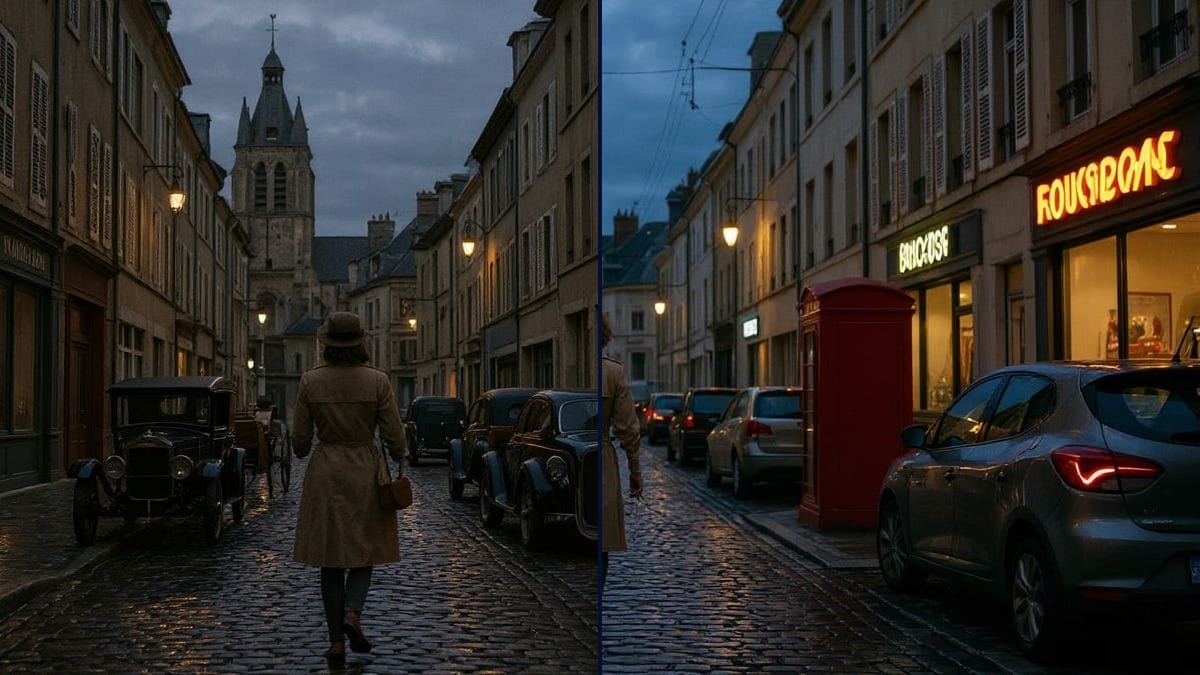
Real workflow: a cobbled street at dusk with modern cars, cables and a church tower, then the same street with black 1920s automobiles and not a cable in sight, and with 1980s cars, neon signs and a red phone box. A recent car stays in the foreground of the 1980s version.
At a glance
A period film is rarely shot on a built set. You find an old street, then count what has to be hidden: cars, signs, cables, road markings, and what has to be brought in. Before committing the art department budget, production wants to see whether the street holds up. This workflow starts from YOUR location photo and shows it to you in the 1920s and in the 1980s.
The hard part is keeping the place. Left alone, a model invents a generic period street that is useless for a recce. The prompt names what goes, what arrives and what stays put, one sentence per change. Flux Kontext edits in place and keeps cobbles, facades and tower, even if it lets anachronisms through and drops things, here the 1920s horse cart.
To find the place first, start with the location scout; to extend the set beyond the street, see the matte painting. Both periods cost twelve credits.
These are the files of the workflow above, exactly as the models produced them, unretouched. The starting point is shown when there is one.
Starting point
Render
Production designers, directors, location managers, producers and AI filmmakers preparing a period shoot on location.
A sharp location still taken from the camera position, the period you want, and the list of what goes and what comes in.
Shoot from the camera position
Stand where the camera will be, at the planned focal length if you can. A sharp location still, no motion blur, in light close to the shoot's.
List what goes
Cars, signs, cables, road signs, recent street furniture: name each one, one sentence per item. Whatever the prompt forgets stays in the picture, like the hatchback in the 1980s version.
Say what comes in
Vehicles, signs, street lamps, the actor's costume. A precise period and a few typical objects beat a vague "1920s style".
Count the anachronisms
Spot what slipped past the prompt on the render. That is also the list of what the art department will have to deal with on the day.
The same canvas, tuned for different needs: each variation is two or three lines of prompt away.
She scouts a street for a 1925 scene. The render helps her cost what must be hidden and brought in, vintage cars, painted signs, street lamps, before the budget meeting with production.
The producer doubts a small-town street can pass for the 1980s. Two images of the real street, transformed, make the discussion concrete and save looking for another location.
A student crew wants to shoot a 1920s scene in their own town. The render shows that framing tight on cobbles and facades, two hired vintage cars are enough.
To get the street closed and residents' cars moved, the location manager attaches the image to the filming permit request. The council sees what the shoot will change.
A creator shoots real plates himself and wants to set them in the 1980s. The render becomes his first frame, which he animates or uses as a reference to keep the same period.
An author sets her crime novel in her home town in 1925. She transforms her street photos for her research notes and for the visuals of her book trailer.
Our first 1920s try kept the cables, which went on the second with a sentence of their own, and the 1980s version keeps a recent hatchback. List everything that gives the period away, signs and street plates included.
Cars, signs, lamps, cart, costume and hair: even in separate sentences, Kontext drops some, here the cart and the long coat. Do a second pass on the render if one element matters.
The signs come out with meaningless letters. For a readable shop name, the art department paints it, or you make it with a text template and composite it.
The render shows intent. What can actually be hidden depends on permits, residents and budget, and gets checked on site with the locations and art teams.
Hardly: cobbles, shuttered facades, tower, sky and framing stay those of the photo in the 1920s version. In the 1980s version the sky darkens a little and the framing shifts slightly, worth checking if the image is a precise reference.
Not always. In the demo, the cables are gone in the 1920s, but a recent car stays in the 1980s foreground. Name what is left in the prompt and run it again, six credits a try.
Yes: the Belle Époque, the war years, the 1960s. Give the typical vehicles, signs and costume, and keep the sentence that locks the street, the tower and the light.
Twelve credits, six per render on Flux Kontext. A third period on the same photo costs six more.
Because it edits the image in place instead of redrawing it: the cobbles, the shuttered facades and the tower stay those of your recce. The trade-off is checking every element removed or added.
16:9, 1392 x 752 pixels in the demo, close to the shooting frame. To project it in a meeting, run it through the Enhance node.
Yes for costume and hair, like the woman in the trench coat in the demo. For a proper outfit test on a specific actor, see the costume board and the casting test.
Yes, as a statement of intent, making clear it is a simulation on a location photo. For commercial use, see the usage rules.
Turn a filming location into a period set with AI
Use this workflowFree account, no card required. The workflow opens pre-filled in your canvas.
 Flux Kontext
 Nano Banana 2.1
 GPT Image 2.5 Sunburst