The low-budget fantasy director
His short takes place below a castle he can't film. He shoots in a real old street and shows his VFX team the concept for the final shot, castle included.
Your shot with the background replaced by a medieval castle on a cliff or by a futuristic tower in the haze, matched in scale and light. Street and actor kept. Workflow visible here, no account needed.
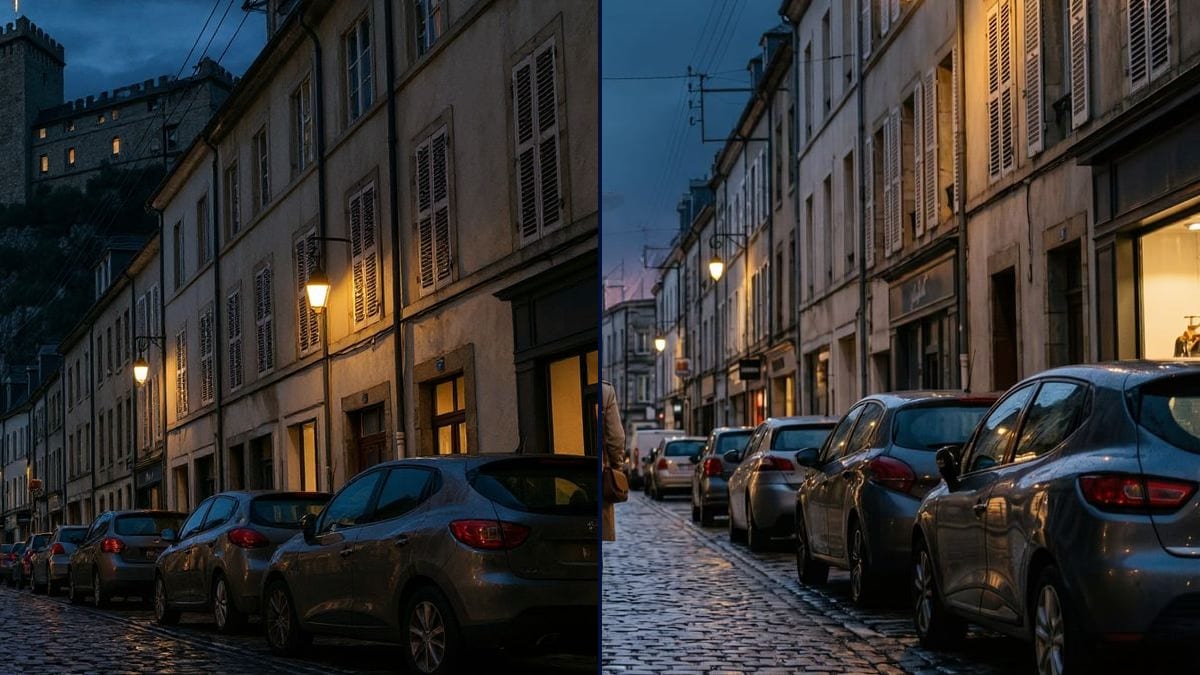
Real workflow: a cobbled street at dusk, a woman in a trench coat from behind and a church tower at the end, then the same street under a lit fortress on a cliff, and with a distant futuristic tower and a glowing hovering disc in the haze where the church tower stood.
At a glance
The set always ends too soon. A village street that should lead to a castle, a science fiction city, a mountain that doesn't exist. In film, that's the matte painter's job: paint what lies beyond the set and blend it into the shot. This workflow starts from YOUR shot and replaces the background two ways, a medieval castle and a futuristic city.
The hard part is scale, and the plate. Our first castle came out tiny, perched on the roofs like a model, and our first futuristic street got redrawn. The prompts now set the castle's size and, for the future, a pixel-identical street. Flux Kontext then replaces only the area you ask for.
To widen the frame at the sides, see the image extender; to change the period of the street itself, the period set. Both backgrounds cost twelve credits.
These are the files of the workflow above, exactly as the models produced them, unretouched. The starting point is shown when there is one.
Starting point
Render
Directors, VFX supervisors, production designers, screenwriters and AI filmmakers who want to extend a set.
A wide shot with a clear background, the area to replace, what to add with its size in the frame, and what must stay identical.
Pick a shot with sky
A wide shot with a clear background: sky, end of the street, horizon. The cleaner and more separate the area to replace, the better the blend holds.
Name what disappears
The tower and the sky, the hill, the building at the back: say exactly which area the matte painting replaces.
Give a size
"Fills the whole upper third", "rises high above the roofs": without a sense of scale, whatever you add comes out small.
Check against the plate
Put the render next to the original shot: street, cars and actor should match. If the street has moved, run it again before signing off.
The same canvas, tuned for different needs: each variation is two or three lines of prompt away.
His short takes place below a castle he can't film. He shoots in a real old street and shows his VFX team the concept for the final shot, castle included.
The supervisor has to bid six set extension shots. One concept per shot, made on the scout photos, becomes the basis for the quote and the conversation with production.
A creator mixes live-action and generated shots. The matte painting puts his futuristic city behind his own footage stills, which he then animates into video.
The stage set has a window onto the city. The designer tests the view that will be printed on the backdrop, dusk light included, before ordering an expensive print that can't be changed.
A screenwriter pitches a near-future series. A recognisable street of today opening onto futuristic towers gets her world across faster than a page of the bible.
A self-published fantasy author photographs a lane in his town at dusk and adds the castle from his novel, for a launch visual, a social post or the opening shot of a book trailer.
"Add a castle at the end of the street" gets you a tiny castle, like our first try. Write how much of the frame it takes and how high it rises above the roofs.
If trees or facades hide the background, the model has to invent everything and the seam shows. Pick a shot where the sky or the horizon reads clearly.
Our first futuristic try rebuilt the street: cars on both sides, actor closer. Write that only the background changes and name what stays, then always compare with the original shot.
The futuristic street is intact now, but its distant tower stays discreet, far from the line of giant towers we wanted. As with the castle, say how much of the frame the background should take.
Yes: in the futuristic version, the street, the cables, the cars parked on the right and the woman in the trench coat are the ones from the photo. In the castle version, the essentials stay, framing slightly tighter.
Because the prompt demands it. On the first try, with no size written, it came out tiny at the end of the street. "The whole upper third" and "high above the roofs" fixed the scale.
As a concept or for a short locked-off shot, yes. For a shot with camera movement, the matte painting gets redone in compositing, from this concept and the original plate.
Twelve credits, six per render on Flux Kontext. A third background on the same shot costs six more.
Because it replaces one area of the image while keeping the rest of the shot, which is the whole point of a set extension. It sometimes rebuilds the street: tell it only the background changes, and compare against the plate.
16:9, 1392 x 752 pixels in the demo, the shape of the shot. For a concept projected in a VFX meeting, run it through the Enhance node.
Yes, as long as the sky separates from the roofs. Ask for lit windows or lights on what you add, like the demo castle, so it reads in the dark.
This workflow handles one image. To animate the shot, chain a video node from the render, keeping a slow camera move so the background holds.
Make a matte painting set extension with AI
Use this workflowFree account, no card required. The workflow opens pre-filled in your canvas.
 Flux Kontext
 Nano Banana 2.1
 GPT Image 2.5 Sunburst