The plain CV
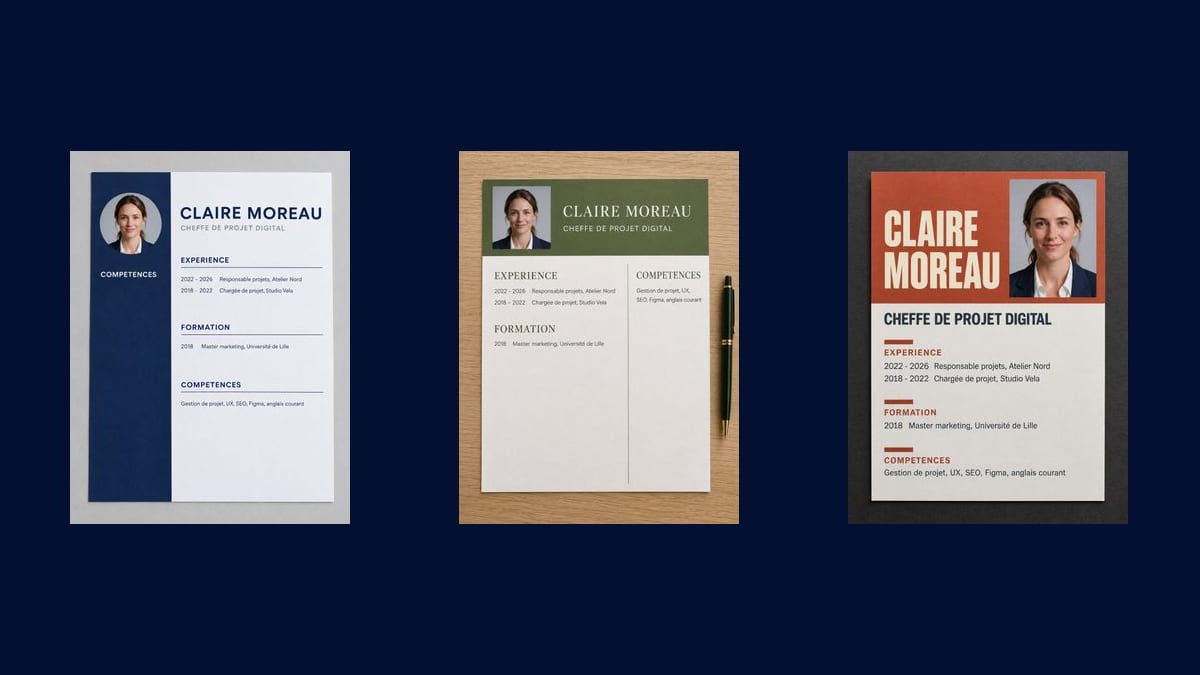
Navy band, clean sections, plenty of white space. It is the one that goes anywhere, from a bank to a public body, and the one you regret least six months later.
Your ID photo goes into three Image nodes that turn it into three one page CVs, text included: plain with a side band, graphic in two columns, creative with a colour block. The full workflow is visible here, no account needed.
The real workflow: the portrait wired to three GPT Image 2.5 Flare nodes, one layout per node. The three CVs are the demo's own, text and sections written into the image.
At a glance
The content of a CV is settled in an hour, the layout drags on over three evenings. This workflow turns that around: your photo and your text go in, and three complete one page layouts come out, with the sections, the dates and the job titles already set. You look at which one resembles you before spending time on it.
The three do not aim at the same jobs: the plain one with its navy band goes anywhere and shocks nobody, the graphic one in two columns breathes and puts the skills opposite the jobs, the creative one with its terracotta block gets noticed and suits a trade where getting noticed is part of the work.
One thing to know before using it: the render is an IMAGE, not a document. A CV sent as a JPEG does badly with the screening software recruiters use, which reads the text. This workflow is for choosing a layout and showing it, then you rebuild it. GPT Image 2.5 Flare writes the eleven lines without a mistake for nine credits the three pages.
These are the files of the workflow above, exactly as the models produced them, unretouched. The starting point is shown when there is one.
Starting point
Render
Give a sharp portrait on a plain background
Framed at the shoulders, facing the camera, in even light. If you do not have one, professional headshot makes it before this one lays it out.
Replace every line between quotes
Name, job title, jobs, education, skills: everything between quotes after the word "exactly" is copied as is, accents included.
One line per job
A date, a job title, a company. Past a dozen lines on the page the letters distort and the layout breaks: the detail belongs in the covering letter.
Generate all three, keep one
"Generate all" produces the three layouts. Once chosen, rebuild it in a word processor for the official application, and keep the image for a message or a portfolio.
The same canvas, tuned for different needs: each variation is two or three lines of prompt away.
Navy band, clean sections, plenty of white space. It is the one that goes anywhere, from a bank to a public body, and the one you regret least six months later.
Two columns, an olive banner, the skills opposite the jobs. It breathes more and suits trades where legibility is part of what you are being asked for.
Terracotta block, name very large, portrait as a tall rectangle. It gets noticed in a pile, which is an asset in visual trades and a risk everywhere else.
Seeing your layout before writing helps you know how many lines really fit on one page. Plenty of CVs run long because nobody ever looked at them whole.
Few jobs, so a lot of white space to fill: the creative or graphic layout fills the page better than the plain one, without having to pad the content.
Once the direction is chosen, the product label and the shop mockups follow the same logic for a freelance who also sells something.
The recruiter's screening software reads text, not pixels, and an image CV often comes back empty. Rebuild the chosen layout in a document before applying.
Twelve lines fit, twenty-five do not: the letters distort and the page becomes unreadable. Keep the three or four jobs that count for this particular post.
A busy background, hard light or a full length frame give a confused little medallion once shrunk. Plain background, framed at the shoulders, even light.
A model can swap two digits in a year. Read every date on the render, it is the first thing a recruiter looks at.
As an image it is risky: many companies run CVs through software that extracts the text, and an image gives it nothing to extract. Send a text PDF, and keep the image for a direct message, a portfolio or a social network.
Yes, it is cropped and resized but not redrawn, as the demo's three CVs show. It is the same face on all three, at three different scales.
The workflow is built around a portrait. If you are applying in a country where photos do not go on a CV, keep the layout you like and rebuild it without the photo in your word processor.
Nine credits, three per page. Redoing a single layout after changing one line costs only three credits.
Yes, describe them in the instruction: the band, the banner or the block take the shade you name. Stay on one strong colour, a CV in three colours reads badly.
It is portrait format, close to A4 without having its exact proportions. For a printed application, the chosen layout is rebuilt in a word processor at the right size.
Yes, in any of the site's fourteen. Give the lines in the language you want and say so in the instruction, exactly as the demo does in French.
No, she is invented, like every character in the site's demos. Her career and the companies named are fictional.
Lay out your CV with AI
Use this workflowFree account, no card required. The workflow opens pre-filled in your canvas.
 GPT Image 2.5 Flare
 Nano Banana Pro
 Recraft V4.1