A hotel or restaurant website
The sea view or the steam from a dish moves at the top of a hotel or restaurant website, without a heavy video to load or a shoot to organise.
Your photo becomes a looping video where a single element moves, water, sky or smoke, while everything else stays frozen. The workflow is shown here, no account needed.
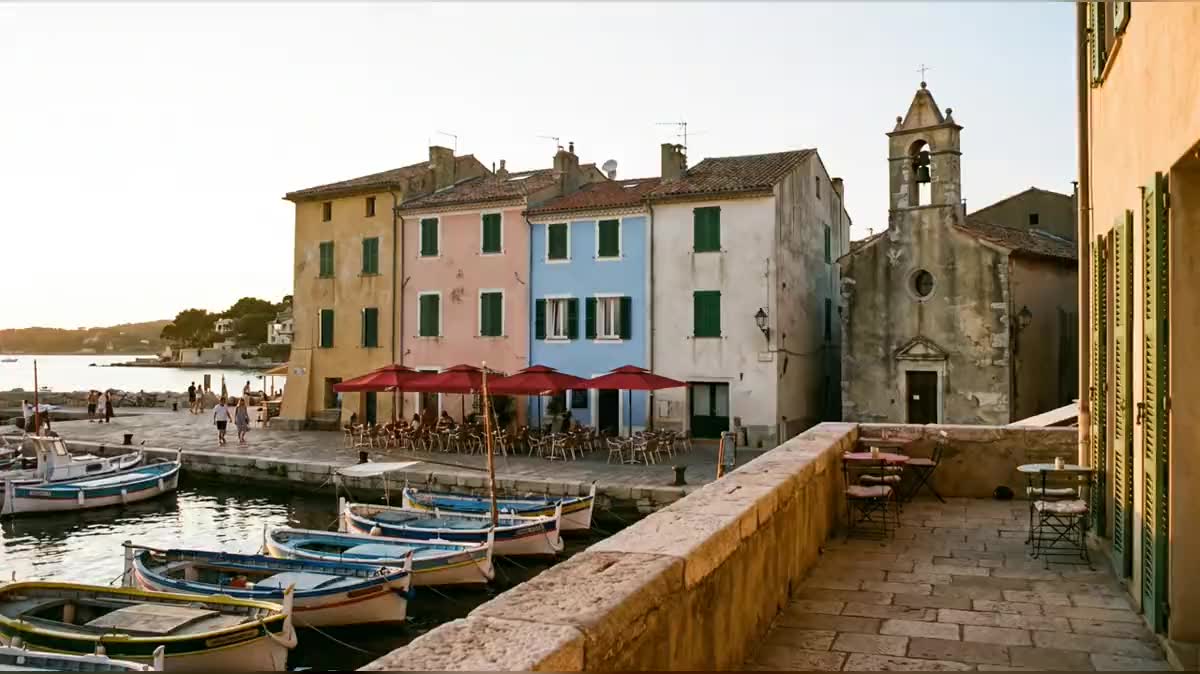
Real workflow: the photo of a small Mediterranean harbour, then a five-second loop where only the water ripples and the boats barely move. Houses, bell tower and people stay frozen, the end joins the start.
At a glance
A cinemagraph is a living photo: everything is frozen except one element, harbour water, steam from a cup, hair in the wind, which moves in an endless loop. It stops the scroll on social media and dresses a website without weighing down the page. This workflow makes one from a single photo.
Two wires make the loop: the same photo goes into the Video node as start frame AND end frame, so the video returns exactly to its starting point. The prompt names what moves and freezes everything else, camera included: without it, the model makes an ordinary video shot.
To make a whole photo move, see animate an old photo; to move the light, day to night. The cinemagraph costs sixty credits.
These are the files of the workflow above, exactly as the models produced them, unretouched. The starting point is shown when there is one.
Starting point
Render
Hotels, restaurants, photographers, brands and content creators who want a living photo in a loop.
A sharp photo with one element to animate, well separated from the rest: water, sky, smoke, waterfall.
Pick a photo with an element that moves
Water, sky, smoke, a waterfall, leaves. The more this element is separated from the rest, the cleaner the loop.
Wire the photo twice
As start frame and as end frame of the Video node. That is what brings the video back to its starting point.
Name what moves, freeze the rest
The water ripples; houses, people and sky stay still like a printed photo. And the camera on a tripod, not moving a single pixel.
Check the loop
Play the video on loop: no jump at the seam, nothing else moves. If the camera drifts, run it again with a stricter camera prompt.
The same canvas, tuned for different needs: each variation is two or three lines of prompt away.
The sea view or the steam from a dish moves at the top of a hotel or restaurant website, without a heavy video to load or a shoot to organise.
A travel photo where only the water or the sky moves: the detail that stops the scroll on Instagram or TikTok, where a still photo goes unnoticed.
Coffee steaming, perfume mist floating, bubbles rising in a drink: a living product ad made from a single still photo.
A sparkling pool or curtains moving in the wind on the photo of a premium real estate listing, to convey the feel of the place.
A landscape shot becomes a living print for an online portfolio or an exhibition screen, without changing anything in the photographer's composition.
A header image that moves discreetly, converted into a light GIF, brings a newsletter to life without weighing it down for email clients.
Without an end frame, the video drifts away from the photo and the loop jumps at the seam.
A video model moves the camera by default. Describe a tripod and a frame that never moves by a single pixel.
Passers-by walk if the prompt does not freeze them, and the cinemagraph becomes an ordinary video.
Hair over a face or leaves in front of a facade: the movement spills onto what should stay frozen.
Yes: download the mp4 and convert it. For a website, keep the mp4 autoplaying and muted, it weighs far less than a GIF.
Yes, by naming both: the water and the clouds. Beyond that it is no longer a cinemagraph but an animated photo.
Five seconds are enough for a loop. Longer costs more and adds nothing: the loop repeats anyway.
Sixty credits: five seconds of Wan 3.0 in 720p, without sound. There is no other step.
It accepts a start frame AND an end frame, which closes the loop, and it follows a still camera prompt.
In the demo, yes after a stricter camera prompt: the first version drifted slightly. Always check the loop.
Yes: turn sound on and describe the lapping water or the wind. The price does not change on Wan 3.0.
A sharp photo is enough; the video comes out in 720p, or 1080p at twice the price.
Create a cinemagraph with AI
Use this workflowFree account, no card required. The workflow opens pre-filled in your canvas.
 Wan 3.0
 Kling V3
 Seedance 2.5