The street that stops
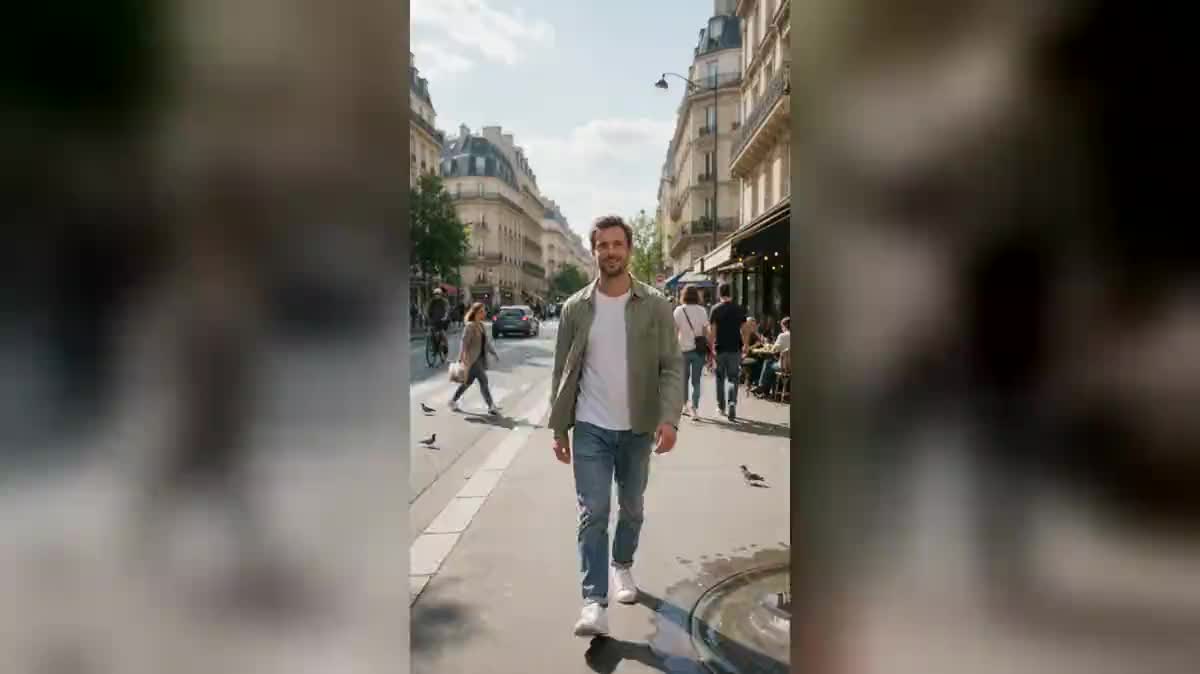
The most readable case: passers-by frozen mid step, a car stopped dead, a cyclist hanging in the air. It is the one that works best when you do not yet know what to film.
Your phone clip goes to three Wan 3.0 nodes that freeze everything else: the crowd mid step, the cafe terrace, a flock of pigeons suspended in mid air. The whole workflow is visible here without an account.
The real workflow: the starting clip wired as a reference to three Wan 3.0 Video nodes, one time stop per node. The three videos are the demo's own, the same person and the same walk.
At a glance
It is the most copied effect on social media, and the simplest to describe: you walk, and everyone around you stops dead. One foot in the air, a cup suspended, a pigeon frozen in mid flight. You are the only one still moving, and you look at them as you pass.
The three treatments in the demo do not freeze the same things: the crowd and the traffic of a wide avenue, a cafe terrace with its coffee pouring as a solid ribbon, and a flock of pigeons held still in mid air around you. Your clip stays yours, only the city stops.
Everything rests on one rule: whatever is frozen must be TOTALLY frozen, not slowed down. One passer-by drifting by a centimetre breaks the whole illusion, so the three prompts repeat it. Wan 3.0 takes your clip as a reference and keeps your face, your clothes and your walk. The three videos cost one hundred and eighty credits.
These are the files of the workflow above, exactly as the models produced them, unretouched. The starting point is shown when there is one.
Starting point
Render
Film one continuous five second shot
You walk toward the camera, no cut, no zoom. A plain shot gives a better render than a worked one, because the model has only one thing to reproduce: your movement.
Choose somewhere busy
A crowded street, a terrace, a station concourse. The more movement around you in the starting clip, the more the stop is seen in the render.
Keep the sentence that forbids slow motion
Every prompt says that the frozen people and objects do not move at all, not even slightly. That sentence is the difference between a time stop and a simple slow motion.
Generate all three, keep the best
"Generate all" outputs the three time stops. You pick the one where the set plays best, and rerun that one alone if a detail bothers you.
The same canvas, tuned for different needs: each variation is two or three lines of prompt away.
The most readable case: passers-by frozen mid step, a car stopped dead, a cyclist hanging in the air. It is the one that works best when you do not yet know what to film.
A motionless waiter with his tray tilted, the coffee pouring as a solid ribbon, a cup suspended halfway to the lips. In this treatment the details count for more than the crowd.
Dozens of pigeons held still in mid flight around you, wings open at every angle. It is the most spectacular of the three, and the one that needs the fewest extras.
Five seconds of stopped time make a hook, not a video. Put them at the top, then run on into your content with the Edit node, which assembles the shots in the browser.
Your market, your station, your old school yard. The effect is ordinary on an anonymous set and strong on a place your audience recognises straight away.
If you would rather transform the set than stop it, put yourself in a video game takes the same kind of clip and replays it inside a game level.
If there is nobody around you, there is nothing to freeze, and the render looks like an ordinary shot. The effect needs movement in order to stop it.
A cut or a zoom during the five seconds blurs the reference, and the model renders a slightly different person from one end to the other. One single movement, no editing.
Writing that the world slows down gives slow motion, not a stop. The prompt has to say that nothing moves at all, which is a far harder demand and a far more rewarding one.
Three or four frozen elements are enough to tell the time stop. Beyond that the model forgets some, and the ones it forgets are exactly the ones that keep moving.
No, a handheld shot is fine, and that is what the demo does. What counts is the absence of a cut and a readable movement, not perfect stability.
Yes, your clip enters as a reference and not as an edit: the model renders the same person, the same clothes and the same walk. That is why this workflow runs on Wan 3.0 and not on a video editing model.
The node goes up to thirty seconds, but the price follows the duration. For a short format, five seconds are plenty: the effect reads in two.
One hundred and eighty credits for the three treatments, sixty per five second video in 720p with sound. Rerunning a single treatment costs only sixty credits.
Yes, the node outputs the video with its audio. On a time stop the sudden silence is part of the effect, and you can always lay your own music over it in the edit.
Yes, that is the intended use: replace the demo media with your clip. It has to run between one and fifteen seconds and show a clear movement.
Film a moving object rather than a person, a ball, a bike, a dog, and adapt the prompt. The principle does not depend on a face.
Vertical 720p, which is the native format of social media. For a wider release, the Enhance node raises the definition without reinventing the picture.
Stop time in a video with AI
Use this workflowFree account, no card required. The workflow opens pre-filled in your canvas.
 Wan 3.0
 Seedance 2.0
 Kling V3