The holiday memory
The photo of the harbour or village square where you spent the summer becomes a scale model: an image to print, and a video that shares better than a whole album.
A photo of a place becomes a miniature diorama standing on a table, same facades, then a five second video. Workflow visible here, no account needed.
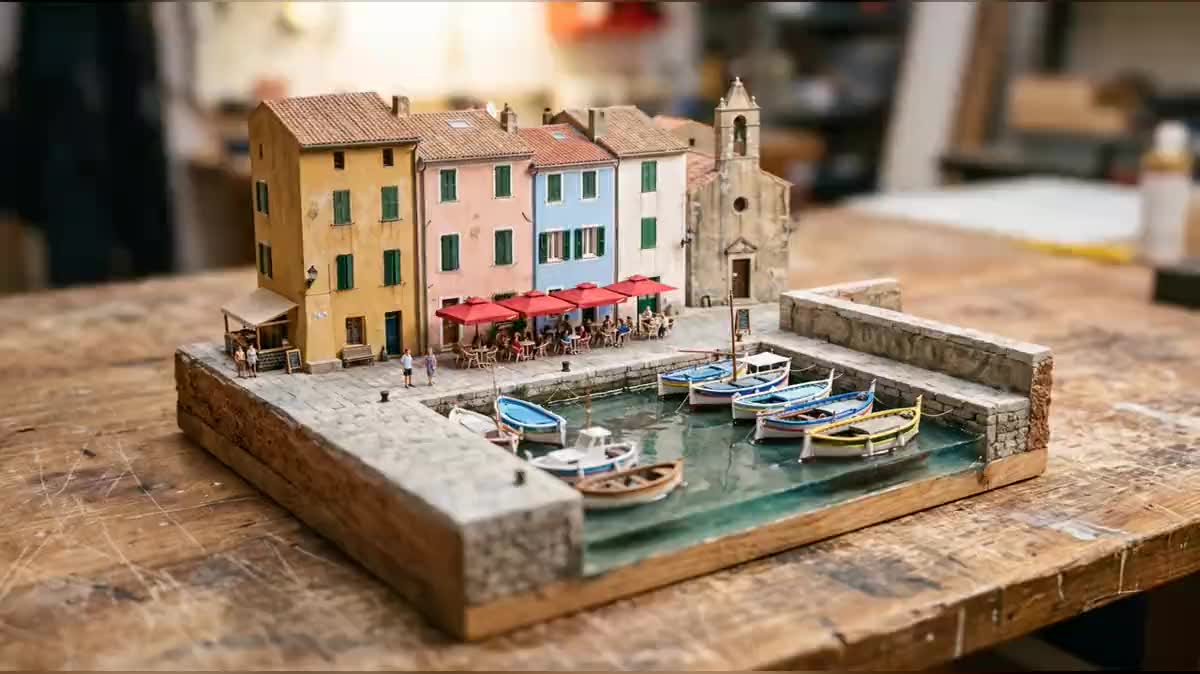
Real workflow: the photo of a small harbour, the miniature diorama that keeps its four facades and its bell tower, then five seconds of camera along the table. The video starts from the diorama, the diorama starts from the photo.
At a glance
Your street, your holiday village or your shop front as a scale model on a workbench, with tiny passers-by and a tilt-shift blur: that is the miniature effect all over social media. This workflow makes it from a single photo, then a five second video slides along the table.
The hard part is likeness. An image model makes a lovely village diorama that is not yours. The prompt therefore names every building, its colours and its place as the photo shows them: that is the list you rewrite for your own place.
The video starts from the diorama as its first frame and rebuilds nothing, the rule of your floor plan in 3D. Honestly, Wan 3.0 barely animates the figurines: the camera does most of it. The diorama and the video cost seventy-nine credits.
These are the files of the workflow above, exactly as the models produced them, unretouched. The starting point is shown when there is one.
Starting point
Render
Travellers, shopkeepers, families, tourist offices and creators who want the social media miniature effect on their own place.
A sharp photo of the place taken from a slightly raised viewpoint, plus the list of buildings and their colours.
Pick a photo taken from slightly above
A balcony, a terrace, a bridge: a raised viewpoint gives a readable diorama. A photo taken at pavement level gives a model where you only see the facades.
Name what makes the place
The buildings, their colours, a bell tower, a sign, the terrace. Without that list, the model makes a nice model village that looks like nowhere in particular.
Require the tilt-shift blur and the base
A sharp band, a blurred top and bottom, the base visible on the table: those three clues are what make the eye read "miniature" at first glance.
Let only the small details move
The video starts from the diorama and its prompt forbids adding a building or changing a colour. The figurines, the boats, the camera, and nothing else.
The same canvas, tuned for different needs: each variation is two or three lines of prompt away.
The photo of the harbour or village square where you spent the summer becomes a scale model: an image to print, and a video that shares better than a whole album.
A bakery or café front in miniature, with its figurine customers, makes a social media visual that stops the thumb and stays true to the real place.
The grandparents' house, photographed from the garden, becomes a diorama to frame: a gift that speaks to the whole family, with nothing to build by hand.
An iconic square, harbour or monument of a town as a scale model opens a presentation video or a post, with the charm of an exhibition model.
A wedding hall, an estate or a marquee in miniature serves as the invitation visual, then the five second video announces the date on social media.
The diorama ends a sequence that starts with the zoom from space: from the planet to the village, then to the village turned into a model.
With no list of buildings and colours, the diorama is pretty and generic. Name what people should recognise, in the order you see it in the photo.
Seen from the street, a diorama only has flat facades. A raised viewpoint shows the roofs, the square and the base, and the miniature effect works.
Without a sharp band and blurred edges, the image looks like a retouched photo, not a model. The blur is what fools the eye about the scale.
Wan 3.0 barely animates tiny figurines: the camera and the water do the moving. Write a caption that matches what the video really shows.
Yes, with a photo of the facade taken from slightly above, from across the street or a window. Name the colours and details that make it recognisable.
A little: on the demo, Wan 3.0 keeps the diorama intact but mostly animates the camera and the boats. A stronger motion asked for in the prompt widened the frame without animating the passers-by any more.
Delete the Video node: the diorama alone costs nineteen credits and already makes a lovely image for a post or a postcard.
Seventy-nine credits: nineteen for the diorama on Nano Banana Pro, sixty for five seconds of Wan 3.0 at 720p. The diorama alone costs nineteen credits.
Because it faithfully keeps its first frame, facades and colours included, as measured on the real estate listing video and the 3D floor plan. Seedance or Kling can be wired in instead.
Sharp and well lit is enough. What matters is that the buildings stand apart: a backlight that drowns the facades gives a diorama with invented colours.
Yes, a public place can be photographed and transformed freely. Just avoid recognisable people in the foreground of the starting photo.
16:9 in 2K for the diorama and 720p for the video. For a vertical social media format, switch both nodes to 9:16 in their settings.
Turn a photo into a miniature diorama with AI
Use this workflowFree account, no card required. The workflow opens pre-filled in your canvas.
 Nano Banana Pro
 Wan 3.0
 Seedance 2.5
 Kling V3