Announcing day one
The director wants to post the first slate on social media before there's a single set photo. The classic slate with the film title goes out the night before: scene 1, shot 1, take 1.
A photo of a classic chalk slate and a navy acrylic slate with your company name, with the film title and numbers written right. Workflow visible here, no account needed.
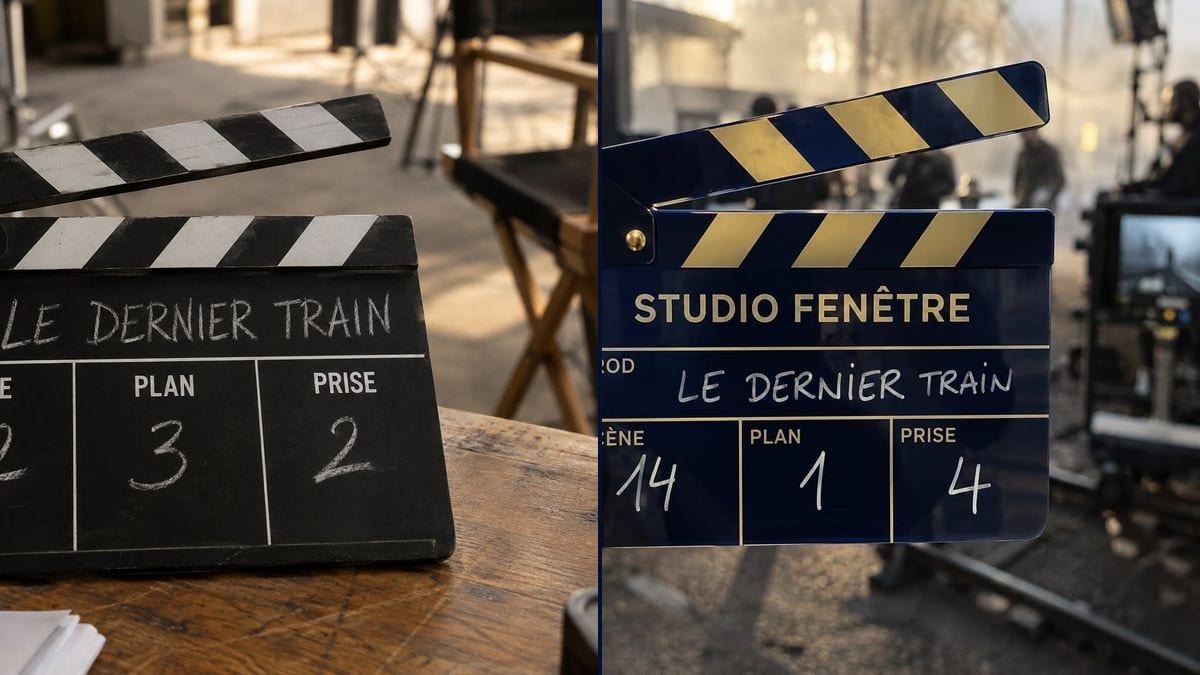
Real workflow: a black and white slate standing on a set table, "LE DERNIER TRAIN" scene 12, shot 3, take 2 in chalk, then a navy and gold "STUDIO FENÊTRE" slate held in hand in front of rails and a monitor, scene 14, shot 1, take 4.
At a glance
Everyone wants a photo of the slate with the film's title: to announce day one of the shoot, for the production deck, to open a making-of or an AI film. A quick snap on set usually has smudged chalk or yesterday's numbers. This workflow gives you two clean slate photos, a classic black and white one in chalk and an acrylic one with your company's name.
The hard part is the text: the printed labels, the handwritten title and numbers, with no invented fields and no missing accents. The prompt keeps print and handwriting apart and quotes every value. Sunburst gets it all right for three credits a photo.
For the logo to put on the slate, see the production company logo; for photos of the set, the behind-the-scenes photo. Both slates cost six credits.
These are the files of the workflow above, exactly as the models produced them, unretouched. The starting point is shown when there is one.
Render
Directors, production companies, props teams, AI filmmakers, school film clubs.
The film title, the company name, the field labels and the scene, shot and take numbers, plus the slate style.
Give the film title
In capitals, as it will appear on the slate. A short title reads better in chalk than a six-word one.
Pick the fields
PROD, SCENE, SHOT, TAKE are enough for a photo. You can add DIRECTOR, CAMERA, ROLL or DATE, each in quotes with its value.
Choose the slate
Classic black and white in chalk, or coloured acrylic in marker with the company name printed at the top. On a table or held in hand.
Check the numbers
Scene, shot, take: make sure they match what you want to show, the opening scene or a key shot.
The same canvas, tuned for different needs: each variation is two or three lines of prompt away.
The director wants to post the first slate on social media before there's a single set photo. The classic slate with the film title goes out the night before: scene 1, shot 1, take 1.
Studio Fenêtre wants acrylic slates made with its name. The navy and gold slate photo serves as the mockup to agree colours and layout with the manufacturer.
She opens her AI film with a slate shot, as on a real set. She makes the slate here with the text right, then animates it in a video node with the sticks snapping shut.
The producer is putting together a deck for a fund or a partner. A slate photo with the project's title on the cover sets the tone right away, before the synopsis pages.
The making-of editor wants an opening card. The photo of the slate held in hand, set blurred behind, bridges the title and the footage from the shoot.
Students are shooting a short for a school festival. The teacher makes a slate with the film title for the poster and the credits, and keeps the club's real slate for sync.
Without set labels, it adds boxes you never wanted, or empty ones. Give each label in quotes, in the language of the shoot.
Six words of chalk in one field become illegible or wrap onto two lines. Keep it short, or use the working title.
If the prompt doesn't say what's handwritten, the title sometimes comes out printed like a logo. Separate the printed labels from the handwritten values.
A printed image doesn't clap. For picture and sound sync you need a physical or electronic slate, and a camera assistant to hold it.
In the demo, yes: the labels, the title, the numbers and "STUDIO FENÊTRE" are all exact, accents included.
No: it's an image. On set, sync needs a real slate clapped in front of the camera. The image works as a visual, or as a mockup to order a custom one.
The workflow starts from a blank page and writes the name in letters. For a drawn logo, add it afterwards in your editing software, in the top band.
Six credits, three per photo on GPT Image 2.5 Sunburst at medium quality. One more slate for another scene costs three more.
Because it spells correctly, labels and numbers included, and it's the cheapest model in the catalogue. In the demo it also handled chalk on black and gold on navy.
The prompt aimed for 4:3, but both photos came out almost square, 1370 x 1148 and 1312 x 1199 pixels. Crop to 16:9 for video; the slate sits in the middle.
Yes: red and white, matte black and silver, light wood. Describe the material, the colour of the stripes and the colour of the marker or chalk.
Write the fields the way your crew does, for instance scene "12C" with the setup letter and "TAKE 2", or add ROLL. The prompt structure stays the same.
Make a custom film clapperboard image with AI
Use this workflowFree account, no card required. The workflow opens pre-filled in your canvas.
 GPT Image 2.5 Sunburst
 Nano Banana 2.1
 Recraft V4.1