The fantasy novelist
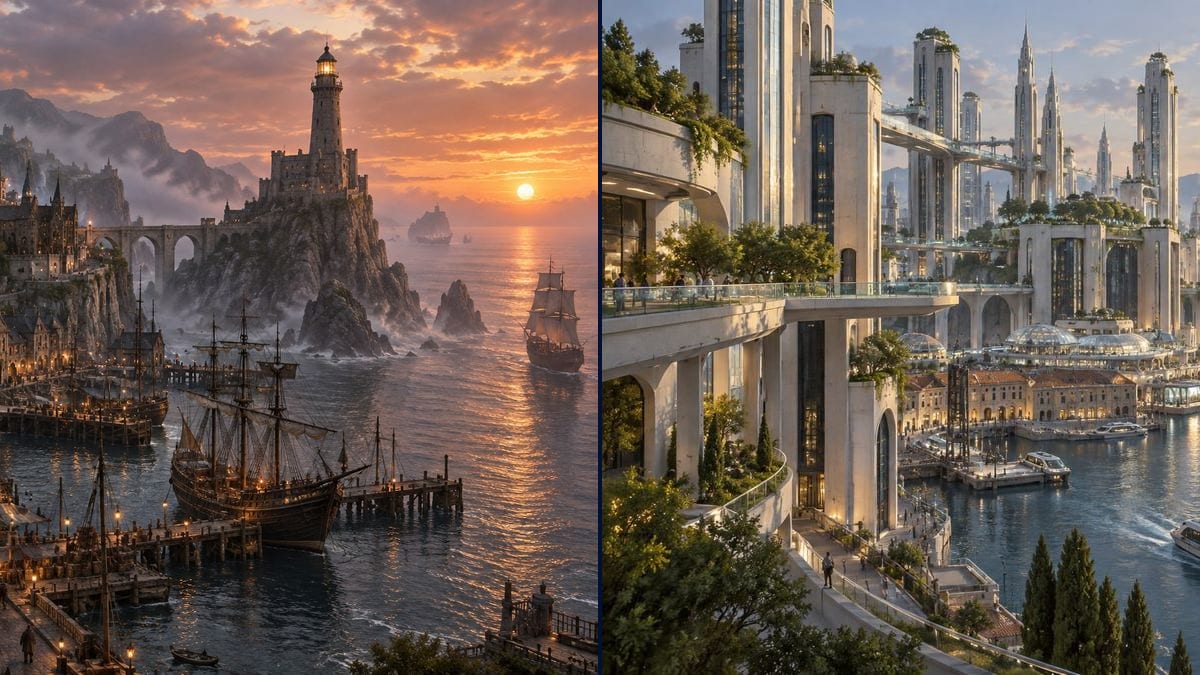
His heroine reaches the harbour in chapter four. Before writing the scene, he renders the view and describes what he sees: the terraces, the lighthouse, the smell of the docks. The prose picks up concrete detail.
Two wide views of your story's city, a fantasy harbour on a cliff or a science fiction city over an old port, readable architecture, no text. Workflow visible here, no account needed.
Real workflow: a fantasy harbour of terraced stone houses, a lighthouse on its rock and ships at the quay at sunset, then a science fiction city of white towers and walkways over an old ferry port, under a giant solar mirror.
At a glance
A novelist spends three pages on the city, a screenwriter one line of scene description, and every reader, producer or production designer pictures it differently. Until there's an image, the city stays vague, even for the person who invented it. This workflow gives you two wide views of YOUR city, one fantasy and one science fiction, with streets, a harbour and a scale you can follow.
The hard part is readability. Left alone, a model stacks towers in the mist and hands you a pretty poster you can't describe anything from. The prompt names the materials, the terrain, a landmark and the time of day, and asks for readable architecture. Sunburst has nothing to write here: it earns its place on price, three credits a view.
To place the city on its continent, see the fantasy world map; for the mood of a whole film, the film moodboard. Both views cost six credits.
These are the files of the workflow above, exactly as the models produced them, unretouched. The starting point is shown when there is one.
Render
Fantasy and science fiction novelists, writers preparing a series bible, directors and production designers, game masters.
The terrain, two or three materials, a visible landmark, the time of day and the city's genre.
Give it terrain
Cliff, delta, valley, crater, island: that's what shapes a city before any building goes up.
Name the materials
Stone and slate, timber and thatch, white concrete and glass. Two or three materials are enough to give the city an identity.
Pick a landmark
A lighthouse, a bridge, a tower, a mirror in the sky: something the reader will meet in the text and that anchors the view.
Set the hour
Sunset, dawn, a rainy night. The light changes the whole tone, and it's the cheapest thing to try again.
The same canvas, tuned for different needs: each variation is two or three lines of prompt away.
His heroine reaches the harbour in chapter four. Before writing the scene, he renders the view and describes what he sees: the terraces, the lighthouse, the smell of the docks. The prose picks up concrete detail.
A writer developing a science fiction series opens her bible with a wide view of the city. Producers get the tone from one page, before reading a single episode.
In prep for a short film, the view is where talks with the director start. They point at what to keep, what a location scout might find and what will need visual effects.
A young director is raising money for his animated film. The city view becomes the banner of the campaign page and makes people want to see the world move.
The game master shows the city the moment the players sail into the harbour. An image on the screen at the table is worth ten minutes of read-aloud description, and the questions start straight away.
A self-published author splits her novel into three parts, one per city. Each city view, turned black and white, opens the part that takes place there.
"A city founded by exiles after the great war" means nothing to the model. Describe what you can see: materials, terrain, light, a landmark.
Without it, the model drowns everything in haze and reflections. You get a poster, not a city you can write from.
People in the streets, boats, lit windows: they're what tell you how big the city is. Ask for them if the view feels empty.
The view gives you a mood, not a geography that holds from one render to the next. For your characters' routes, keep a map or plan alongside.
Because image models love adding shop signs and street signs in a fake alphabet. On a city view they add nothing and give the image away as generated.
Not identically: each render redraws the city. Keep the same description and change the viewpoint, knowing the details will shift.
Yes: describe a mid-sized seaside town, its apartment blocks, its fishing harbour. Handy for the fictional town of a crime novel, like Pontcarré in our demo universe.
Six credits, three per view on GPT Image 2.5 Sunburst at medium quality. A third version, the same city at night for instance, costs three more.
For the price. It has nothing to write here, and at three credits a view you can try several lights, seasons or styles before choosing the city that goes into the bible.
16:9 requested, around 1536 x 1024 in the demo. A wide frame that suits a double-page spread, a banner or a presentation screen.
Yes, by connecting the view to a video node for a slow camera move. See the book trailer for the full chain.
Yes, for your own project. See the rules on commercial use, and disclose AI use if your platform asks.
Create concept art of your story's imaginary city with AI
Use this workflowFree account, no card required. The workflow opens pre-filled in your canvas.
 GPT Image 2.5 Sunburst
 Nano Banana 2.1
 Recraft V4.1