The writer with a meeting next week
Nora has a week before she meets a producer. She has the pages, not a designer. The night cover makes her bible look like a project someone has thought through, without a budget she doesn't have.
Two A4 covers for your series bible, one at night and one graphic, with title, format, writer and draft date written letter for letter. Workflow visible here, no account needed.
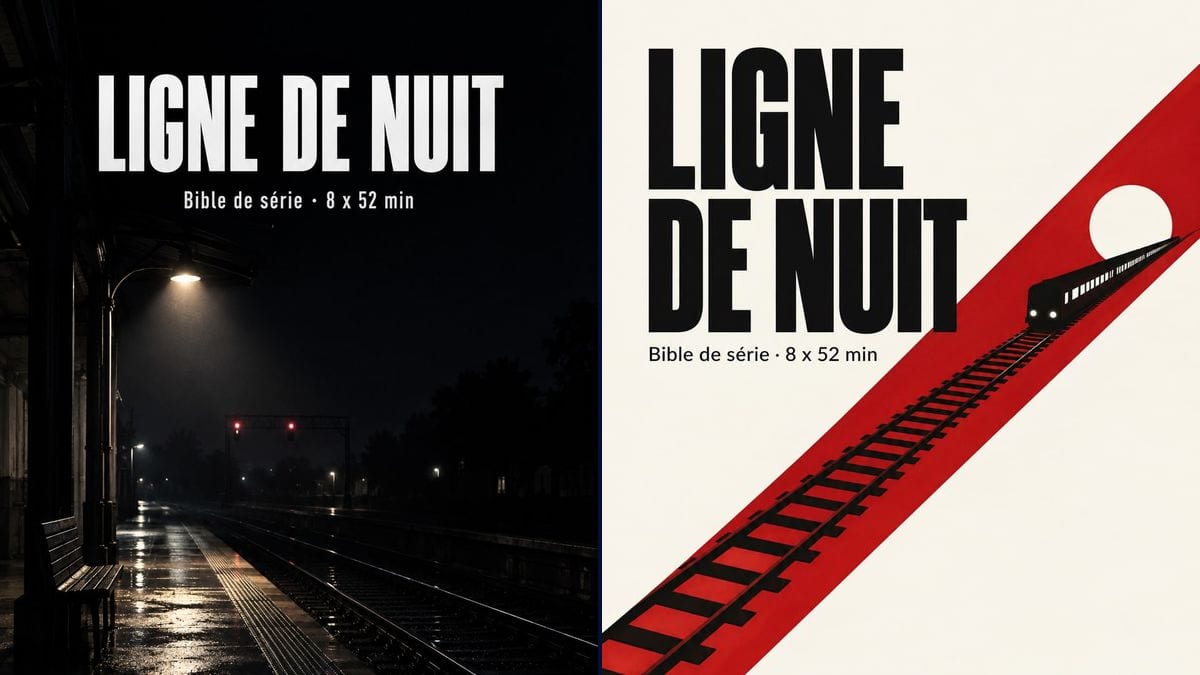
Real workflow: two bible covers for "LIGNE DE NUIT", a made-up 8 x 52 min series by Nora Bellanger, one on a wet station platform under a lamp, the other on off-white with a red track crossing the page and a train with its headlights on.
At a glance
A series bible lands on a producer's, a network's or a funding panel's desk along with dozens of others. The first thing anyone sees is the cover, and plenty of writers send a blank page with the title in Times New Roman. This workflow gives you two A4 covers for your bible: a photographic night scene and a three-colour graphic one.
The hard part is setting a mood without overdoing it. A title lost in the image, a fake network logo or a trailer-style tagline, and the project looks less serious than it is. The prompt leaves room for the title, gives the four lines in quotes and forbids adding any. Sunburst spells them right, white on black as well as black on white.
For the look of the pages inside, move on to the film moodboard and the character sheets. Both covers cost six credits.
These are the files of the workflow above, exactly as the models produced them, unretouched. The starting point is shown when there is one.
Render
TV writers and series creators pitching to producers, writing teams applying for funding, film schools, producers in development.
The title, format in episodes and running time, the writer's name and draft date in quotes, plus a location from the show for the image.
Give the title and format
The title in capitals, then the format: number of episodes and running time, "8 x 52 min", "10 x 30 min". It's the line a producer looks for first.
Describe one image
A location from the show, empty, that carries the mood: a platform at night, a restaurant kitchen, a mountain road. No face in the foreground, it would compete with the future cast.
Date the draft
"October 2026 draft" or "Draft 3 · October 2026". A bible travels for a long time, and the date stops people discussing an old version.
Build the PDF
Put the image on the first page of your document, and check it still reads when printed in black and white.
The same canvas, tuned for different needs: each variation is two or three lines of prompt away.
Nora has a week before she meets a producer. She has the pages, not a designer. The night cover makes her bible look like a project someone has thought through, without a budget she doesn't have.
Two writers apply for development funding. The graphic cover, plain and legible, survives a black and white photocopier and doesn't distract from the fact that the writing is what gets judged.
He's preparing a 10 x 8 min web series for a streaming platform. Same prompt, different format line, and an image of his main set, a basement rehearsal room.
A class develops a series as a writers' room. Each group makes its own cover for the final presentation, and the tutor compares the visual choices before opening a single bible.
A company picks up a series that has been in development for three years. New draft, new cover: the date changes and so does the picture, so networks don't think they're rereading the old pitch.
An author is pushing to adapt her novel as a series. The cover uses a location from the book and a line "based on the novel by", so the link is clear from page one.
Close-up face, tagline, fake air date: the bible looks like a show that's already been sold. One location, a title, a format, a writer.
Putting the logo of a network that hasn't bought anything is the quickest way to lose a reader's trust. Only show what's true.
Without a date, nobody knows which bible they read. Put it on the cover and in the file name.
Thin letters over a busy photo: in an email preview, the title disappears. Keep an empty area behind it, dark or light.
In the demo, yes: the title, the format line, the writer's name and the draft date are exact on both covers, apostrophe and middle dot included.
Yes: add a line in quotes at the bottom of the page. For its logo, see the production company logo.
Yes: replace the format line with "Feature film · pitch document" or whatever wording the funding call asks for.
Six credits, three per cover on GPT Image 2.5 Sunburst at medium quality. A third mood, in daylight or on another set from the show, costs three more.
Because it spells correctly and holds a condensed white title on black, and it's the cheapest model in the catalogue. Handy when you redo the cover for every draft.
The render comes out in A4 proportions, about 1055 x 1490 pixels. Sharp on screen and in a PDF; for a proper print run, pass it through the Enhance node first.
Season arc, characters, world, episode outlines, a statement of intent: the cover is only the front door. Our guide to consistent characters helps with the visuals inside.
Yes, it's a presentation visual. Just check the funding call doesn't impose its own layout, and read the usage rules if the series gets sold.
Make a TV series bible cover with AI
Use this workflowFree account, no card required. The workflow opens pre-filled in your canvas.
 GPT Image 2.5 Sunburst
 Nano Banana 2.1
 Recraft V4.1