The dream job
Astronaut, pilot, surgeon, head chef. It is the obvious use, and the one that gets shared: the video says in five seconds what an opening line tells badly.
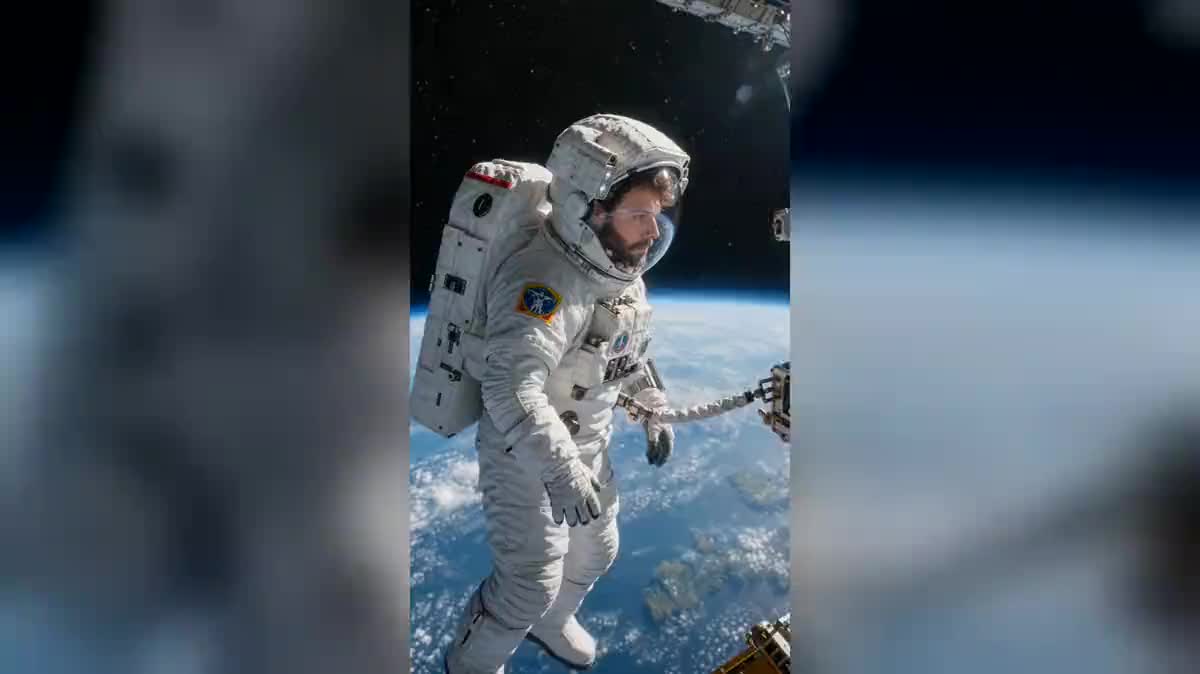
Your selfie goes to two Wan 3.0 nodes that show you in two jobs: an astronaut on a spacewalk, a chef in the middle of service. You pick the job, it is not drawn at random. Workflow visible here, no account needed.
The real workflow: the selfie wired as a reference to two Wan 3.0 nodes, one job per node. The two videos are the demo's own, the same face in both.
At a glance
A filter is doing the rounds right now: you send a photo, it announces your ideal job and shows you inside it. The problem is double: it picks the job, and the face that comes back is no longer quite yours.
This workflow takes the problem the other way round. You write the job, the setting and the framing, you rerun as often as you like, and your face stays yours from one job to the next. The demo shows it on two deliberately distant worlds: the vacuum of space and a restaurant service.
What makes it possible is a detail of the catalogue: Wan 3.0 accepts a real face as a reference and holds it. The lock covers the face, the hair and the beard, never the clothes, because the job is what dictates them. The two videos cost one hundred and twenty credits.
These are the files of the workflow above, exactly as the models produced them, unretouched. The starting point is shown when there is one.
Starting point
Render
Give a sharp selfie
Framed at the chest, facing the camera, in daylight. It is the only thing you are asked for, and it does not need to be beautiful, it needs to be sharp.
Write the job, not your face
The prompt describes the setting, the outfit of the job and the light, and points to the photo for the features. As soon as a face is described, the model rebuilds it instead of taking yours.
Put in an action, not a pose
A flame rising from the pan, a head turning toward the lens. Five seconds of a static pose tell nothing, five seconds of a gesture tell the job.
Generate both, then change job
"Generate all" outputs the two shots. Then replace one job with your own in the prompt and rerun that single node: the other keeps its render.
The same canvas, tuned for different needs: each variation is two or three lines of prompt away.
Astronaut, pilot, surgeon, head chef. It is the obvious use, and the one that gets shared: the video says in five seconds what an opening line tells badly.
Filming yourself in your own job, better lit and better framed than the reality of the office, gives an introduction video that no phone propped on a pile of books will produce.
Showing where you come from, the first summer job, your grandfather's workshop. The contrast between two shots of the same face tells a path without a word being written.
Seeing yourself in three different jobs before picking a course beats a brochure. The video decides nothing, but it makes the question concrete in a few seconds.
An employer showing the post from the inside, with the real setting and the real gesture, catches on better than a written offer. The face can be that of an employee who agreed to it.
The same mechanism, a selfie as a reference and a described setting, serves something else entirely in become a giant, where it is the scale that changes and not the job.
Writing the colour of the eyes or the shape of the nose rebuilds a face instead of taking yours. The photo speaks of you, the prompt speaks of the job.
Demanding your usual outfit and the uniform of the job in the same sentence gives a contradictory prompt, and the model decides at random. Let the job dress the scene.
The model takes what it sees: a badly lit face comes out badly lit in both jobs. A sharp daylight photo changes the whole result.
A five second shot where nobody moves looks like an animated photo. A flame, a look toward the lens, a working gesture: it is the action that sells the job.
The filter picks the job for you and hands back an approximate face. Here you write the job, the setting and the framing, and the model holds the face from the photo as a reference. You can rerun with another job without losing anything.
Because the job dictates them. A prompt demanding your usual jacket and a spacesuit at the same time would contradict itself, and the model would decide at random. So the face is locked and the outfit is described as part of the scene.
Yes, duplicate a Text node and a Video node, wire the same selfie, and the third job arrives. Count sixty credits more per job.
One hundred and twenty credits, sixty per five second video in 720p with sound. Rerunning a single job after changing the prompt costs only sixty credits.
On the two shots of the demo it is the same face, the same beard and the same hair, under a helmet and under a toque. It holds better in a wide shot than in a very tight close-up, as always with a reference.
Yes, the Edit node assembles them in the browser, with no software and no extra credit. Ten seconds of two jobs make a video that stands on its own.
Vertical 9:16 in 720p, the native format of social media. The guide on format and resolution for social gives the expected sizes network by network.
Yes, as for any publication: the workflow changes nothing about image rights. The demo uses the face of the site's founder, with his consent.
Your future job in video with AI
Use this workflowFree account, no card required. The workflow opens pre-filled in your canvas.
 Wan 3.0
 Seedance 2.0
 Kling V3