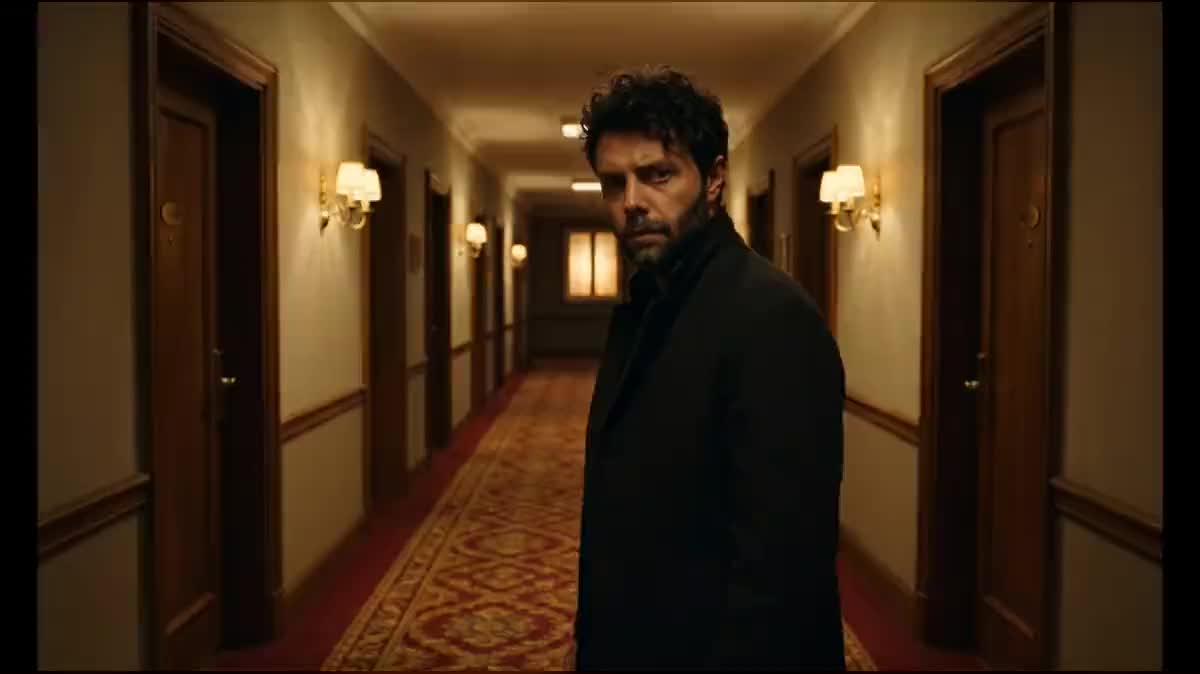
The revelation shot
The moment a character understands, in a short film or a fiction video: the Vertigo says the shift without dialogue, and it is shot with no gear and no grip.
Your wide angle shot and the same shot with a telephoto lens, then Wan 3.0 moves from one to the other: the subject keeps their size, the set closes in. Workflow visible here, no account needed.
Real workflow: a man in the middle of a hotel corridor at wide angle, the same shot redone with a telephoto lens, then five seconds where the corridor compresses behind him. The video starts from the two demo images.
At a glance
The dolly zoom, called the Vertigo effect since Hitchcock's film, is the shot that says unease without a word: the character does not move, and the world closes in around them. On set it takes a dolly and a zoom synchronised by hand. This workflow does it from a single photo.
The hard part is measured: in text alone, no video model can do it. Wan 3.0 goes into a sideways track, Kling V3 changes the set along the way, Seedance 2.5 refuses a photo of a real person. The recipe therefore sets the end of the shot: Nano Banana Pro redoes your photo with a telephoto lens, same person at the same size, compressed set.
Wan 3.0 starts from your photo and has to land on that end frame: all it has left to do is change the perspective. It is the same logic as scene coverage, one shot serving as the reference for the other. The end shot and the video cost seventy-nine credits.
These are the files of the workflow above, exactly as the models produced them, unretouched. The starting point is shown when there is one.
Starting point
Render
Directors, editors, video creators and film teachers who want the Vertigo effect without a synchronised dolly and zoom.
A sharp photo of a centred subject in front of a deep set: corridor, street, platform, path.
Pick a deep set
A corridor, a street, a station platform, a tree lined path: you need lines running far behind the subject. In front of a wall there is nothing to compress and the effect does not show.
Centre the subject, framed at the waist
The Vertigo works on a subject who stays still in the middle of the frame. Too wide and the subject is tiny, a close up hides the set that has to warp.
Have the shot redone with a telephoto lens
The Image node keeps the person at the same size and place and only changes the background: the far window grows, the walls tighten. Compare the two images before running the video.
Wire both ends
The photo into the start image port, the telephoto shot into the end image port. The video prompt only asks for the change of perspective, with no cut and nothing added.
The same canvas, tuned for different needs: each variation is two or three lines of prompt away.
The moment a character understands, in a short film or a fiction video: the Vertigo says the shift without dialogue, and it is shot with no gear and no grip.
The first three seconds of a social video, where the set closes in on you before you speak: a shot that stops the thumb because people recognise it.
On the drop of a track, the artist stands still and the set plunges behind them: a director's effect made in an afternoon.
A tension shot in the middle of a film trailer, between two action shots: the Vertigo sets up the dread in five seconds.
A teacher shows what a focal length change does, first as stills then in motion, on a shot made for the demonstration rather than lifted from a protected film.
A corridor or a row of rooms tightening behind an amused estate agent: a cinema wink that stands out in a feed full of standard viewings.
Measured on three models: none makes the dolly zoom without an end frame. The result is an ordinary zoom or track, and the effect is gone.
If the end shot enlarges or shrinks the person, the video becomes a plain zoom. The subject keeps their size and place, only the background changes.
A wall, a studio backdrop or a sky have nothing to compress. The Vertigo needs vanishing lines: corridor, street, rails, a row of trees.
A character who walks or turns steals the show from the set. They stay still; only their eyes may widen, that is the whole point of the shot.
Yes: swap the two cables. The set then starts at telephoto and opens up to wide angle behind the subject, a vertigo that pulls away instead of closing in.
No, a phone photo in a corridor or a street is enough, as long as the subject is sharp and centred and the set has depth.
The workflow starts from a still. Grab the sharpest frame of your shot and use it as the starting photo: the generated video lasts five seconds and gets edited in with the rest.
Seventy-nine credits: nineteen for the telephoto shot on Nano Banana Pro, sixty for five seconds of Wan 3.0 at 720p. Redoing only the video costs sixty credits.
Seedance 2.5 refuses a start image showing a real person. Wan 3.0 and Kling V3 accept both images; Wan is kept here, and Kling can be wired in instead if you prefer.
Almost: on the demo, they drift a little in the frame mid shot, then come back. It is less rigorous than a real dolly on rails, but the effect reads instantly.
Five seconds, long enough to feel the set closing in without the model wandering off. Beyond that, the character tends to move.
No: start from a photo you took or made. A film frame is a protected work, and the workflow works just as well on your own corridor.
Make the Vertigo effect (dolly zoom) in a video with AI
Use this workflowFree account, no card required. The workflow opens pre-filled in your canvas.
 Nano Banana Pro
 Wan 3.0
 Kling V3
 Seedance 2.5