The ad you cannot shoot
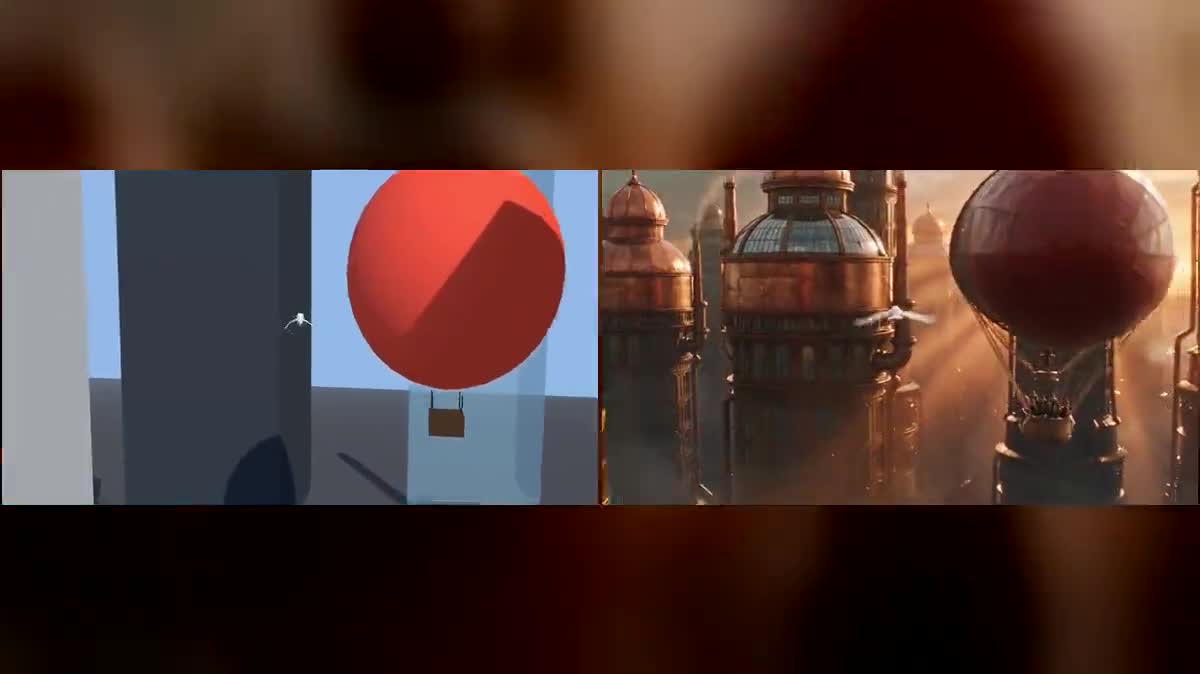
A hot-air balloon between city towers, filmed in flight: the shot costs two hundred and eighty-eight credits instead of a helicopter, a pilot and a flight permit that will never arrive in time.
Your grey previz goes into two Seedance 2.5 nodes through the video port and comes back as live action, with the same camera move and two different worlds. Workflow visible here, no account needed.
Real workflow: six seconds of previz exported from the 3D studio, wired into the video port of two Seedance 2.5 nodes, one world per node. Both videos come from the demo, the camera comes from the previz.
At a glance
A previz is your shot in grey shapes: the camera, its path, the timing, where every element sits. You do not watch it, you hand it to a video model so that it has nothing left to invent about the framing. This workflow is that handover: the previz goes in through the video port, the final shot comes out.
The trap fits in one sentence, and it is the only one that really matters: the prompt has to say KEEP the camera motion, the framing, the speed and the timing frame for frame, and change nothing but the look of the world. Without it the model reframes, invents another move, and you are back to the lottery the previz was built to end.
Second rule, less obvious: a video model does not know what a grey cube stands for. Both prompts in the demo NAME every shape, the red sphere is a hot-air balloon, the white shape is a seabird. The previz comes from the 3D Previz studio, where the scene is built and exported without spending a credit. The two shots cost two hundred and eighty-eight credits together.
These are the files of the workflow above, exactly as the models produced them, unretouched. The starting point is shown when there is one.
Starting point
Render
Directors, ad makers and AI filmmakers who already know the shot they want and are tired of re-rolling generations to land the right framing.
A previz mp4 of four to thirty seconds, at least 407,696 pixels per frame: the export from the 3D Previz studio works as is.
Block the shot in 3D
Set, actors, camera and path in the 3D Previz studio, then export an mp4. Everything there is free: only the video render spends credits.
Wire the previz to the Video port
Not to the start image. The video port is what turns the previz into the source to rewrite; a start image would make the model read the mp4 as a photo and the shot would start over.
Forbid reframing
The sentence to copy as is: keep the camera motion, framing, speed and timing frame for frame, only the look of the world changes.
Name every grey shape
The red sphere is a hot-air balloon, the white shape is a bird. Without those sentences the model paints a world around volumes it never identified, and the objects turn into anything.
The same canvas, tuned for different needs: each variation is two or three lines of prompt away.
A hot-air balloon between city towers, filmed in flight: the shot costs two hundred and eighty-eight credits instead of a helicopter, a pilot and a flight permit that will never arrive in time.
A client hesitates between three art directions: one previz, three prompts, three final shots. The camera does not move by a pixel between them, so the comparison is really about the mood.
One shot is missing between two sequences already filmed. The previz locks the exact length and the camera axis, and the render drops in without showing the seam, which a free generation almost never manages.
One key scene rendered for real beats any storyboard: the decision maker sees the light, the scale and the timing, and only has to imagine what is not written yet.
The opening shot is the one you redo ten times. Blocking it in 3D then rendering it once costs less than ten tries, and the short film workflow takes over for the rest of the story.
If what must be kept is not the camera but the movement of a body, make a photo dance transfers the gesture of a reference video onto your character, which is the other half of the job.
This is the mistake that cancels all the 3D work. Without the sentence that locks camera, framing and timing, the model feels free: it widens, it slows down, it invents another move, and the previz served no purpose.
The mp4 is then read as an image, the shot falls back to image to video and the movement is gone. The video port is the only one that requalifies the job as rewriting an existing video.
A video model does not guess that a red sphere is a hot-air balloon. Unnamed, the shapes become colour patches, or vanish into the world it paints around them.
The whole length of the source is billed, and the longer the shot, the more chances the model has to drift. Six to ten seconds hold one idea, and cost what one idea is worth.
From the Imaginode 3D Previz studio: the bird and balloon scene, built in the browser, exported as mp4 and cut to six seconds. No 3D software, and not a single credit spent on that part.
Because an input video imposes its own length: the length of the source IS the bill. Six seconds cost one hundred and forty-four credits per shot, fourteen would cost three hundred and thirty-six for exactly the same demonstration.
In both demo shots the push between the towers, the balloon passing and the wingbeats land on the same frames as the previz. What changes is the matter: brass on one side, glass and cold mist on the other.
Two hundred and eighty-eight credits, one hundred and forty-four per six second shot in 720p. Running one world again with a different prompt only costs one hundred and forty-four credits.
Seedance 2.5 REWRITES the video you hand it, which is the path on this page. Wan 3.0 takes the video as a plain reference and keeps control of length and framing. Kling 3.0 Motion Control transfers a precise gesture onto a character.
No. The 3D Previz studio runs in the browser: describe the scene, place the camera with the mouse, export. It is the free part of the workflow, and also the part that decides how good the final shot will be.
The format of the previz: when a video goes in, the provider refuses any length, aspect ratio or resolution of your own, and the output follows the source. The demo starts from a 1280 by 720 mp4 and returns 1280 by 720.
No, audio is off on both nodes: a silent previz has nothing to hand the model. Music and sound effects come afterwards, for instance with add sound to a video.
Turn a 3D previz into real video with AI
Use this workflowFree account, no card required. The workflow opens pre-filled in your canvas.
 Seedance 2.5
 Wan 3.0
 Kling 3.0 Motion Control