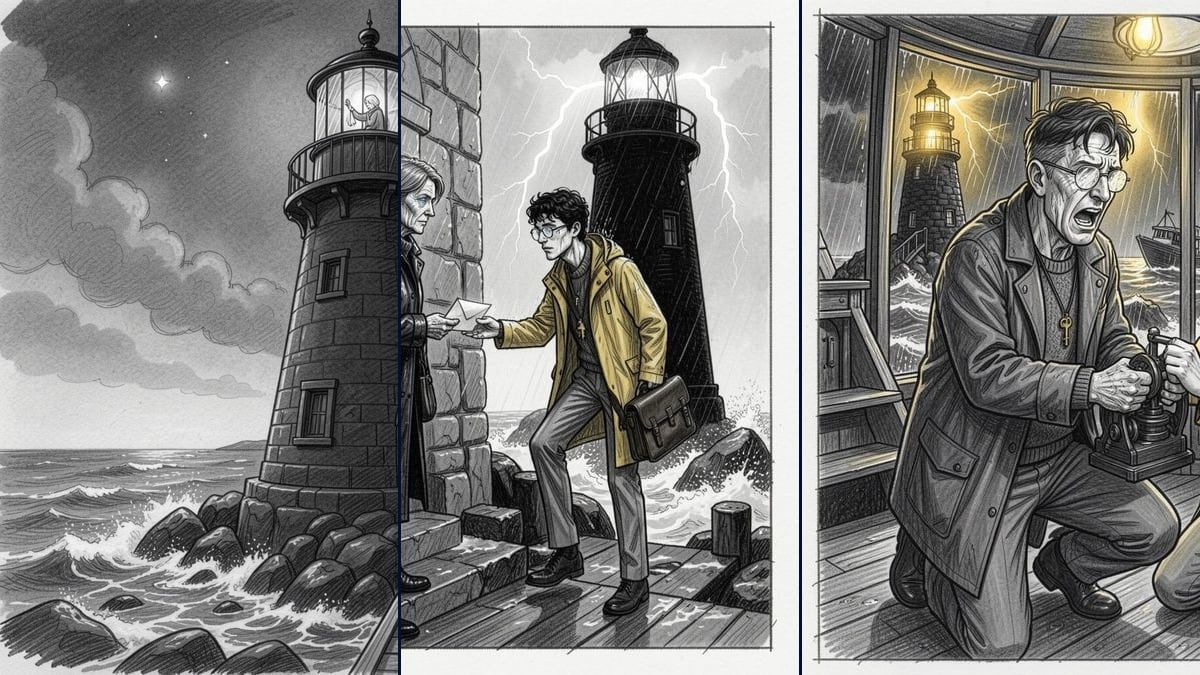
The storyboard of a novel chapter
This is the demo: six pencil panels that follow the chapter in order, the bible wired to hold the characters. Replace the PDF, keep the instructions, and the board redraws itself for your text in a minute.
A chapter in PDF dropped on the canvas: one Text node writes a short bible, six others each write one panel in story order, and Flux 2 Klein draws them as pencil sketches, grey wash, no text. The board to show before shooting, for about thirty credits. The whole workflow is visible without an account.
The real workflow: the first chapter of a novel in PDF in a Media node, Claude Sonnet 5 for the bible and the six panels, Flux 2 Klein for the six sketches. The texts shown are the models' answers, untouched.
At a glance
A storyboard is the chapter seen by a camera: six moments, a shot size and an angle for each. The PDF goes into a Media node, and a first Text node writes the bible: one line of sketch style, each character in two lines, each place in one. Six Text nodes receive the bible and the PDF, and each write one panel, in story order.
Six Image nodes on Flux 2 Klein draw the panels as pencil sketches, grey wash, no text, for two credits each. The result reads like a storyboard sheet: you see the breakdown before generating a single video. For photoreal panels, switch the Image nodes to Nano Banana Pro.
The demo breaks down the first chapter of "North of Silence", an original novel written for the example. Replace the PDF with your chapter, add a row of nodes per extra panel, and the board follows. It is the natural companion of the screenplay to film workflow: here you decide which shots deserve a video.
These are the files of the workflow above, exactly as the models produced them, unretouched. The starting point is shown when there is one.
Render
Authors, screenwriters and directors who want to see the breakdown of a text before generating or shooting.
A chapter or a scene in text PDF, two to six pages: six panels cover the text in order, a longer text splits into two boards.
Drop the chapter PDF on the canvas
A Media node receives it. A chapter or a scene of a few pages: the six panels cover the text in order, a very long chapter splits into two boards.
Let the first node write the bible
Sketch style, characters in two lines, places in one: the bible is wired to the six panel nodes so the characters keep the same face from panel to panel, even in pencil.
One panel per Text node
Each node reads the PDF and the bible and writes its panel: shot size, angle, what we see, the action, the light. The six instructions are identical except for a number: change the panel count in each if you add some.
Draw the board
The six Image nodes draw as pencil sketches, grey wash, no text. Two credits per panel, one minute per board. Regenerate a panel that does not work without touching the others.
The same canvas, tuned for different needs: each variation is two or three lines of prompt away.
This is the demo: six pencil panels that follow the chapter in order, the bible wired to hold the characters. Replace the PDF, keep the instructions, and the board redraws itself for your text in a minute.
A screenplay in PDF works just as well: the sluglines help the model cut. Ask for twelve panels on two rows of nodes for an action scene, six are enough for a dialogue.
Export the six panels and lay them on an A3 page: a pencil storyboard states the directing intention without committing to a look, which keeps the discussion open.
A validated panel becomes the first frame of a scene in the screenplay to film template: copy the panel's text into the scene Text node, and the film starts from the shot you chose.
Switch the six Image nodes to Nano Banana Pro and remove the pencil mention from their prompt: the same bible and the same panels give film stills, ten credits per panel.
Each instruction says "panel N of six": if all six say the same thing, the model redraws the opening six times. Check the number in each instruction after duplicating.
Flux writes letters badly. The Image nodes' prompt forbids any text; if a panel comes out with words, regenerate it, and keep the stage directions in the Text node, not in the image.
The bible must be wired to every panel node and describe two distinctive traits per character. Without it, each panel invents its own lighthouse keeper.
Because a storyboard is for deciding, not impressing: in pencil you judge framing and rhythm without being distracted by texture. And each panel costs two credits instead of ten. Nano Banana Pro renders the same board photoreal if you prefer.
As many as rows of nodes: the demo makes six for one chapter. Duplicate a row per extra panel and put the new total in the instructions, so the breakdown covers the whole text in order.
About thirty credits: seven PDF readings by Claude Sonnet 5 (two to three credits each) and six Flux 2 Klein sketches (two credits each). The price is shown on every node before you click.
Yes: the bible's VISUAL STYLE line and the Image nodes' prompt decide. Pencil and grey wash in the demo; ink and screentone, charcoal or watercolour work too, just say it in both places.
Yes: each instruction asks for one precise panel of a breakdown that covers the chapter in order, and the bible recalls the places. On a very long chapter, split the PDF in two to keep six strong moments per board.
16:9 in the demo, the film format. Switch the Image nodes to 4:3 for a classic storyboard, or to 9:16 for a vertical project.
Each panel exports as JPEG from its node. A Retouch node assembles the six on one page with margins, as PNG, without credits.
Storyboard a chapter with AI
Use this workflowFree account, no card required. The workflow opens pre-filled in your canvas.
 Flux 2 Klein
 Claude Sonnet 5.5
 Nano Banana Pro
 Seedream 5 Pro