A transition inside an edit
This is its first use: five seconds dropped between two sequences, and the cut makes itself. Generated once, the passage goes back into every video you make afterwards.
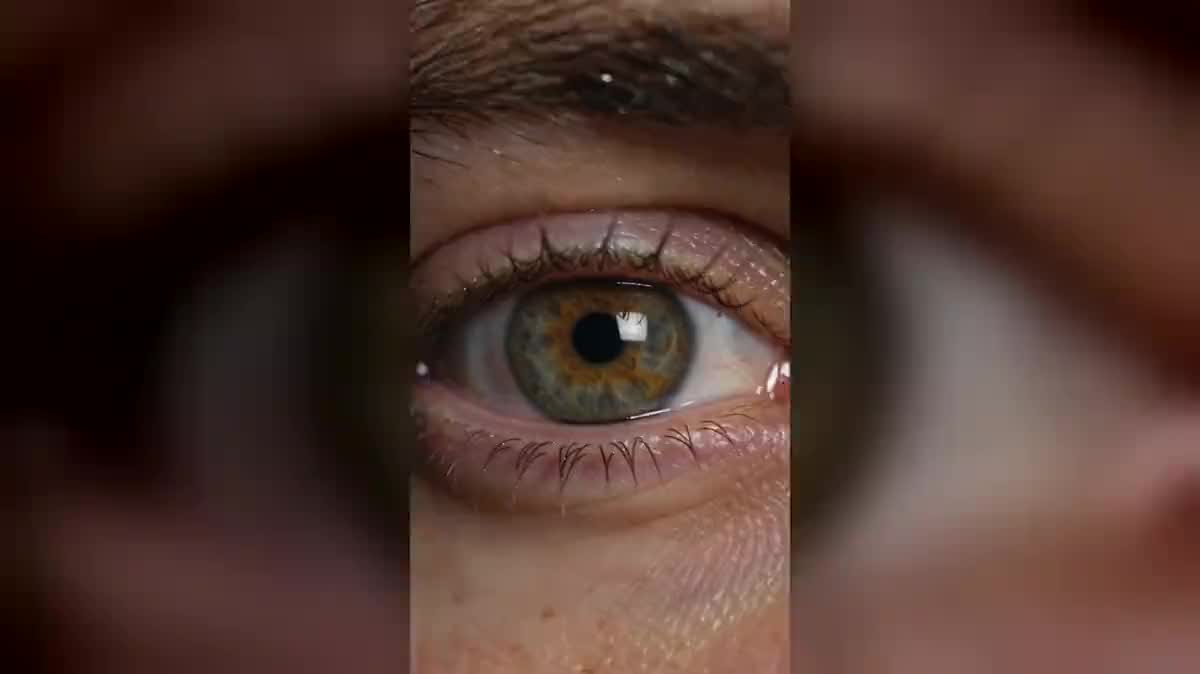
One selfie and two Seedance 2.5 nodes: extreme close-up on your eye, then the camera passes through the pupil and comes out in a city or an ocean. The real workflow, with both renders, is visible here without an account.
The real workflow: the selfie wired as a reference into two Seedance 2.5 nodes, one passage per node. Both videos are the demo's own, the same eye at the start.
At a glance
Close up on an eye, the camera enters the pupil, and it comes out above a city or underwater. It is the only effect of the family that is a TRANSITION tool: the others serve once, this one goes back into every edit you will ever make.
The trap is the same as on the zoom from space, and it kills the effect the same way: without an explicit ban, the model returns two shots glued together, the eye then the world. The passage has to be a move that never stops, and both prompts say so in plain words.
The reference is an IMAGE and the model only takes your iris colour and the skin around it from it: it does not film your eye, it rebuilds it at scale. Seedance 2.5 holds that iris detail better than the others, and that detail is what makes the shot. Both passages cost two hundred and forty credits.
These are the files of the workflow above, exactly as the models produced them, unretouched. The starting point is shown when there is one.
Starting point
Render
Give one sharp selfie
Framed from the waist up, facing the camera, in daylight. The model reads your eye colour and the skin around it from it, you do not need a macro of your own eye.
Ban the cut in writing
One single continuous move, the camera goes into the pupil and comes out the other side in one unbroken take. Without that sentence you get a fade to black and two shots.
Describe what is on the other side
A city at night, a reef, a desert, your living room. It is the only truly free part of the prompt, and it is the part that tells a story.
Keep the shot for an edit
Five seconds of passage drop between two sequences and the cut makes itself. Generate it once, reuse it in everything you make afterwards.
The same canvas, tuned for different needs: each variation is two or three lines of prompt away.
This is its first use: five seconds dropped between two sequences, and the cut makes itself. Generated once, the passage goes back into every video you make afterwards.
Starting from your eye and coming out above the city you are arriving in replaces the aeroplane shot everyone has seen, and ties the place back to your own gaze.
Going into the eye and out into a scene from the past says memory without a single explanatory caption. Cinema has done it forever, for a great deal more money.
A brand moving from its workshop to its finished product through an artisan's pupil tells the craft in one shot, where two edited shots say nothing at all.
Coming out of the pupil into a game level is the transition version of put yourself in a video game, where the whole person enters the world instead.
The reverse journey, from the world into the eye, closes a sequence instead of opening it. Just describe the path backwards in the prompt.
This is the mistake that kills the effect. A video model joins two shots with a fade far more readily than it holds a passage, and it has to be forbidden in plain words.
A phone macro is soft and badly lit, and the model will inherit those flaws. A waist-up selfie gives a better iris, because the model composes it rather than copying it.
A prompt that stops at the pupil lets the model invent the exit, and it usually picks an abstract background. What is on the other side is half the shot.
A close-up on both eyes has no centre, and the camera does not know which one to enter. One eye filling the frame is what makes the passage readable.
No, and it is actually worse. A waist-up selfie is enough: the model takes the iris colour and the skin from it, then composes the close-up itself, with a sharpness a phone macro never reaches.
Because the prompt does not ban the dissolve. A video model is happy to join two shots with a fade, it is easier than holding a passage. The sentence that forbids it changes the whole result.
Yes, describe the journey in reverse in the prompt: the camera pulls back from the reef, enters the pupil and comes out on the face. Same effect, used as an ending rather than an opening.
Two hundred and forty credits, one hundred and twenty per five second video in 720p. Rerunning a single passage after changing the arrival only costs one hundred and twenty.
Because it runs on Seedance 2.5, which costs twice Wan 3.0 per second. On this effect the difference shows: the iris detail and the sharpness of the pupil tunnel are what hold the shot together.
Yes, and it is the right length: the passage is a cut, not a scene. A longer shot slows the entry into the pupil and the effect loses its violence.
Vertical 9:16 in 720p, the native format of social feeds. The format and resolution guide gives the expected sizes network by network.
Yes, as for any publication: the workflow changes nothing about image rights. The demo uses the face of the site's founder, with his consent.
Create an eye transition with AI: the camera dives through the pupil
Use this workflowFree account, no card required. The workflow opens pre-filled in your canvas.
 Wan 3.0
 Seedance 2.0
 Kling V3