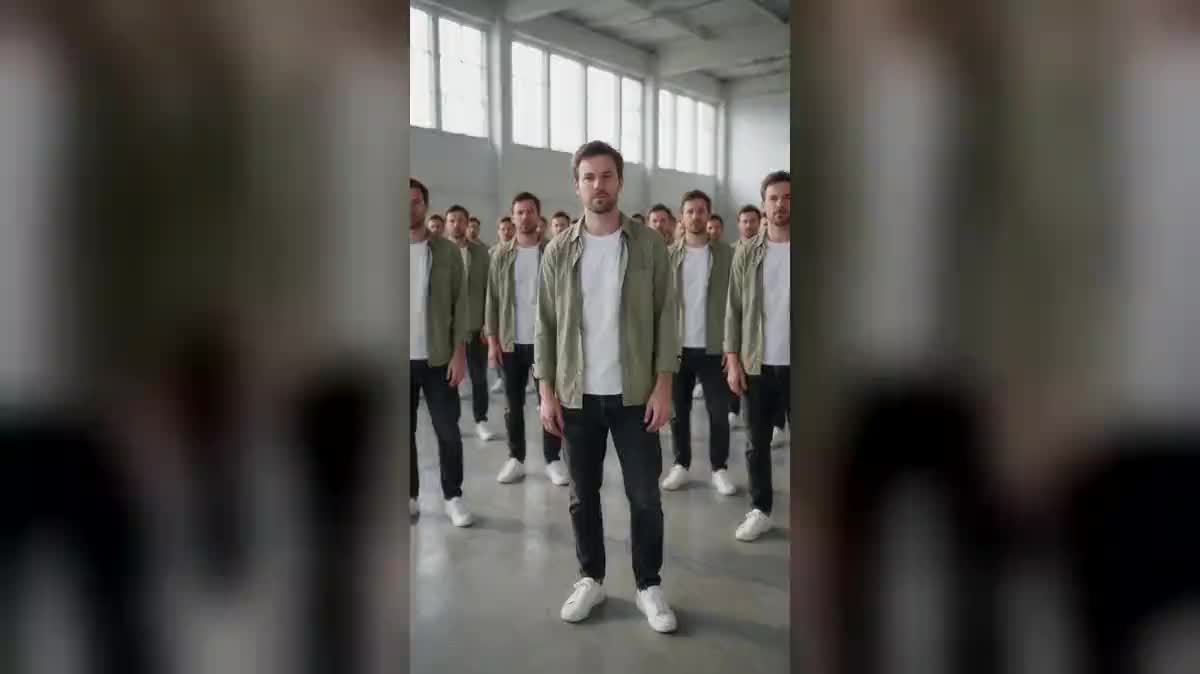
The delayed wave
Five copies in an arc picking your gesture up one after the other, a beat late. It is the most readable treatment, and the one that works best on a simple gesture.
Your phone clip goes to three Wan 3.0 nodes that multiply you: five copies repeating your gesture a beat late, copies at every scale, a whole crowd of you.
The real workflow: the starting clip wired as a reference to three Wan 3.0 Video nodes, one cloning treatment per node. The three videos are the demo's own, the same face on every copy.
At a glance
Video cloning used to need a tripod, a fixed background, several takes and one mask per character. Here it needs a five second clip filmed by hand: you clap, you take a step, and the model fills the frame with you.
The three treatments in the demo do not clone the same way: five copies in an arc that pick your gesture up one after the other, like a wave; copies at every size sliding past one another; and a whole crowd, packed shoulder to shoulder to the back wall.
The hard part is not the number of copies, it is their FIDELITY: the moment one copy comes out with another face or another jacket, the effect collapses. So the three prompts repeat that every copy is the same person. Wan 3.0 takes your clip as a reference and keeps the face, the clothes and the gesture. The three videos cost one hundred and eighty credits.
These are the files of the workflow above, exactly as the models produced them, unretouched. The starting point is shown when there is one.
Starting point
Render
Film somewhere open
A hall, a car park, an empty room, a plain background. The clones need space, and a busy set hides half of them behind the furniture.
One short clean gesture
A clap, a step sideways, a wave. A simple gesture repeats cleanly from one copy to the next, where a sentence or a choreography drifts out of sync.
Keep the fidelity sentence
Every prompt says that all the copies are the same person, same clothes included. That is what stops the model from filling the frame with strangers who vaguely look like you.
Generate all three, compare
"Generate all" outputs the three treatments. The delayed one tells an idea, the crowd makes the effect, the scale makes the picture: the choice depends on what you are telling.
The same canvas, tuned for different needs: each variation is two or three lines of prompt away.
Five copies in an arc picking your gesture up one after the other, a beat late. It is the most readable treatment, and the one that works best on a simple gesture.
Huge versions of you in the foreground, tiny ones at the back, some at knee height, sliding past one another. A graphic render, close to a fashion edit.
Dozens of you packed from the front of the frame to the wall, clapping at the same instant. It is the most spectacular, and the hardest to hold together on the likeness.
Two copies face to face answering each other, rendered from a clip of you talking. A short video format that travels well, and it needs a very still gesture at the start.
A freelancer multiplied into a meeting, a shoot, a customer service desk. The picture says in three seconds what a paragraph explains badly on an about page.
One dance step picked up by the whole crowd at the same instant. Keep the movement short: the longer it runs, the more the copies at the back end up going their own way.
A sofa, a table and a shelf eat the space where the clones should be standing, and the model puts two of them instead of ten. A bare wall and clear floor beat a nice set.
A five second choreography drifts out of sync between the copies and gives a crowd fidgeting for no reason. Two seconds of clear gesture, held, are worth more.
Without that sentence, the model fills the frame with men and women who look like you from a distance, and the cloning effect gives way to an ordinary crowd.
A complicated pattern or a precise logo degrades on the distant copies. A plain outfit holds the repetition far better, and that is what the demo does.
The crowd in the demo counts several dozen. Beyond that the model loses the likeness on the copies at the back, which barely shows in vertical but shows on a large screen.
That is something you ask for. The first treatment deliberately offsets them by a fraction of a second to build a wave, the third has them all clap at the same instant.
Film them both in the starting clip and ask for each group of copies to keep the right person. It is more fragile than with one, expect several attempts.
One hundred and eighty credits for the three treatments, sixty per five second video in 720p with sound. Rerunning a single treatment costs only sixty credits.
The node generates the audio with the video, and the crowd claps in a single sound. For a precise render, replace the sound in the edit.
Yes, the Edit node assembles them in the browser with no extra credit. Fifteen seconds of cloning make a video that stands on its own.
Between one and fifteen seconds. Five are enough, and a shorter clip leaves the model fewer chances to lose the likeness.
Yes, the mechanism does not assume a human. Film your dog in an empty corridor and ask for faithful copies: the likeness lock applies in exactly the same way.
Clone yourself on video with AI
Use this workflowFree account, no card required. The workflow opens pre-filled in your canvas.
 Wan 3.0
 Seedance 2.0
 Kling V3